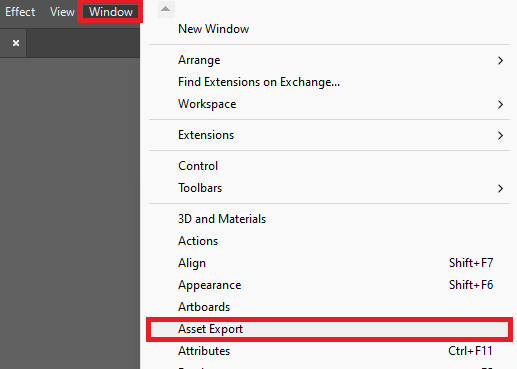
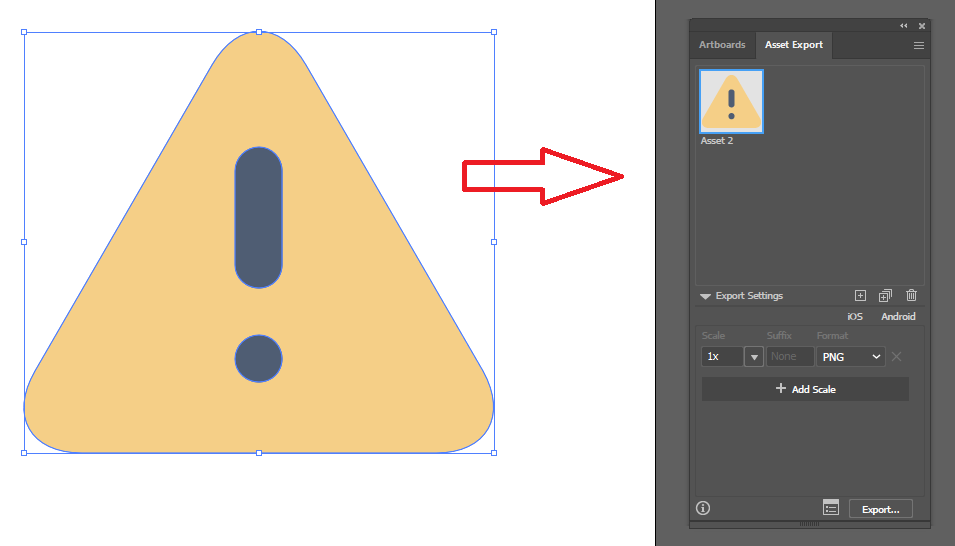
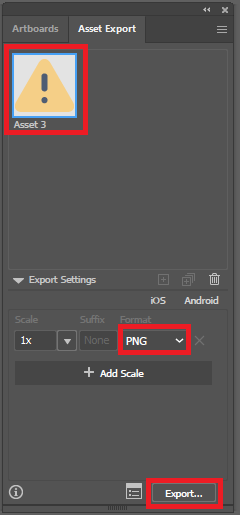
How to export objects using Asset Export in Adobe Illustrator Data 20/01/2023 Autor stefan cirstea Categorie OS - Windows, Soluții, Aplicatii specifice -9 270 Configurare noua (How To) Situatie Solutie 1. Go to Window and select Asset Export 2. Drag the object into the Asset Export Panel. 3. Select the asset, choose the format you need and select Export. Tip solutiePermanent Voteaza Up Down (5 din 19 persoane apreciaza acest articol) ShareTweetShare Despre Autor stefan cirstea Solutii Asemanatoare Cum configurati un server privat de chat vocal Mumble pe Windows 11? 2 How to install Discord on Ubuntu 24.04 0 How to enable Windows Sandbox in Windows 11 2 Repair commands to run before you reinstall Windows 6 Ways to insert a Command or Code Block in Microsoft Word 0 Microsoft Word is making a big change to web links 8 Leave A Comment? × Cancel Reply Save my name, email, and website in this browser for the next time I comment. five × = 5
Leave A Comment?
