
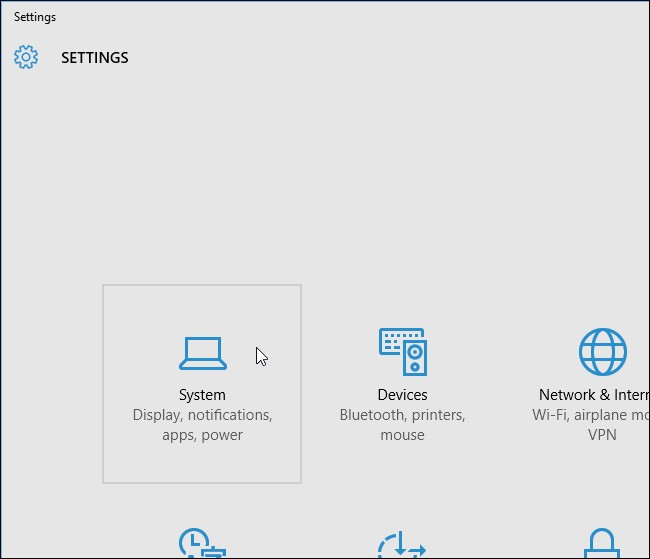
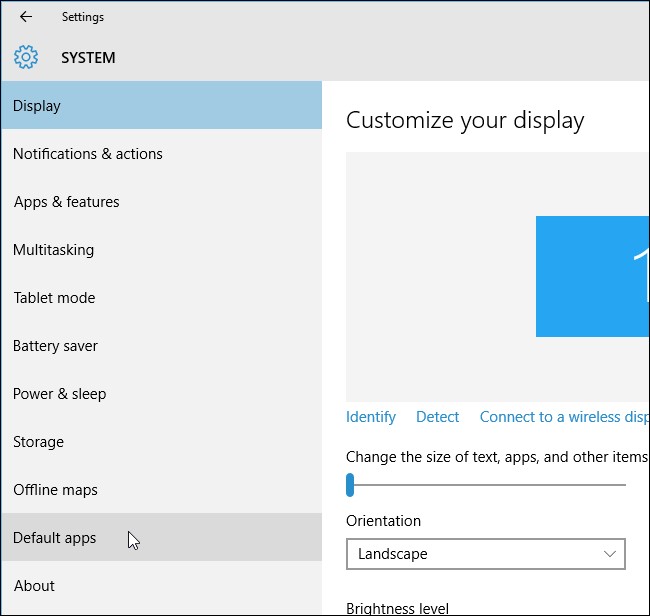
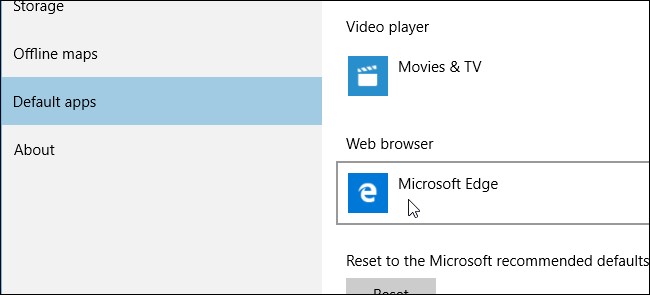
Afla cum poti schimba internet browserul implicit BING in google in windows 10 Data 27/01/2016 Autor Calin Maxim Categorie OS - Windows, Personalizare sistem operare, Configurare browser, Aplicatii specifice, Stații de lucru -9 2241 Configurare noua (How To) SituatiePutem folosi aceasta functie in momentul in care dorim sa schimbam instant search in windows 10 Solutie Pasi de urmat In “Settings” dialog box, apasa pe “System”. Pe ecranul “System”, apasa “Default apps” in lista din stanga Scroll down pana la sectiunea “Web browser” apasa pe “Microsoft Edge” sau alta optiune In “Choose an app” popup menu, selectati “Google Chrome”. Google Chrome este acum web browser presetat Puteti inchide fereastra. Tip solutiePermanent Voteaza Up Down (17 din 42 persoane apreciaza acest articol) ShareTweetShare Despre Autor Calin Maxim Solutii Asemanatoare Bring your Windows Desktop to life with Wallpaper Engine 3 How to move Taskbar to top or side on Windows 11 0 Arduino Soil Moisture Sensor 1 Review Attack Shark X3Pro mouse 4 Review Attack Shark x85 keyboard 3 Arduino Fingerprint Sensor 4 Leave A Comment? × Cancel Reply Save my name, email, and website in this browser for the next time I comment. − five = two
Leave A Comment?