
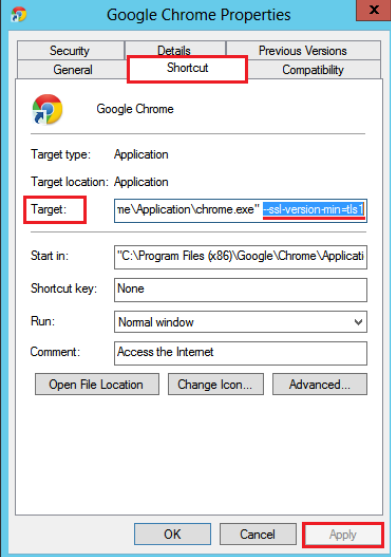
Cum dezactivam protocolul SSL 3.0 in Google Chrome Data 03/05/2018 Autor Daniel Chr Categorie OS - Windows, Configurare program 11 1084 Configurare noua (How To) SituatieProtocolul SSL 3.0 a dovedit ca este vulnerabil la atacurlile ce extrag informatii criptate, chiar si la tranzactii. Solutie Pasi de urmat Cautam in Start Chrome si deschidem locatia executabilei prin click dreapta > “Open file location”. Dam click dreapta pe shortcut si “Properties”. Adaugam in target “–ssl-version-min=tls1” Tip solutiePermanent Etichetare: setari chromessl 3.0 Voteaza Up Down (42 din 73 persoane apreciaza acest articol) ShareTweetShare Despre Autor Daniel Chr Solutii Asemanatoare What is OpenClaw? Reviving a classic through open technology 2 How to install and configure Gentoo Linux 0 How to create a Windows to go with Rufus to run Windows 11 from USB 1 Cum îți faci un raport complet al PC-ului cu PowerShell 8 Cum vezi toate procesele care pornesc automat cu Windows 1 Cum se instalează sistemul de gestionare a fotografiilor Lychee pe Debian 12 5 Leave A Comment? × Cancel Reply Save my name, email, and website in this browser for the next time I comment. five × = ten
Leave A Comment?