
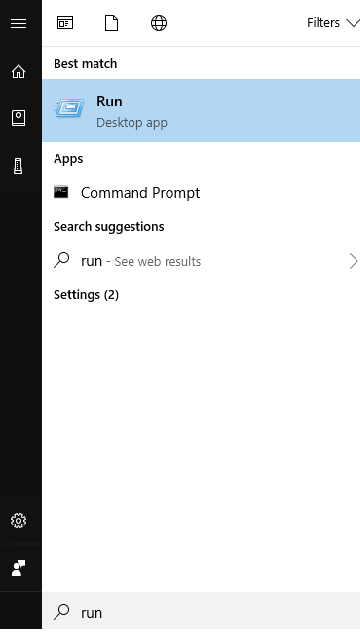
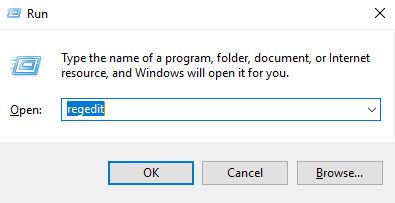
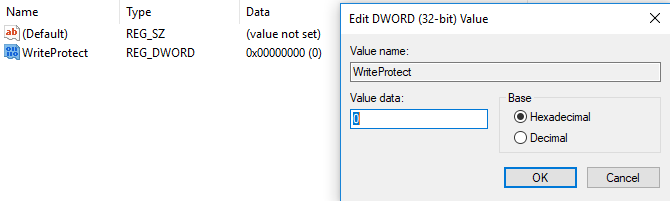
Dezactivare functie scriere protejata pe USB Data 03/05/2018 Autor Daniel Chr Categorie OS - Windows, Configurare program, Stații de lucru 7 892 Configurare noua (How To) SituatieCum dezactivam functia de scriere protejata pe USB? Solutie Pasi de urmat Deschidem “Run” din Start. In Run, cautam regedit si apasam tasta enter. Urmam calea : ComputerHKEY_LOCAL_MACHINESYSTEMCurrentControlSetControlStorageManagement Ne uitam in dreapta tree-ului si gasim “WriteProtect” Schimbam valoarea in “0” Tip solutiePermanent Etichetare: dezactivare scriere protejatasetari usb Voteaza Up Down (30 din 53 persoane apreciaza acest articol) ShareTweetShare Despre Autor Daniel Chr Solutii Asemanatoare Bring your Windows Desktop to life with Wallpaper Engine 3 How to move Taskbar to top or side on Windows 11 0 Arduino Soil Moisture Sensor 1 Review Attack Shark X3Pro mouse 4 Review Attack Shark x85 keyboard 3 Arduino Fingerprint Sensor 4 Leave A Comment? × Cancel Reply Save my name, email, and website in this browser for the next time I comment. five + = nine
Leave A Comment?