Follow Us

Soluții pentru problemele tale IT

Home /Stații de lucru/OS - Windows/Is not accessible. You might not have permission to use this network resource. Account restriction
Home /Stații de lucru /Is not accessible. You might not have permission to use this network resource. Account restriction
Home /OS - Windows/Configurare Sistem de operare/Is not accessible. You might not have permission to use this network resource. Account restriction

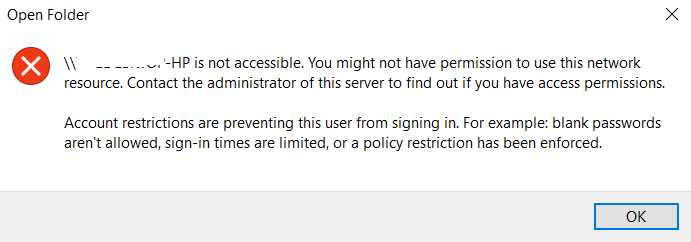
Is not accessible. You might not have permission to use this network resource. Account restriction

  • Data 25/06/2019
  • Autor Tiberiu Gache
  • Categorie Configurare Sistem de operare, OS - Windows, Stații de lucru
  • -5
  • 789
Rezolvare problema (Fix IT)

Situatie

Doriti sa accesati un PC din aceeasi retea si nu reusiti sa va conectati.

Simptome
Solutie

Pasi de urmat

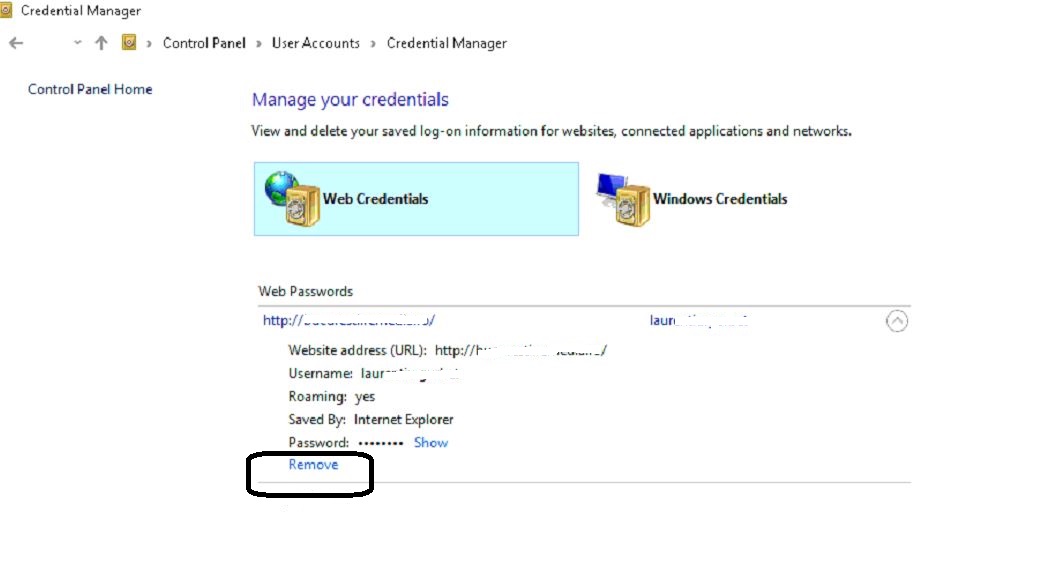
Accesati Control Panel – User Accounts – Manage your credentials.

La Web Credentials, in ultimul rand aveti Remove

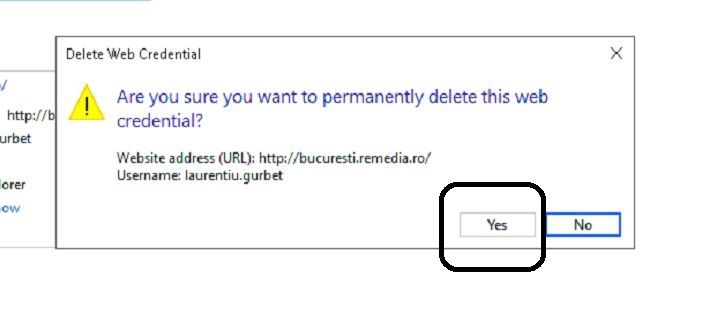
Click Yes.
Mergeti la PC-ul pe care doriti sa-l accesati, verificati daca are parola de logare. La aceasta eroare, cel mai probabil nu are si va trebui sa-i setati o parola de logare.

Cand veti incerca sa-l accesati in retea, automat va cere parola. Introduceti userul si parola, si PC-ul este accesibil.

Tip solutie

Permanent
Etichetare: Account restrictionaccount restrictions are preventing this user from signing in win 10Is not accessible.Is not accessible. You might not have permission to use this network resource. Account restriction

Voteaza

Up Down
(19 din 44 persoane apreciaza acest articol)
Share
Tweet
Share

Despre Autor

Tiberiu Gache

Solutii Asemanatoare

  • Bring your Windows Desktop to life with Wallpaper Engine 3
  • How to move Taskbar to top or side on Windows 11 0
  • Arduino Soil Moisture Sensor 1
  • Review Attack Shark X3Pro mouse 4
  • Review Attack Shark x85 keyboard 3
  • Arduino Fingerprint Sensor 4

Leave A Comment? × Cancel Reply

30790

Soluții Disponibile

0 Articole

In ultima saptamana

Cele mai recente soluții

  • How to resolve a Windows Update Install Error – 0x80070002
    • 90
    • 1 week ago
  • Bring your Windows Desktop to life with Wallpaper Engine
    • 66
    • 1 week ago
  • How to move Taskbar to top or side on Windows 11
    • 96
    • 17/12/2025
  • Reparare eroare:”Trust Relationship Failed” fără scoatere din domeniu și fără restart (PowerShell)
    • 73
    • 1 week ago
  • You’ve been deleting files the wrong way in Windows
    • 73
    • 1 week ago
© Askit.ro, 2014 - 2025. All rights reserved. Done by Class IT
Share
Tweet
Share