Follow Us

Soluții pentru problemele tale IT

Home /Stații de lucru/OS - Windows/Is not accessible. You might not have permission to use this network resource. Account restriction
Home /Stații de lucru /Is not accessible. You might not have permission to use this network resource. Account restriction
Home /OS - Windows/Configurare Sistem de operare/Is not accessible. You might not have permission to use this network resource. Account restriction

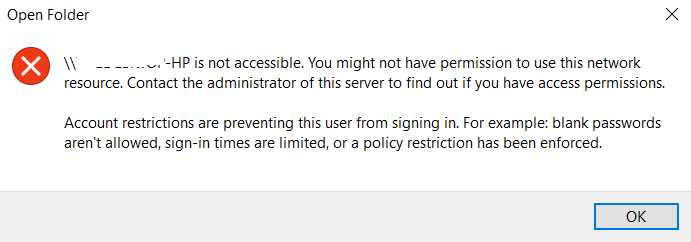
Is not accessible. You might not have permission to use this network resource. Account restriction

  • Data 25/06/2019
  • Autor Tiberiu Gache
  • Categorie Configurare Sistem de operare, OS - Windows, Stații de lucru
  • -6
  • 902
Rezolvare problema (Fix IT)

Situatie

Doriti sa accesati un PC din aceeasi retea si nu reusiti sa va conectati.

Simptome
Solutie

Pasi de urmat

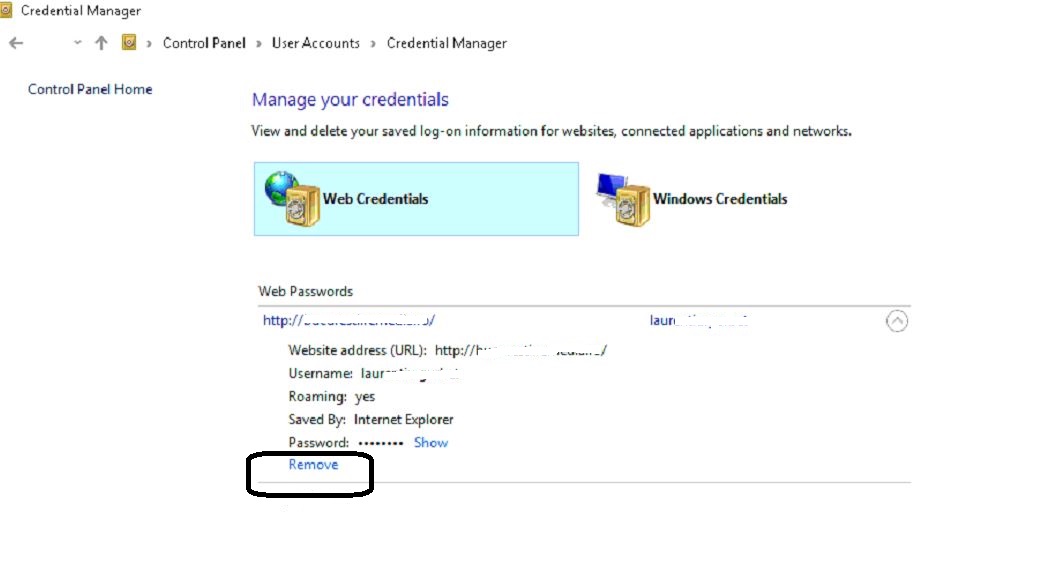
Accesati Control Panel – User Accounts – Manage your credentials.

La Web Credentials, in ultimul rand aveti Remove

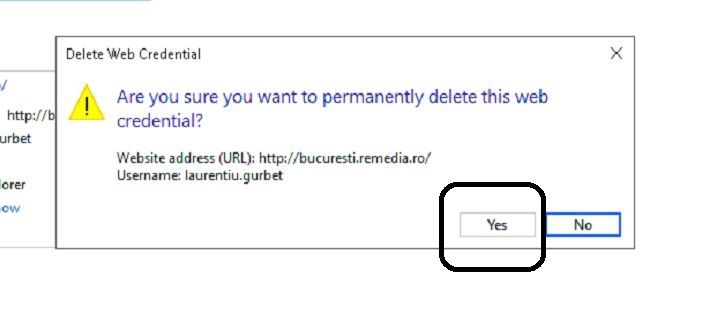
Click Yes.
Mergeti la PC-ul pe care doriti sa-l accesati, verificati daca are parola de logare. La aceasta eroare, cel mai probabil nu are si va trebui sa-i setati o parola de logare.

Cand veti incerca sa-l accesati in retea, automat va cere parola. Introduceti userul si parola, si PC-ul este accesibil.

Tip solutie

Permanent
Etichetare: Account restrictionaccount restrictions are preventing this user from signing in win 10Is not accessible.Is not accessible. You might not have permission to use this network resource. Account restriction

Voteaza

Up Down
(26 din 59 persoane apreciaza acest articol)
Share
Tweet
Share

Despre Autor

Tiberiu Gache

Solutii Asemanatoare

  • Cum urmărești doar o parte dintr-o fereastră cu PowerToys Crop And Lock -2
  • Windows 11 – previzualizarea fișierelor PDF nu funcționează în File Explorer 6
  • How to verify Windows 11 ISO file authenticity using PowerShell 5
  • Here are some other ways to use the power button on a Samsung Galaxy phone 2
  • Sistem de supraveghere video Dahua folosind PC în loc de NVR 4
  • Cum repari rapid o imagine corruptă de Windows când comanda sfc /scannow eșuează -5

Leave A Comment? × Cancel Reply

32386

Soluții Disponibile

0 Articole

In ultima saptamana

Cele mai recente soluții

  • Cum urmărești doar o parte dintr-o fereastră cu PowerToys Crop And Lock
    • 167
    • 5 days ago
  • Windows 11 – previzualizarea fișierelor PDF nu funcționează în File Explorer
    • 89
    • 19/10/2026
  • How to reset a Googlebook to factory settings
    • 100
    • 19/10/2026
  • Tint App Icons to match your New iPhone 18 Pro Color
    • 66
    • 1 week ago
  • How to verify Windows 11 ISO file authenticity using PowerShell
    • 89
    • 16/10/2026
© Askit.ro, 2014 - 2026. All rights reserved. Done by Class IT
Share
Tweet
Share