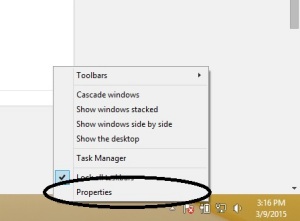
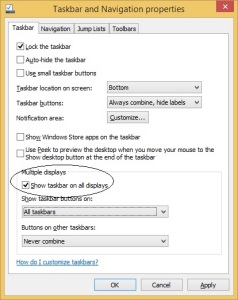
Activarea barei de start pe toate monitoarele secundare Data 16/03/2015 Autor Mihnea I Categorie OS - Windows, Stații de lucru, Configurare Sistem de operare 1 930 Configurare noua (How To) SituatieDoriti sa afiseze taskbar-ul pe toate monitoarele secundare conectate la laptop/desktop. Solutie Pasi de urmat Apasam click dreapta pe taskbar apoi selectam proprietati In fereastra noua bifam “Show taskbar on all displays” Tip solutiePermanent Voteaza Up Down (27 din 52 persoane apreciaza acest articol) ShareTweetShare Despre Autor Mihnea I Solutii Asemanatoare Arduino pulse rate monitor 0 Tailscale: The Easiest way to access your Homelab from Anywhere 5 Recuperarea unui document Word nesalvat 1 How to use Winhance to debloat Windows 11 4 The new AI feature of Kaspersky Premium Antivirus 2 Cum oprim monitorul doar cu un simplu click 2 Leave A Comment? × Cancel Reply Save my name, email, and website in this browser for the next time I comment. eight + = thirteen
Leave A Comment?
