Soluții

Rezolvarea problemelor cu Outlook pentru Windows cu instrumentele de depanare automată

Această Asistentul Microsoft pentru recuperare și asistență vă poate ajuta să diagnosticați și să remediați automat o serie de Outlook probleme. Va trebui să descărcați de aici aplicația pe computerul local, să vă conectați cu contul de acasă, de la locul de muncă sau de la școală și să selectați problema pentru care aveți nevoie de ajutor.

Asistentul Microsoft pentru recuperare și asistență va rula o serie de teste de diagnosticare pe computer și vă va ajuta să configurați un profil nou sau să rezolvați alte probleme. Dacă oricare dintre teste nu reușește, va sugera soluții pentru rezolvarea problemei. Dacă aveți o anumită problemă în Outlook, puteți încerca, de asemenea, unul dintre următoarele linkuri Asistentul Microsoft pentru recuperare și asistență link:

Instrumentul de verificare a calendarului pentru Outlook (CalCheck)

CalCheck este un program care verifică dacă există probleme în calendarul Outlook și efectuează diverse verificări în setările generale, cum ar fi permisiunile, publicarea de tip liber/ocupat, configurarea delegării și rezervarea automată. Apoi, fiecare element din folderul dvs. de calendar este verificat pentru a de găsi probleme cunoscute care pot cauza un comportament neașteptat, cum ar fi întâlnirile care par să lipsească.

Acest instrument se poate descărca de aici: Instrumentul de verificare a calendarului pentru Outlook (CalCheck).
[mai mult...]

What Is rundll32.exe and Why Is It Running?

Rundll32.exe is a standard part of Windows used to run Dynamic Link Library (DLLs) files. DLLs contain code for various functions of a program and are commonly used by Windows processes and third-party apps. Rundll32.exe is not normally malware, but it can be used to execute malicious code. You open up Task Manager only to find countless instances of rundll32.exe running all at once. But what is rundll32.exe?

[mai mult...]

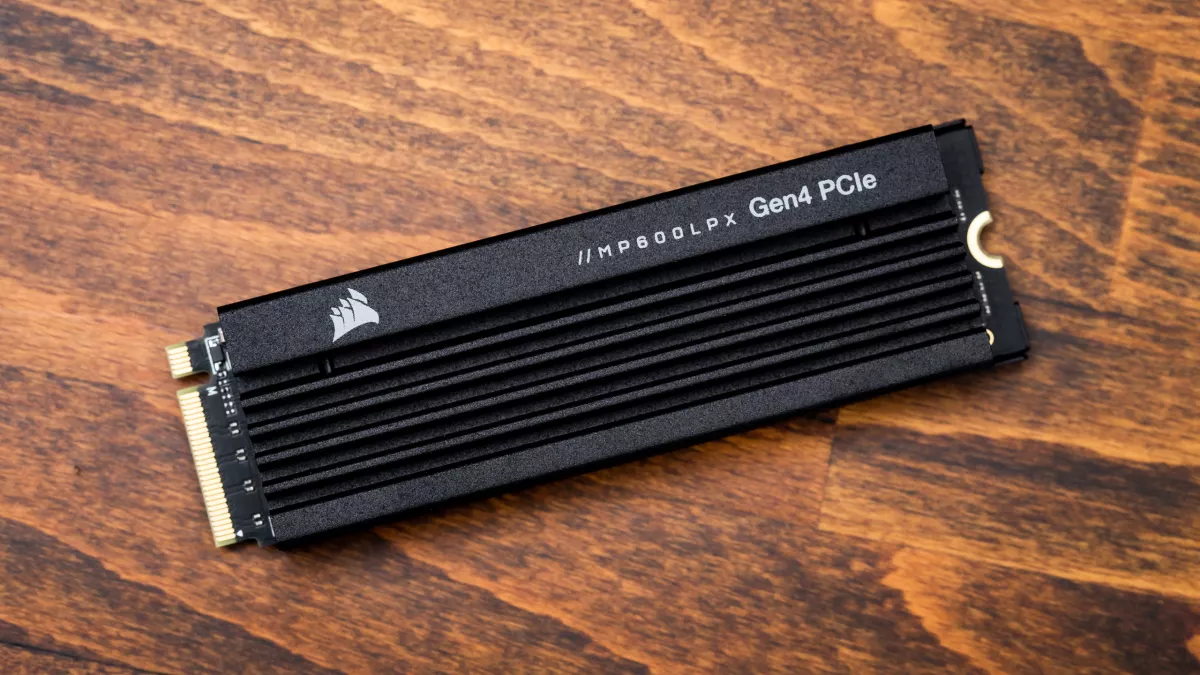
Review Corsair MP600 Pro LPX SSD

The Corsair MP600 Pro LPX is a forgettable high-end PCIe 4.0 SSD that underperforms and runs inefficiently. It does stay cool, at least, and would be a good fit for a PlayStation 5, but its pricing leaves something to be desired and keeps it from being among the best PS5 SSDs. Corsair offers software support with a fair warranty but they have several other SKUs that do what this drive does, but better. There are also plenty of competing products that can match or beat this drive for less money and for everyday use there are far more affordable products. The LPX seems like an afterthought at the end of the day.

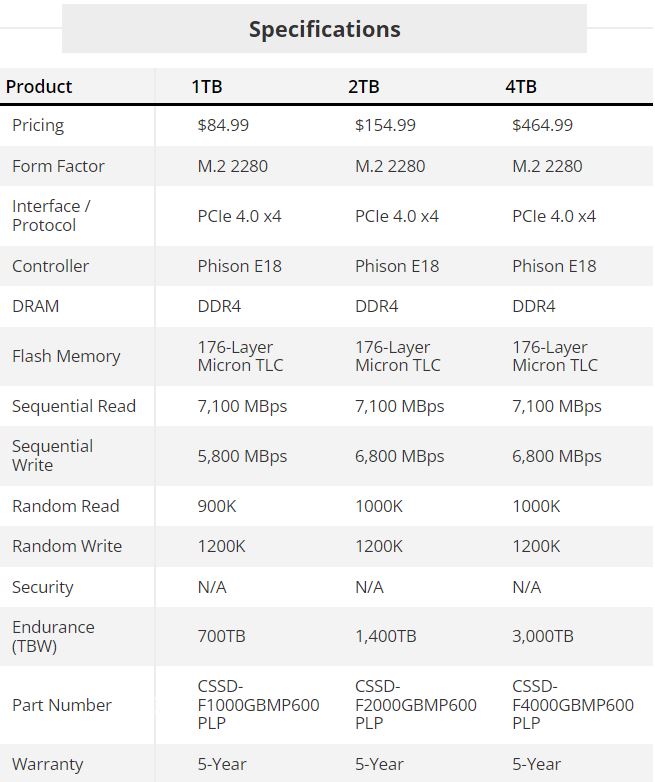
The Corsair MP600 Pro LPX is available in 500GB, 1TB, 2TB, and 4TB, at $57.99, $84.99, $154.99, and $464.99 at the time of review. The 2TB model has the most compelling price. Generally we recommend going for at least 1TB these days, especially for high-end drives, but it is nice to have a 500GB option. Corsair warranties this drive for 350TB, 700TB, 1,400TB, and 3,000TB written for each capacity, respectively, for up to five years.

This drive can reach up to 7,100 / 6,800 MBps for sequential reads and writes and up to 1000K / 1200K IOPS for random reads and writes. These numbers suggest that the LPX is based on newer TLC, which isn’t surprising as the old 96-Layer TLC is passé at this point.

[mai mult...]

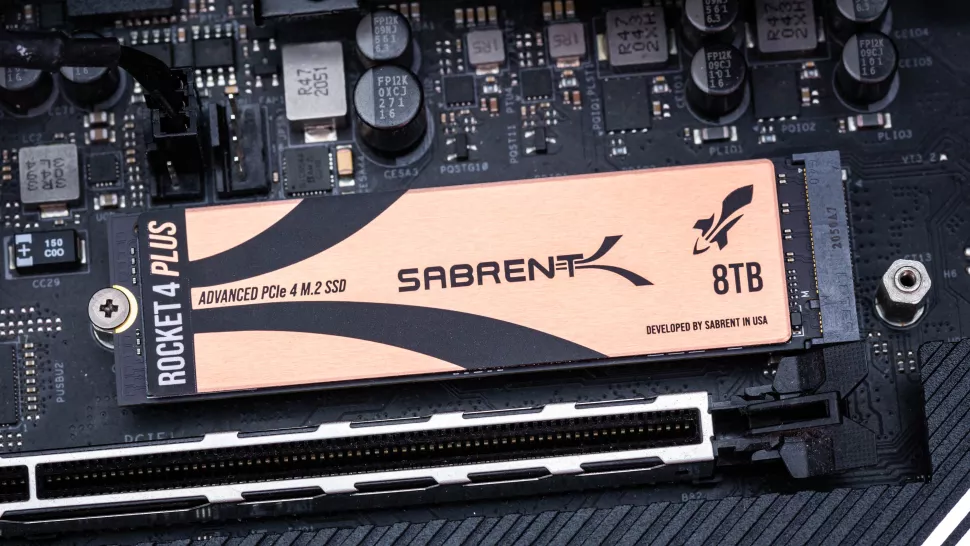
Review Sabrent Rocket 4 Plus 8TB SSD

Sabrent’s Rocket 4 Plus family has long been a favorite for performance seekers, but the new 8TB model ups the ante with extreme capacity courtesy of 112-layer BiCS5 flash, promising to take high-performance, high-capacity SSD storage to the next level as it vies for a spot on our list of Best SSDs.

Sabrent made a name for itself in the SSD market with the original Rocket, a ubiquitous SSD based on Phison’s competitive E12 SSD controller. The company has since enhanced its portfolio with an array of new drives, including the Rocket 4.0 and models with QLC flash, like the Rocket Q and the Rocket Q4.

But perhaps Sabrent is best known for its penchant for pushing the capacity limits with SSDs like the 4TB Rocket, the 8TB Rocket Q, and the 16TB Thunderbolt dock that includes two 8TB SSDs. The Rocket Q Battleship also hosts up to eight of those 8TB drives with a HighPoint RAID controller, providing a total of 64TB of flash storage.

However, plenty of demanding users want higher capacities with their consumer SSDs but don’t want to compromise with lower-endurance and lower-performance QLC flash. So if the drive can use TLC flash and still push the limits of PCIe 4.0 technology, all the better. Those users are in luck as Sabrent now offers this 8TB version of the high-performance Rocket 4 Plus, and it comes with 112-layer BiCS5 TLC flash that the company didn’t use in the original SKUs.

Putting this much storage capacity, especially with TLC flash, on an M.2 drive has lots of challenges that require tough design decisions to ensure the drive is reliable and remains within spec. Nevertheless, it’s nice to see a company willing to reach this high on the capacity front.

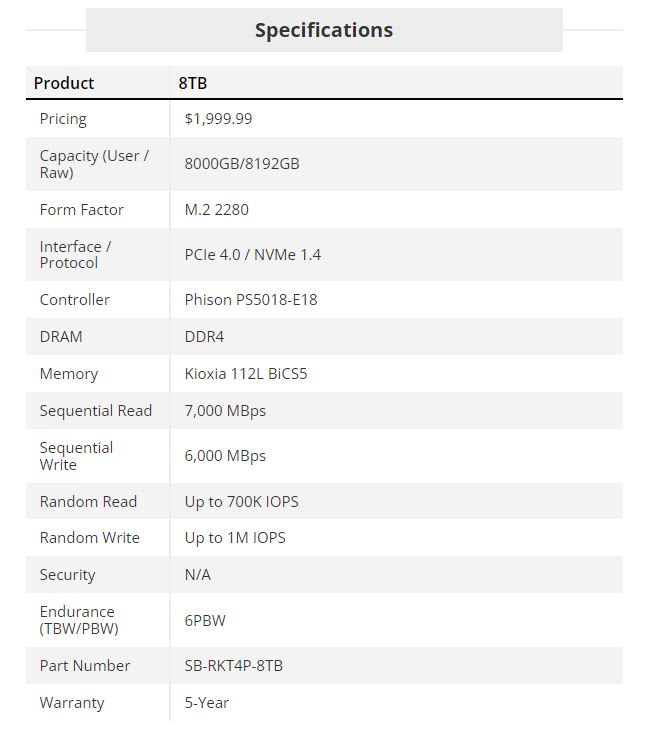
The 8TB Sabrent Rocket 4 Plus is a standard M.2 2280, PCIe 4.0/NVMe 1.4 drive. It’s rated for up to 7/6 GBps of sequential read/write throughput, which is a comparatively slight 100/600 MBps slower than the 4TB model. The SDD is rated for 700,000 random read IOPS and a peak of 1,000,000 IOPS for random writes.

This drive has a nominal one-year warranty that you can extend to five years with registration. Endurance matches expectations at 6PBW (petabytes written), meaning it can absorb 6 petabytes of write data. Even with 8TB of flash, that’s more than enough for the vast majority of users.

[mai mult...]