Follow Us

Soluții pentru problemele tale IT

Home /Stații de lucru/Aplicatii specifice

Aplicatii specifice

Instalare/Reinstalare aplicatii predefinite (ex. Office, PDF reader) 49 Solutii

Instalare/reinstalare aplicatii default(Office, PDF reader) 11 Solutii

Instalare/reinstalare aplicatii la cererea clientului 26 Solutii

Instalare/Dezinstalare aplicatii cerute de client (Viewer .p7m - caiet de sarcini, Autocad) 23 Solutii

Configurare browser 144 Solutii

Configurare program 2639 Solutii

Depanare Office 72 Solutii

Depanare alte aplicatii 40 Solutii

Cum setezi vpn direct din browser cu ajutorul extensiei Private Internet Access

  • Data 07/05/2021
  • Autor Costinel Cirstea
  • 6
  • 693

Pentru a utiliza vpn in Chrome, putem folosi extensia Private Internet Access. Pasii de urmat pentru a instala extensia sunt urmatorii:

[mai mult...]

Cum setezi vpn direct din browser cu ajutorul extensiei HMA

  • Data 07/05/2021
  • Autor Costinel Cirstea
  • -2
  • 694

Pentru a utiliza vpn in Chrome putem folosi extensia HMA. Pasii de urmat pentru a instala extensia sunt urmatorii:

[mai mult...]

How to protect your PowerPoint presentation with password

  • Data 06/05/2021
  • Autor stefan cirstea
  • -12
  • 562

Check the steps below to see how to protect your PowerPoint presentation with a password. Note that the document can’t be recovered if you forget the password. Keeping an unprotected copy of the document as a backup will help in case you forget the password.

[mai mult...]

How to disable Recent Files feature from Office

  • Data 06/05/2021
  • Autor stefan cirstea
  • 1
  • 574

Check the steps below to see how you can disable recent files from showing up in the Home window from Office. You need to do this separately for each Office Application (Word/PowerPoint/Publisher/Excel).

[mai mult...]

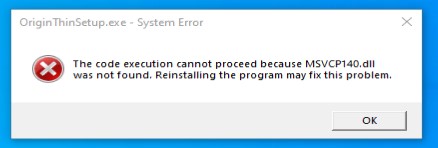
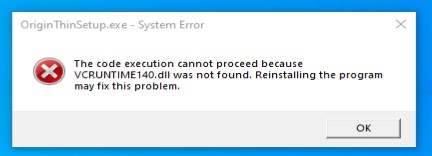
How to fix MSVCP140.dll and VCRUNTIME140.dll error when trying to install Origin

  • Data 06/05/2021
  • Autor stefan cirstea
  • 6
  • 905

If you encounter those error messages when trying to start the Origin installer, it means you are missing the Microsoft Visual C++. Check the steps below to see how you can fix the errors MSVCP140.dll and VCRUNTIME140.dll when trying to install Origin.
[mai mult...]

Cum arhivam un fisier de dimensiuni mari folosind winrar

  • Data 05/05/2021
  • Autor Andrei Grosu
  • 2
  • 721

Avem un fiiser de dimensiuni mari si dorim sa il arhivam intr-un fisier mic folosind cel mai mare nivel de compresie disponibil din programul winrar.

[mai mult...]
  • Previous
  • 1
  • …
  • 333
  • 334
  • 335
  • 336
  • 337
  • 338
  • 339
  • …
  • 885
  • Next

32539

Soluții Disponibile

0 Articole

In ultima saptamana

Cele mai recente soluții

  • How to sync your Android phone’s files to a PC for free
    • 45
    • 3 days ago
  • Use these 7 Linux commands to keep your system tidy and fast
    • 47
    • 4 days ago
  • Cum controlezi telefonul Android de pe calculator cu scrcpy
    • 41
    • 17/11/2026
  • How to mass delete emails in Gmail
    • 44
    • 4 days ago
  • Cum este implementata Arhitectura AI in jocuri video?
    • 48
    • 5 days ago
© Askit.ro, 2014 - 2026. All rights reserved. Done by Class IT