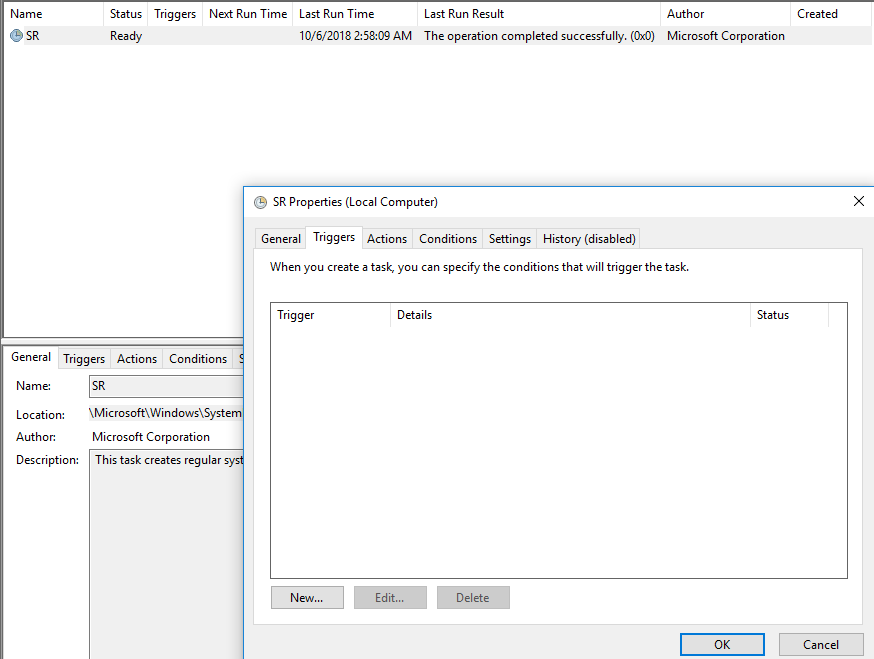
Activare task pentru system restore din Task Scheduler Data 12/10/2018 Autor Daniel Chr Categorie OS - Windows, Stații de lucru, Configurare Sistem de operare -5 954 Configurare noua (How To) SituatieCum activam task-ul de system restore din Task Scheduler? Solutie Pasi de urmat Deschidem Task Scheduler din Start. Urmam calea Microsoft > Windows > SystemRestore Deschidem SR si din tab-ul Triggers, setam timpul cand acesta sa ruleze. Tip solutiePermanent Etichetare: creare task system restoresystem restore task Voteaza Up Down (18 din 41 persoane apreciaza acest articol) ShareTweetShare Despre Autor Daniel Chr Solutii Asemanatoare Docker este configurat corect, dar localhost refuza conexiunea 0 How to fix the word experienced an error trying to open the File by adding a new trusted location on Windows 10/11 1 How to fix the Word experienced an error trying to open the File by disabling the protected view on Windows 10/11 1 How to fix the found unreadable content Error in Word by recovering it on windows 10/11 1 How to fix the found unreadable content error in Word by repairing it on windows 10/11 1 Arduino Weather Station guide 3 Leave A Comment? × Cancel Reply Save my name, email, and website in this browser for the next time I comment. six − 1 =
Leave A Comment?
