
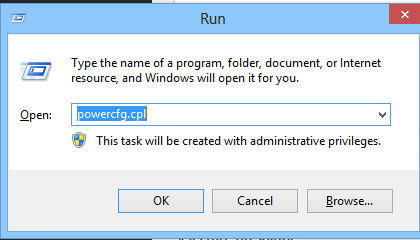
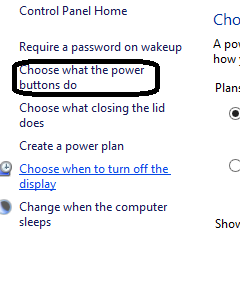
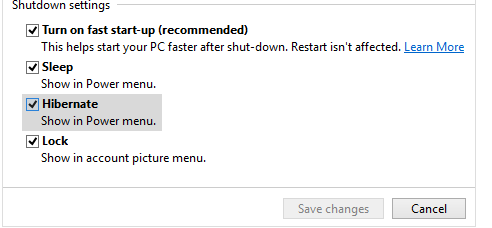
Activarea optiunii Hibernate in Power Options Data 09/12/2015 Autor Cristian V Categorie OS - Windows, Stații de lucru, Configurare Sistem de operare -3 1488 Rezolvare problema (Fix IT) SituatieDorim activarea optiunii Hibernate in Power Options Solutie Pasi de urmat Apasam Win+R si scriem powecfg.cpl Selectam optiunea Choose what the power buttons do Selectam optiunea Change settings that are currently unavailable Optiunea Hibernate va fi nebifata. O bifam si astfel Hibernate va aparea in Power Menu Tip solutiePermanent Voteaza Up Down (26 din 55 persoane apreciaza acest articol) ShareTweetShare Despre Autor Cristian V Solutii Asemanatoare Bara de instrumente Microsoft Word a fost gri sau nu răspunde -1 Nu s-a putut actualiza reagent.xml pe computerul Windows 1 File Explorer se blochează la montarea ISO în Windows 11 1 Cum scapam de ferestrele enervante cand aprindem calculatorul 2 Cum prelungim viata PC-urilor noastre 1 Remediere probleme acces statie de lucru in domeniu 1 Leave A Comment? × Cancel Reply Save my name, email, and website in this browser for the next time I comment. six − = five

Leave A Comment?