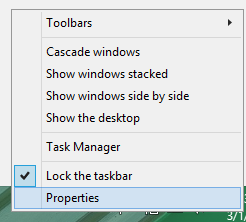
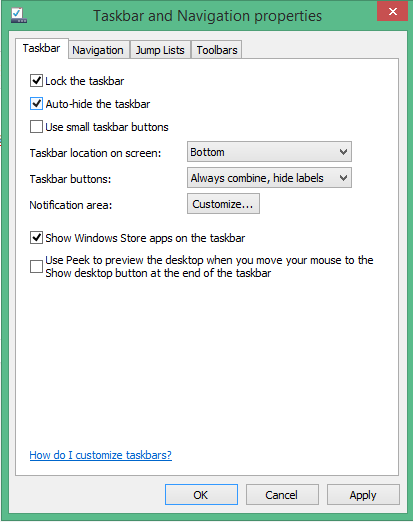
Configureaza auto ascunderea barii de start in Windows Data 02/03/2015 Autor Radu P Categorie OS - Windows, Stații de lucru, Configurare Sistem de operare -6 1281 Configurare noua (How To) SituatieSe doreste ca bara de start sa nu fie vizibila tot timpul pt a marii spatiul de afisare. Solutie Pasi de urmat Se da click dreapta pe bara de Start – Properties Se bifeaza auto-hide the taskbar – OK Tip solutiePermanent Voteaza Up Down (26 din 59 persoane apreciaza acest articol) ShareTweetShare Despre Autor Radu P Solutii Asemanatoare How to disable every AI feature on Microsoft Edge for Windows 11 3 Software Supply Chain Attacks – detectare, prevenire și remediere 6 Cum rezolvam problema timpului din Windows cand apar decalaje de ora 4 Windows – verificarea și repararea fișierelor de sistem 0 Nu s-a putut crea dispozitivul de randare DX11 în Windows 11 3 Eroare Acer Security Boot Fail în Windows 11 6 Leave A Comment? × Cancel Reply Save my name, email, and website in this browser for the next time I comment. 9 + two =
Leave A Comment?
