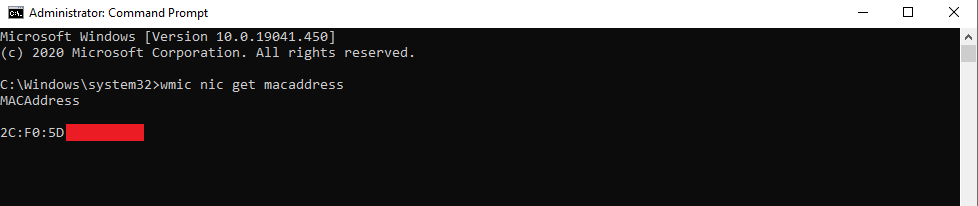
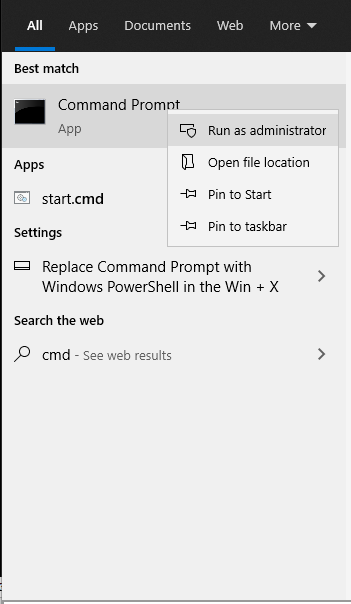
Cum aflam adresa de MAC cu ajutorul WMIC Data 23/08/2020 Autor Costinel Cirstea Categorie OS - Windows, Soluții 6 607 Configurare noua (How To) SituatieDorim sa aflam adresa de MAC a unui sistem. Solutie Pasi de urmat Intram in start si scriem cmd, apoi il rulam cu drepturi de administrator: Rulam comanda: wmic nic get macaddress Tip solutiePermanent Voteaza Up Down (29 din 52 persoane apreciaza acest articol) ShareTweetShare Despre Autor Costinel Cirstea Solutii Asemanatoare Cum urmărești doar o parte dintr-o fereastră cu PowerToys Crop And Lock -3 Windows 11 – previzualizarea fișierelor PDF nu funcționează în File Explorer 6 How to reset a Googlebook to factory settings 3 Tint App Icons to match your New iPhone 18 Pro Color 2 How to verify Windows 11 ISO file authenticity using PowerShell 5 Rezolvarea situatiei cand un laptop se blocheaza -4 Leave A Comment? × Cancel Reply Save my name, email, and website in this browser for the next time I comment. × three = twenty four
Leave A Comment?