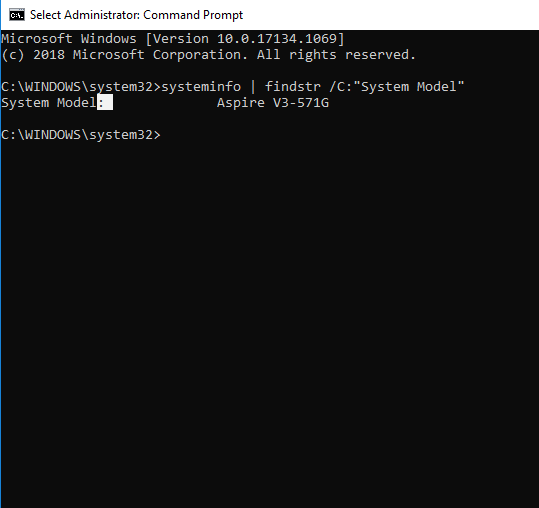
Cum aflam modelul unui laptop cu ajutorul systeminfo Data 22/10/2019 Autor Costinel Cirstea Categorie OS - Windows, Depanare -4 721 Configurare noua (How To) SituatieDorim sa aflam modelul unui laptop Solutie Pasi de urmat Intram in start si scriem cmd apoi il rulam cu drepturi de administrator Rulam comanda systeminfo | findstr /C:”System Model” Tip solutiePermanent Voteaza Up Down (23 din 50 persoane apreciaza acest articol) ShareTweetShare Despre Autor Costinel Cirstea Solutii Asemanatoare Bara de instrumente Microsoft Word a fost gri sau nu răspunde -1 Nu s-a putut actualiza reagent.xml pe computerul Windows 0 File Explorer se blochează la montarea ISO în Windows 11 -2 Cum scapam de ferestrele enervante cand aprindem calculatorul 1 Remediere probleme acces statie de lucru in domeniu 2 How to check defender AV Signature Version on Windows 11 via Command Prompt -1 Leave A Comment? × Cancel Reply Save my name, email, and website in this browser for the next time I comment. two × 7 =
Leave A Comment?
