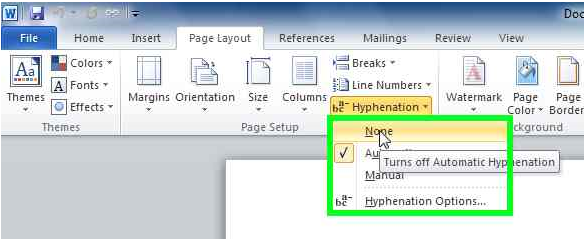
Cum dezactivezi Hyphenation in Office 2010 Data 14/09/2015 Autor Alexandru Chi. Categorie Aplicatii specifice, Configurare program, Stații de lucru 6 3150 Configurare noua (How To) SituatieAi nevoie sa dezactivezi despartirea cuvintelor in silabe; se va opri functia “hyphenation”. Solutie Intr-un document word, in tab-ul Page Layout, in campul Hyphenation, se selecteaza butonul None: Tip solutiePermanent Voteaza Up Down (32 din 58 persoane apreciaza acest articol) ShareTweetShare Despre Autor Alexandru Chi. Solutii Asemanatoare Docker este configurat corect, dar localhost refuza conexiunea 3 How to fix the word experienced an error trying to open the File by adding a new trusted location on Windows 10/11 -2 How to fix the Word experienced an error trying to open the File by disabling the protected view on Windows 10/11 3 How to fix the found unreadable content Error in Word by recovering it on windows 10/11 -2 How to fix the found unreadable content error in Word by repairing it on windows 10/11 -2 Arduino Weather Station guide 3 Leave A Comment? × Cancel Reply Save my name, email, and website in this browser for the next time I comment. + five = 9
Leave A Comment?
