
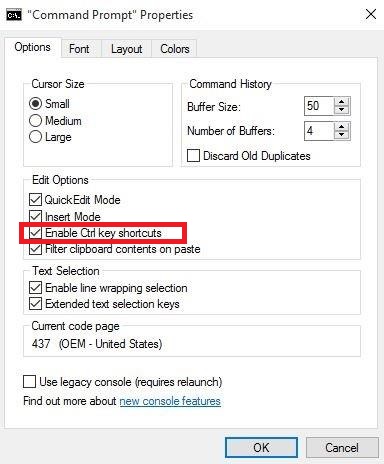
Cum sa activezi ctrl + c si ctrl + v in Windows Command Prompt (cmd) in Windows 10. Data 13/10/2015 Autor Valentin G Categorie OS - Windows, Stații de lucru, Configurare Sistem de operare -6 1608 Configurare noua (How To) SituatieCum sa activezi ctrl + c si ctrl + v in Windows Command Prompt (cmd) in Windows 10. Solutie Pasi de urmat Se deschide Windows Command Prompt (cmd) si se da click dreapta pe bara de sus + “Properties”. Se selecteaza optiunea “Enable Ctrl key shortcuts”. Tip solutiePermanent Voteaza Up Down (45 din 96 persoane apreciaza acest articol) ShareTweetShare Despre Autor Valentin G Solutii Asemanatoare Cum salvam ordinea pictogramelor de pe desktop 1 PikaOS install guide -1 How to install and configure MX Linux 4 How to fix Windows Update Error 0x800f0922 on Windows 11 via System Repair Commands 0 How to fix Windows Update Error 0x800f0922 on Windows 11 via Registry Editor Settings 0 How to fix Windows Update Error 0x800f0922 on Windows 11 via Windows Firewall Settings 3 Leave A Comment? × Cancel Reply Save my name, email, and website in this browser for the next time I comment. 1 + seven =
Leave A Comment?