
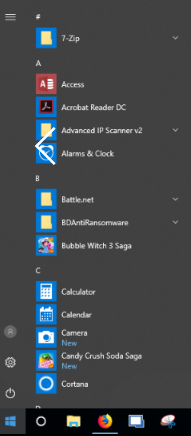
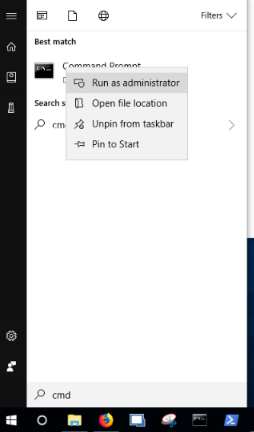
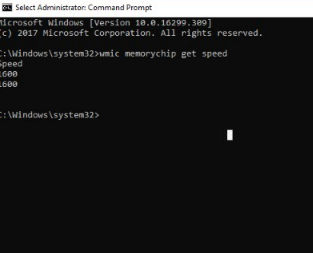
Cum sa aflam viteza RAM cu linie de comanda in CMD Data 06/04/2018 Autor Petrache Dan Categorie Depanare, OS - Windows -3 1428 Configurare noua (How To) SituatieIn caz de vrem sa facem un upgrade la RAM sau sa aflam viteza pentru a cumpara o placa cu aceeasi viteza. Solutie Pasi de urmat Apasam pe butonul “start” in colt stanga jos, cu logo-ul Microsoft . Tastam CMD, dam click dreapta pe icoana cu numele CMD si selectam “Run as Administrator”. Tastam comanda : “Wmic memorychip get speed” si o sa ne arate viteza RAM-ului. Tip solutiePermanent Etichetare: askitaskit.rocmdCmd ram wmicCum sa aflam viteza RAM cu linie de comanda in CMDmicrosoftRun as administratorviteza RAMwmicWmic memorychip get speed Voteaza Up Down (49 din 100 persoane apreciaza acest articol) ShareTweetShare Despre Autor Petrache Dan Solutii Asemanatoare Framework Laptop — A new approach to personal computing -5 How to find BitLocker recovery key on Windows 11 -2 Error when downloading large Files from a WebDAV-Mapped SharePoint Library 3 How to manually Install Windows Updates using the Microsoft Update Catalog 2 Updating HP LaserJet Pro 400MFP M425dn Printer Firmware to troubleshoot Scan to Email issues 2 Notificările Snipping Tool nu se afișează în Windows 11 0 Leave A Comment? × Cancel Reply Save my name, email, and website in this browser for the next time I comment. − one = three
Leave A Comment?