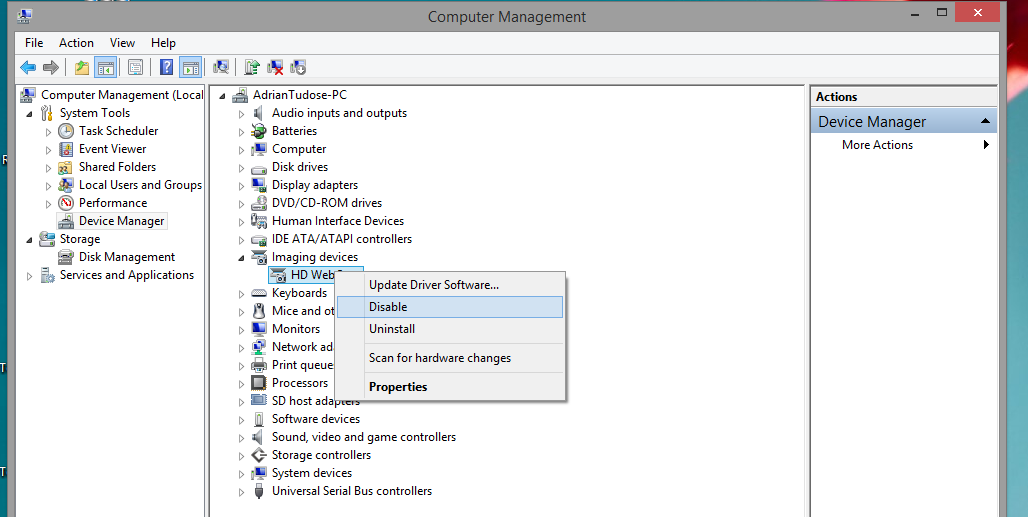
Cum sa dezactivezi webcam-ul Data 07/04/2015 Autor Adrian Tu. Categorie Configurare Sistem de operare, OS - Windows, Stații de lucru -13 1086 Configurare noua (How To) SituatieVrei sa dezactivezi webcam-ul pentru a putea preveni folosirea acesteia fara acordul dvs. Solutie Pasi de urmat Click dreapta My Computer -> Manage Se alege Device Manager -> Imaging devices si se dezactiveaza. Tip solutiePermanent Voteaza Up Down (21 din 54 persoane apreciaza acest articol) ShareTweetShare Despre Autor Adrian Tu. Solutii Asemanatoare Interrupted file playback with Repeat All on Android TV media player – external storage 0 Unable to recharge mobile terminals that have a swappable power connector 1 Workaround pentru optimizarea spatiului pe un server windows 1 Configurare Server Mail Postfix & Dovecot 0 Microsoft ISCSI service nu ruleaza in Windows 11 25H2 0 File Explorer is now stuck in Hi-DPI mode with no way to turn it off 1 Leave A Comment? × Cancel Reply Save my name, email, and website in this browser for the next time I comment. six − = two
Leave A Comment?
