
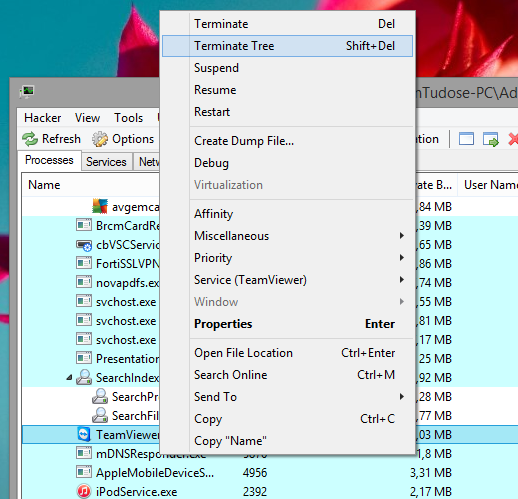
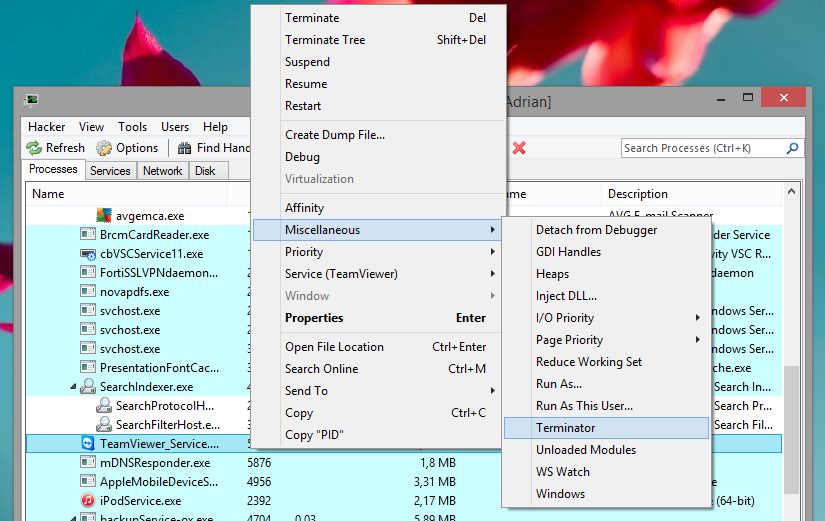
Cum sa inchizi un program daca nu merge din Task Manager Data 14/05/2015 Autor Adrian Tu. Categorie Depanare, OS - Windows, Stații de lucru -2 3733 Configurare noua (How To) SituatieAi un proces pe care nu il poti inchide din Task Manager. Solutie Pasi de urmat Downloadezi si instalezi Process Hacker (http://processhacker.sourceforge.net/downloads.php) Rulezi programul: Selectezi procesul pe care doresti sa il inchizi, dai click dreapta si alegi Terminate Tree. Daca nici asa nu functioneaza, atunci dai click dreapta -> Miscellaneous -> Terminator Iti va mai aparea o fereastra de unde selectezi Run Selected . Tip solutiePermanent Voteaza Up Down (60 din 122 persoane apreciaza acest articol) ShareTweetShare Despre Autor Adrian Tu. Solutii Asemanatoare How to solve “100% Disk Usage” and freezes in Windows by changing PCI express Link state power management 2 5 ways I use randomization in my Home Assistant setup 4 Windows has built-in repair tools that work better than any paid optimizer 3 Your Linux desktop is frozen, but your work isn’t lost 1 Cum remediem erorile: WHEA_UNCORRECTABLE_ERROR, CRITICAL_PROCESS_DIED in Windows Server 4 Delayed mesaj de eroare când încercați să accesați un folder partajat care nu mai există în Windows 1 Leave A Comment? × Cancel Reply Save my name, email, and website in this browser for the next time I comment. × 4 = twenty eight
Leave A Comment?