Follow Us

Soluții pentru problemele tale IT

Home /Stații de lucru/OS - Windows/Optimizare pc/Cum sa stergem/modificam metadata de la o poza in Windows 10
Home /Stații de lucru/OS - Windows/Optimizare PC/Cum sa stergem/modificam metadata de la o poza in Windows 10
Home /Stații de lucru/OS - Windows/Cum sa stergem/modificam metadata de la o poza in Windows 10
Home /Stații de lucru/OS - Windows/Personalizare sistem operare/Cum sa stergem/modificam metadata de la o poza in Windows 10
Home /Stații de lucru /Cum sa stergem/modificam metadata de la o poza in Windows 10

Cum sa stergem/modificam metadata de la o poza in Windows 10

  • Data 13/02/2017
  • Autor George Enescu
  • Categorie Optimizare pc, Optimizare PC, OS - Windows, Personalizare sistem operare, Stații de lucru
  • -12
  • 3781
Configurare noua (How To)

Situatie

De fiecare data cand faci o poza folosind aparatul foto sau camera foto de la telefon, fisierul creeat (poza) nu are doar imaginea ci si o arie de informati despre poza cum ar fi : model aparat, autor, data ora, coordonate gps etc.

Multumita la metadata, informatiile despre poze se pot aranja mai usor cat si accesa mai usor.

In acest tutorial o sa invatam cum sa modificam aceste date cat si cum sa le stergem.


Solutie

Pasi de urmat

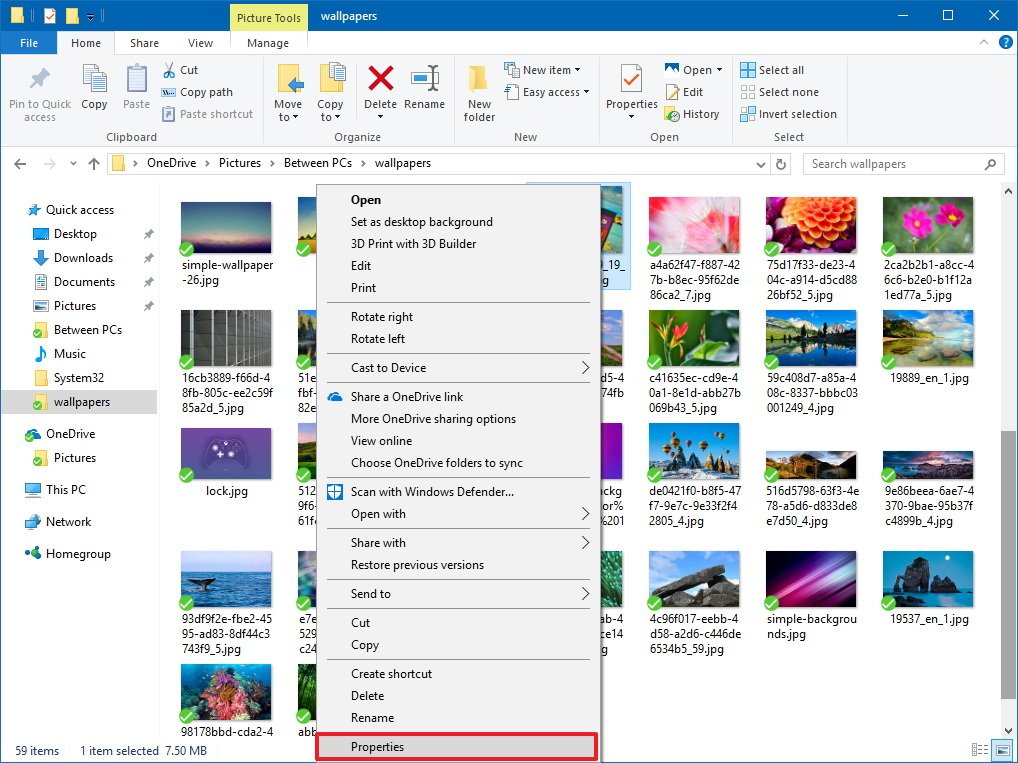
Slecetam poza dorita si apasam pe Properties.

In Propreties selectam Details.
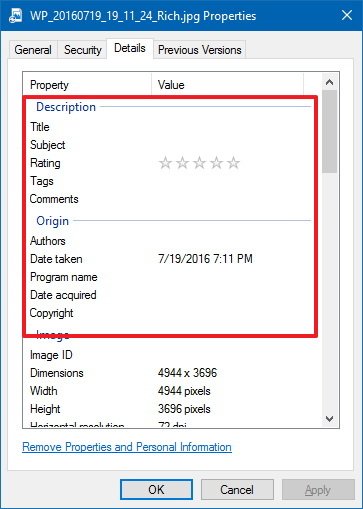
Toate informatiile pe care le vezi in Details sunt o parte din metadata, ele se pot modifica destul de rapid apasand pe proprietatea dorita. Tine minte ca unele date nu se pot modifica.

Tabul de Details imparte  proprietatile metadatei in diferite sectiuni, care pot fi diferite in alte tipuri de fisier. In acest caz, pozele, au doar 6 sectiuni. Prima sectiune este  Description, in care poti clic-ui pe valorile din ea pt a le edita.

In Origin, poti edita autorul, data la care a fost facuta poza, data de achizitie/mutare/copiere cat si copyright.
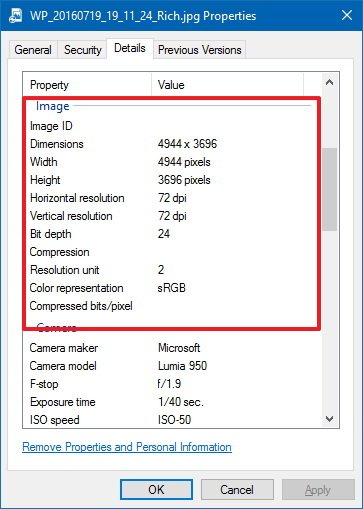
Sectiunea Image:

Poti vedea informatiile despre:

  • Image ID
  • Dimensions
  • Width
  • Height
  • Horizontal resolution
  • Vertical resolution
  • Bit depth
  • Compression
  • Resolution unit
  • Color representation
  • Compressed bits/pix

    el


In sectiunea Camera:

  • Camera maker and model
  • F-stop
  • Exposure time
  • ISO speed
  • Exposure bias
  • Focal length
  • Max aperture
  • Metering mode
  • Subject distance
  • Flash mode and energy
  • 35mm focal length

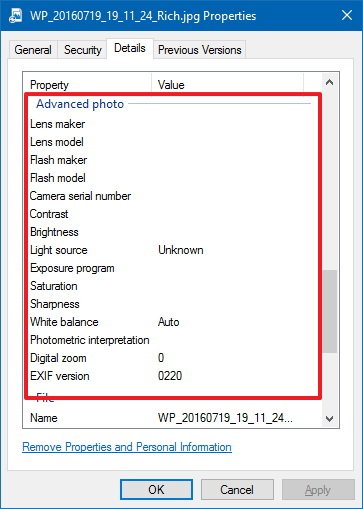
In sectiunea Advanced photo (preferata fotografilor) gasim:

  • Lens maker
  • Lens model
  • Flash maker
  • Flash model
  • Camera serial number
  • Constrast
  • Brightness
  • Light Source 
  • …etc

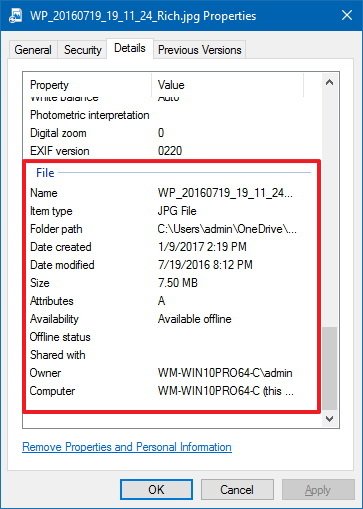
Ultima Sectiune File:

In  aceasta sectiune poti vedea date dspre fisier in sine: nume, cale fisier, data cand a fost creeat, data cand a fost modificat..etc

Aceste date nu se pot modifica
Cum sa Stergem Metadata

Clic dreapta pe poza, apoi clic pe Properties

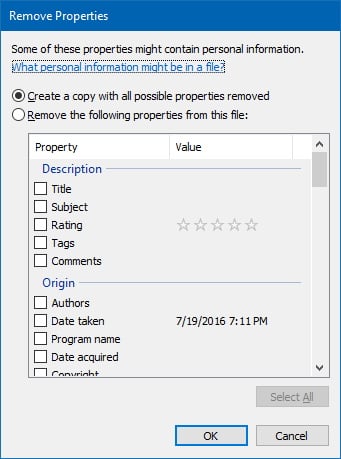
In tabul de Details clic pe Remove Properties and Personal Information

Imagini pentru Remove Properties and Personal Information

332 × 450 – petapixel.com

Clic  Remove the following properties from this file si selecteaza ce proprietati doresti sa stergi din lista de mai jos
Tip solutie

Permanent
Etichetare: Advanced photoaskitaskit.rochange metadataDescriptionMetadatapozaRemove Properties and Personal Informationschimba metadatawindows 10

Voteaza

Up Down
(31 din 74 persoane apreciaza acest articol)
Share
Tweet
Share

Despre Autor

George Enescu

Solutii Asemanatoare

  • How to disable the Drag Tray feature on Windows 11 using the Registry Editor 3
  • How to disable share Drag Tray at the top of screen on Windows 11 0
  • Cum găsești și elimini fișiere duplicate în OneDrive 2
  • 5 scurtături din meniul contextual Windows care salveaza timp -1
  • Notificările pot fi oprite cu acest mic utilitar 2
  • Remedierea erorii:„Missing DLL File” în sistemele de operare Windows 3

Leave A Comment? × Cancel Reply

30720

Soluții Disponibile

0 Articole

In ultima saptamana

Cele mai recente soluții

  • How to sync your Android and Windows devices seamlessly
    • 11
    • 7 days ago
  • How to Install the Google Play Store on an Amazon Fire Tablet
    • 12
    • 02/12/2025
  • How to disable the Drag Tray feature on Windows 11 using the Registry Editor
    • 51
    • 7 days ago
  • How to disable share Drag Tray at the top of screen on Windows 11
    • 48
    • 01/12/2025
  • Cum raportezi emailurile de tip phishing în Outlook
    • 38
    • 01/12/2025
© Askit.ro, 2014 - 2025. All rights reserved. Done by Class IT
Share
Tweet
Share