
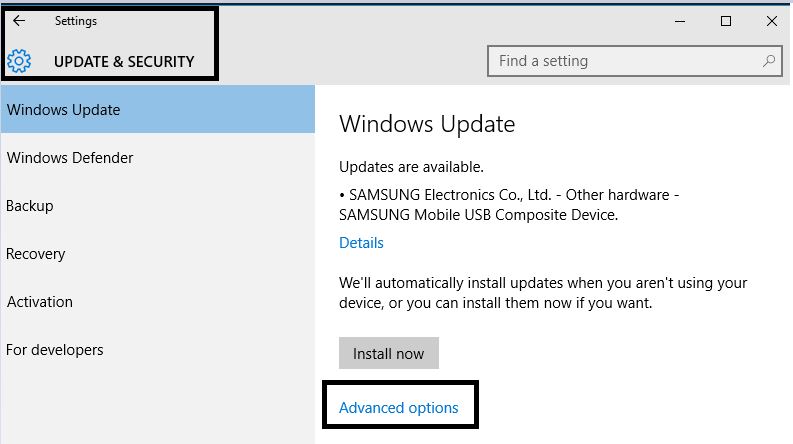
Dezactiveaza restartul automat dupa update in windows 10 Data 17/08/2015 Autor Claudiu Gherghinoiu Categorie Configurare Sistem de operare, OS - Windows, Stații de lucru 2 1842 Configurare noua (How To) SituatieVrei sa iti setezi sistemul de operare sa nu se mai updateze automat, afla cum poti seta acest lucru. Solutie Pasi de urmat Se da click pe butonul de Start , apoi click pe Settings. Click pe Update & Security, apoi Windows update. Click pe Advanced Options , se selecteaza Notify to schedule restart. Tip solutiePermanent Voteaza Up Down (26 din 50 persoane apreciaza acest articol) ShareTweetShare Despre Autor Claudiu Gherghinoiu Solutii Asemanatoare Funcția UNIQUE nu funcționează în Excel 2 Outlook nu funcționează cu VPN pe PC Windows 2 Bara de volum in Windows 11 apare incontinuu 4 Kubuntu installation guide -1 Cum resetam consumul de date din Windows 1 How to enable new CPU boost feature on Windows 11 -1 Leave A Comment? × Cancel Reply Save my name, email, and website in this browser for the next time I comment. three + one =
Leave A Comment?