
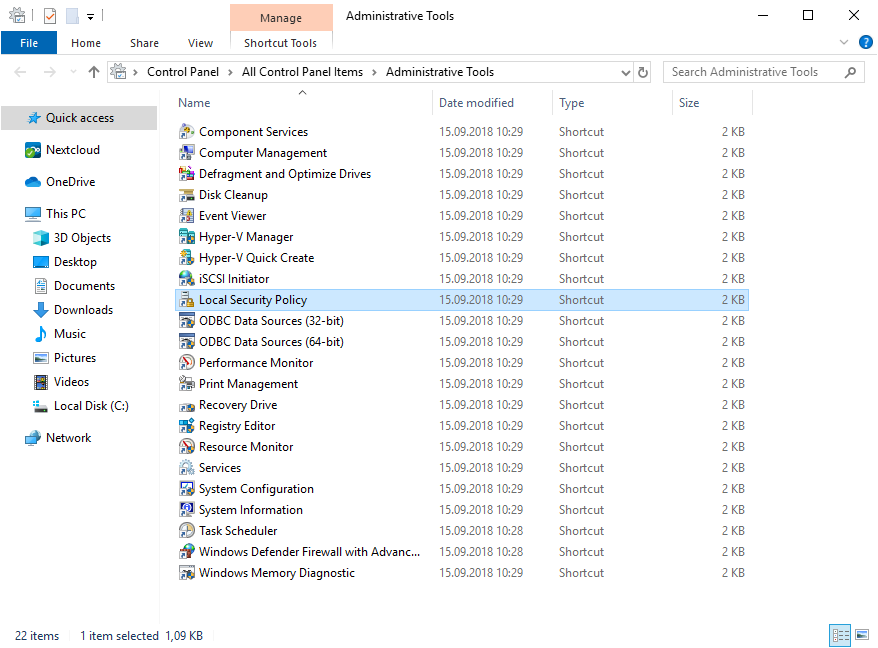
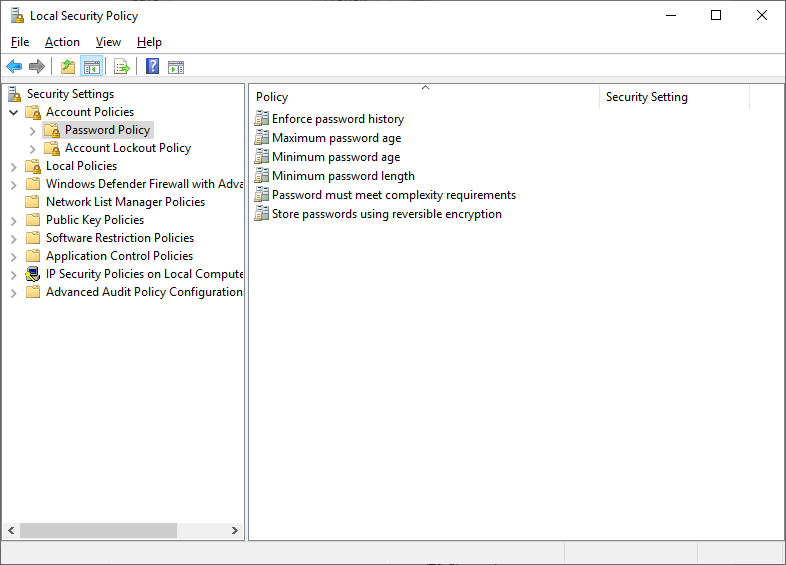
Editarea setarilor de parola de pe Windows server 2019 Data 06/09/2019 Autor andrei sucu Categorie OS - Windows, Soluții -13 4547 Configurare noua (How To) SituatiePutem edita setari de parola din Windows Server 2019. Solutie Pasi de urmat Cautam in meniul Start “Administrative Tools”: Selectam “Local Security Policy”: Navigam in Account Policy>Password Policy unde avem toate optiunile pentru setarile de parola: Tip solutiePermanent Etichetare: parolepasswordsWindows server 2019 Article Attachments 2019-09-06-1 2019-09-06 2019-09-06-2-2 Voteaza Up Down (25 din 63 persoane apreciaza acest articol) ShareTweetShare Despre Autor andrei sucu Solutii Asemanatoare Cum selectezi si editezi text dintr-o imagine pe Windows 11 -2 How to enable Windows Sandbox in Windows 11 2 Repair commands to run before you reinstall Windows 5 Ways to insert a Command or Code Block in Microsoft Word -1 Microsoft Word is making a big change to web links 6 Importanța testării automate în dezvoltarea software modernă 0 Leave A Comment? × Cancel Reply Save my name, email, and website in this browser for the next time I comment. + 1 = three
Leave A Comment?