
Situatie
The error is preventing users from downloading the available cumulative or security updates on their systems.
Solutie
Pasi de urmat
- Open the Run dialog box by pressing Windows + R and type regedit > OK
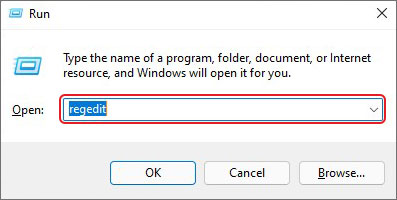
- Click Yes, if prompted. On the Registry Editor window, follow the given path:
HKEY_LOCAL_MACHINE > SOFTWARE > Microsoft > Windows > Current Version > WINEVT > Publishers.
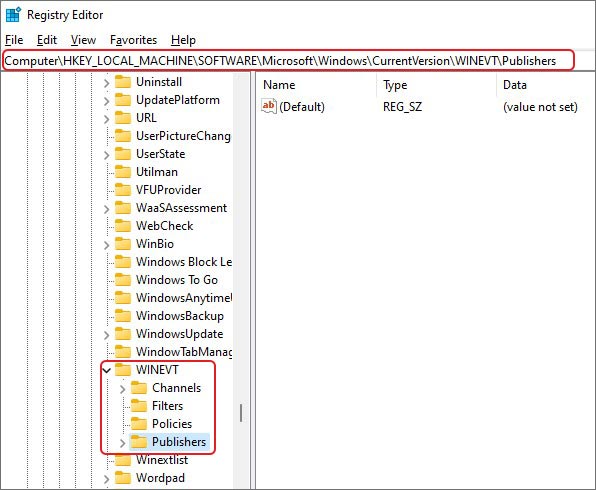
- Next, right-click on Publishers and select Export
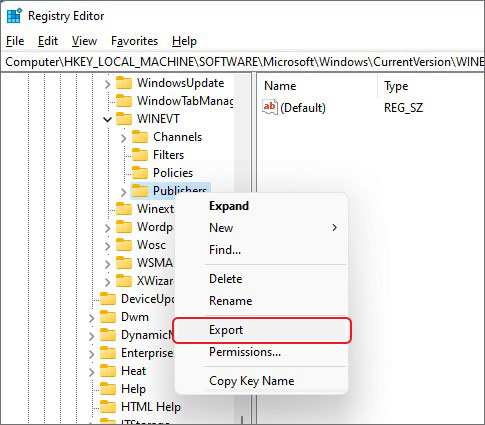
- Select the location and click Save to store in the desired location
- Once done, locate the following keys and delete the following keys in Publishers folder
e7ef96be-969f-414f-97d7-3ddb7b558ccc and 8c416c79-d49b-4f01-a467-e56d3aa8234c
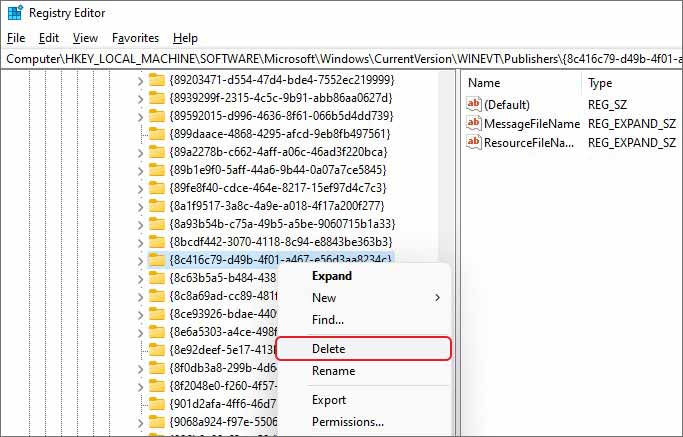
Once done, close the window and reinitiate the update installation process.
Leave A Comment?