
Situatie
To prevent Google Chrome from downloading AI models like Gemini Nano on Windows 11 using the Registry, follow these steps:
Solutie
1. Open Start on Windows 11
2. Search for regedit and click the top result to open the Registry
3. Open the following path:
Computer\HKEY_LOCAL_MACHINE\SOFTWARE\Policies
4. Right-click the Policies key, select New, and choose Key
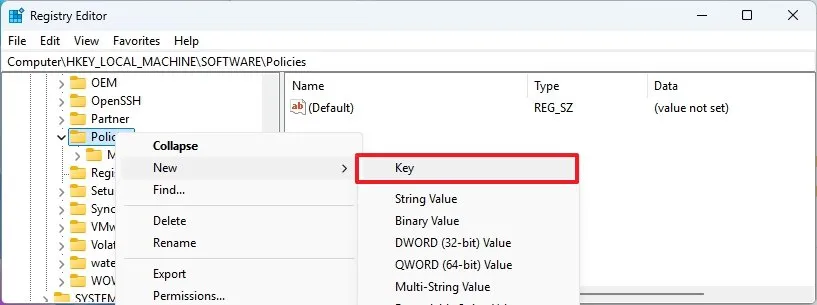
5. Confirm the Google name and press Enter
6. Right-click the Google key, select New, and choose Key
7. Confirm the Chrome name and press Enter
8. Right-click the Chrome (folder) key, select the New submenu, and choose the “DWORD (32-bit) Value” option
9. Confirm the GenAILocalFoundationalModelSettings name and press Enter
10. Right-click the newly created key and select Modify
11. Set the value to 1 to prevent Chrome from downloading and using locally available AI models on your device.
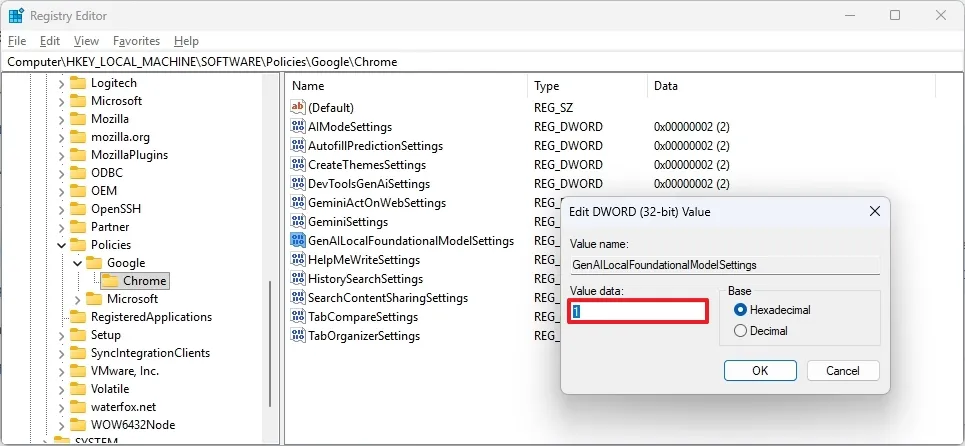
12. Click the OK button
13. Restart your computer.
Once you complete the steps, Google Chrome will no longer download AI models (such as Gemini Nano) on your computer, and any existing model (if already downloaded) will be deleted.
Leave A Comment?