
Situatie
To debloat Windows 11 using Winhance, follow these steps:
Solutie
1. Open the Winslop download page
2. Click the download option for the latest version available
3. Save the Winhance.Installer.exe file on your computer

4. Double-click the installer to begin the installation
5. Select the option to accept the terms
6. Click the Next button
7. Choose the “Perform a regular installation” option
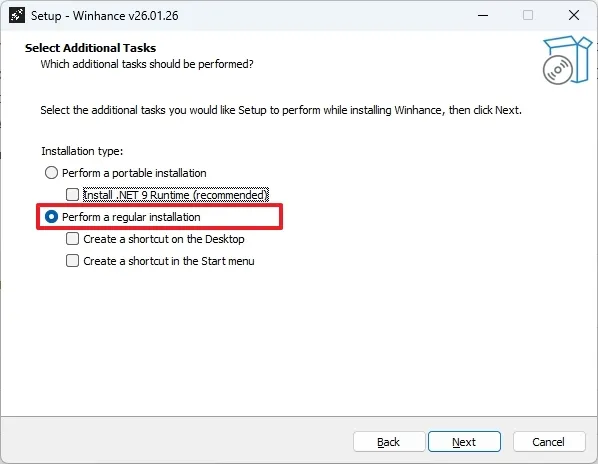
8. Click the Next button
9. Click the Next button one more time
10. Click the Install button
11. Click the Finish button.Once you complete the steps, the application should launch automatically, but if it doesn’t, you can find it in the Start menu.
To remove bloatware from Windows 11, follow these steps:
1. Open the Winhance tool
2. Click on Software & Apps from the left pane
3. Click the Windows Apps & Features tab
4. Select all the applications you want to uninstall from Windows 11.

Quick tip: The green dot means that the app exists on your device, and the blue recycle symbol means that it’s possible to reinstall the application. On the other hand, the red dot means the app no longer exists, and the red recycle symbol means that it can’t be reinstalled through this tool.
5. (Optional) Choose the features that you may want to uninstall under the “Windows Capabilities” section
6. (Optional) Choose the optional features to uninstall under the “Windows Optional Features” section
7. Click the “Remove Selected items” button
After you complete the steps, the tool can take some time to uninstall all the bloatware from your computer. It’s worth noting that this app can uninstall many applications that the operating system won’t let you remove easily, such as Microsoft Edge, Microsoft Store, and others.
Also, from the “External Software” tab, it’s possible to install or uninstall applications that are not part of the standard setup and are not even software developed by Microsoft, including Steam, LibreOffice, 7-zip, Notepad++, and others.
Leave A Comment?