
Situatie
Solutie
1.Package Contents
The package contains two main files:
- windows_license_audit.ps1 – collects licensing information, generates recommendations, and creates the report.
- script_launch.cmd – launches the PowerShell script with a double-click.
The script automatically creates a result folder: you can copy the package to a USB drive and run it on multiple Windows computers. Reports remain in the same result folder, with a unique filename for each run.
2. How the Script Is Built
The script follows five stages.
Collecting Information
PowerShell reads local information trough CIM/WMI:
- SoftwareLicensingProduct – activation status, license channel, product identifiers, partial product key, and KMS information
- SoftwareLicensingService – the OEM firmware key, when available.
- Win32_OperatingSystem – the installed Windows edition.
The script also reads the edition identifier and BackupProductKeyDefault from the registry, when available.
Filtering Windows Products
The SoftwareLicensingProduct query uses the Windows ApplicationID:
This excludes Office licensing records. By default, the script retains Windows records with a partial product key or a licensing status greater than zero.If multiple records are found, they are reported separately.
Interpreting Results
The script translates numeric status codes into values such as Licensed, Unlicensed, grace-period states, and activation notification. When a remaining grace period is available, the script calculates an estimated deadline. This may represent a reactivation deadline; it is not the contractual expiration date of the license.
Generating Recommendations
Recommendations depend on the reported status and channel. For example:
- KMS: maintain periodic access to the organization network or VPN.
- An unactivated record: check the Activation page and confirm that the installed edition matches the license.
- Activated Retail or OEM: retain purchase records; immediate reactivation is not indicated.
- Incomplete information: resolve collection errors before drawing conclusions.
Creating the Report
The script creates the XLSX file using .NET components available in Windows. It does not require Microsoft Excel, additional PowerShell modules, or internet acces.The workbook contains two worksheets: Summary and Details
3. Preparing the Files
To assemble the package manually:
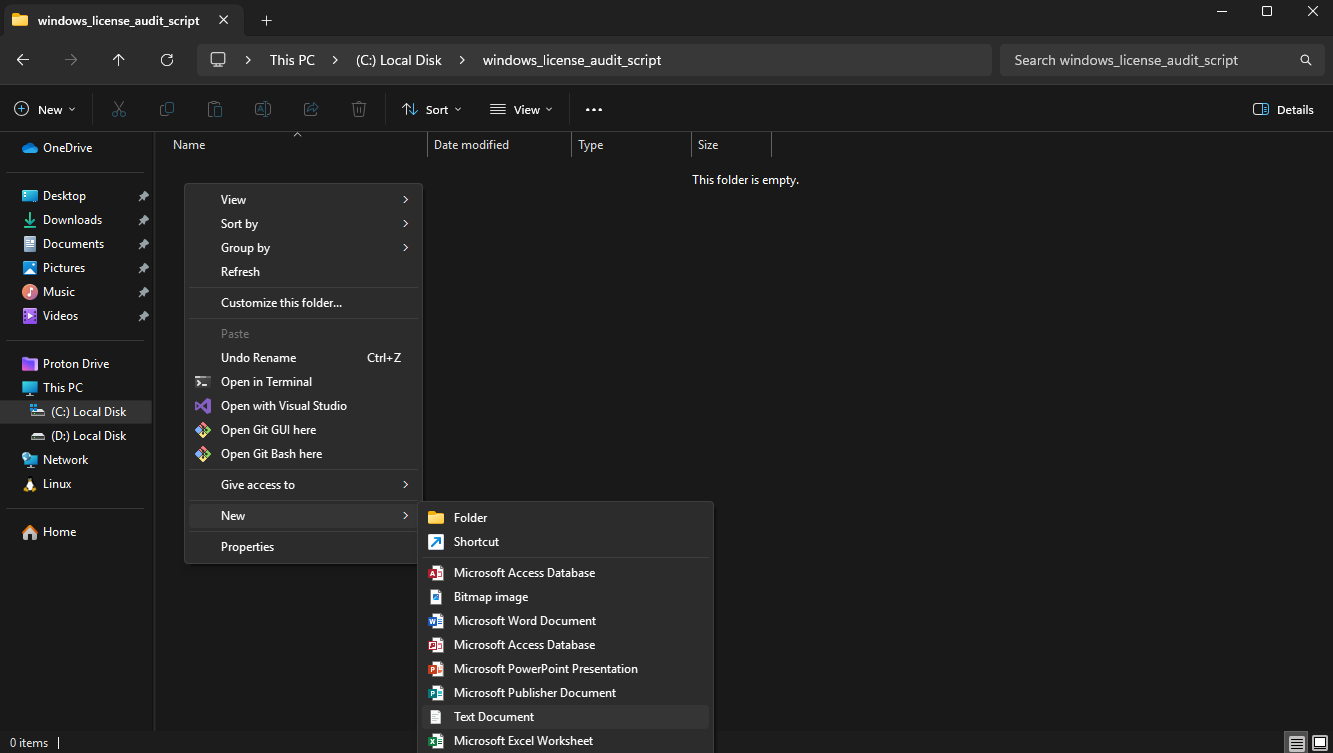
Step 1 – In the script folder, create a .txt document:
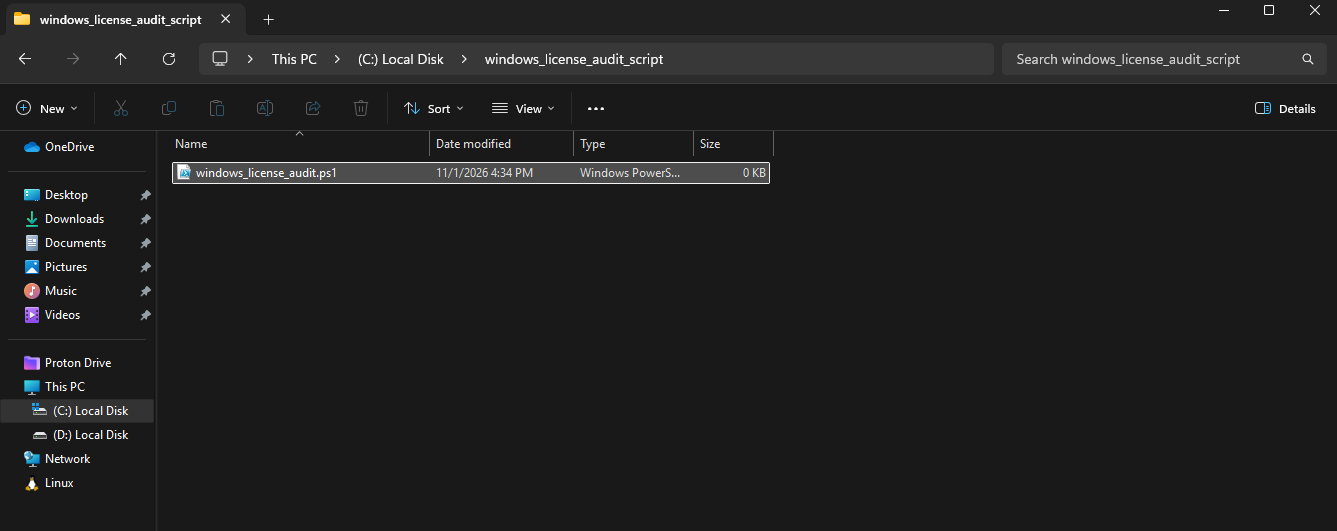
Step 2 – Rename the file to “windows_license_audit.ps1“, make sure to change the extension in to “.ps1” and not leave it as “.txt“:
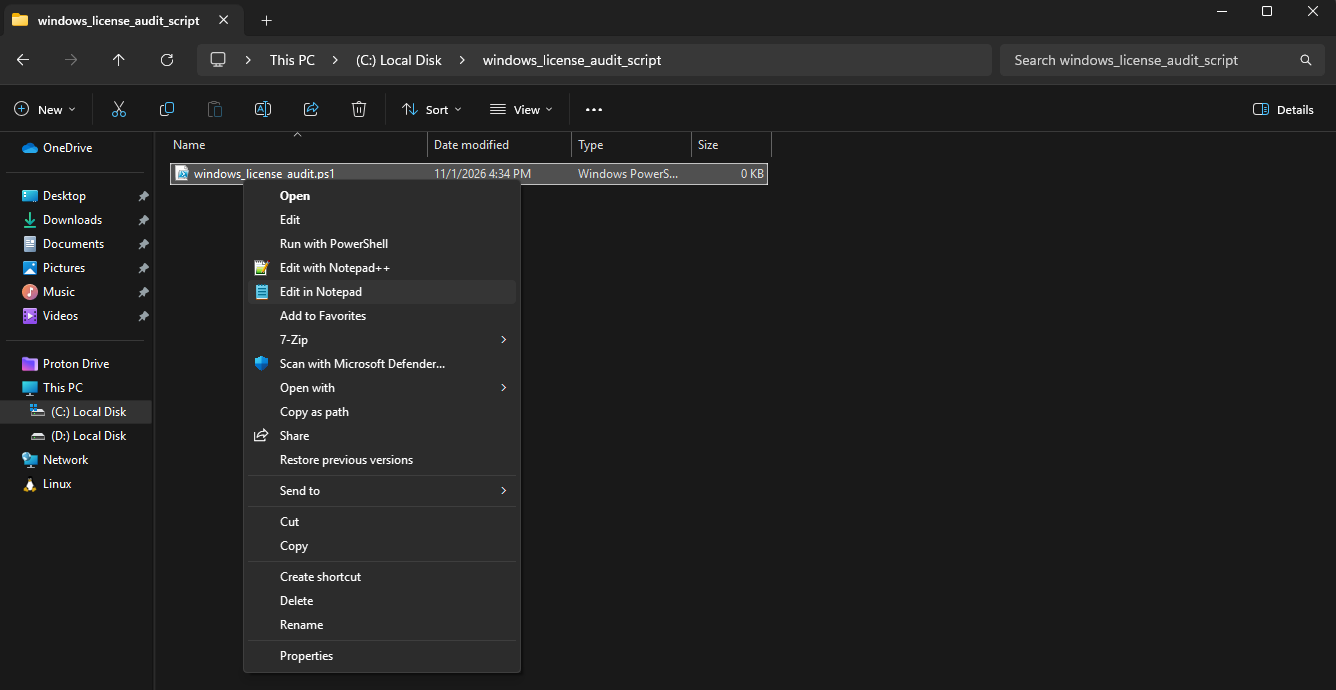
Step 3 – Right-click on the file and select “Edit in Notepad“:
Step 4 – Once Notepad is open, copy and paste the following code:
#requires -Version 5.1
<#
.SYNOPSIS
Read-only local Windows license audit with a portable XLSX report.
.DESCRIPTION
Reports are saved in the result folder next to this script. No activation
changes, network requests, computer names or hardware inventory are collected.
Available OEM and registry backup keys are exported in full.
#>
[CmdletBinding()]
param([switch]$IncludeAllWindowsProducts, [switch]$PassThru)
Set-StrictMode -Version 2.0
$ErrorActionPreference = ‘Stop’
$issues = New-Object ‘System.Collections.Generic.List[string]’
function Read-Value($Object, [string]$Name) {
if ($null -ne $Object -and $null -ne $Object.PSObject.Properties[$Name]) { return $Object.PSObject.Properties[$Name].Value }
return $null
}
function Display-Value($Value) {
if ($null -eq $Value -or [string]::IsNullOrWhiteSpace([string]$Value)) { return ‘Not available / not reported’ }
return [string]$Value
}
function Read-Class([string]$Name, [string]$Filter) {
try {
$params = @{ClassName=$Name; Namespace=’root/cimv2′; ErrorAction=’Stop’; OperationTimeoutSec=30}
if ($Filter) { $params.Filter=$Filter }
Get-CimInstance @params
} catch { $issues.Add((‘{0}: read failed ({1}, HRESULT 0x{2:X8})’ -f $Name,$_.Exception.GetType().Name,$_.Exception.HResult)) }
}
function Format-Date($Value) {
if ($null -eq $Value) { return $null }
try { $date=[datetime]$Value; if ($date.Year -gt 1601) { return $date.ToUniversalTime().ToString(‘o’) } }
catch { return [string]$Value }
}
function Get-LicenseAdvice($Record) {
if ($null -eq $Record.LicenseStatus) { return ‘Activation status is unknown. Resolve collection errors and check the Activation page in Settings.’ }
$channel=[string]$Record.ProductKeyChannel+’ ‘+[string]$Record.Description
if ($Record.LicenseStatus -ne 1) {
if ($channel -match ‘VOLUME_KMSCLIENT|Volume:GVLK’) { return ‘This record does not report Licensed. Connect to your organization network or VPN and ask IT to check KMS activation.’ }
return ‘This record does not report Licensed. Check Settings > Activation, run activation troubleshooting, and verify that your license matches the installed edition. This report alone is not a reason to buy another license.’
}
if ($channel -match ‘VOLUME_KMSCLIENT|Volume:GVLK’) { return ‘KMS activation is reported. Maintain periodic access to your organization network or VPN for renewal. For a personal device without an organization license, ask the seller to clarify its licensing.’ }
if ($channel -match ‘VOLUME_MAK|Volume:MAK’) { return ‘MAK activation is reported. No immediate reactivation is indicated; confirm with IT that the device is covered by the organization licensing agreement.’ }
if ($channel -match ‘OEM’) { return ‘OEM activation is reported. No immediate reactivation is indicated. Keep the device purchase records; the firmware key may belong to a different Windows edition.’ }
if ($channel -match ‘Retail’) { return ‘Retail activation is reported. No immediate reactivation is indicated. Keep proof of purchase; the Retail channel alone does not establish license origin or transfer rights.’ }
return ‘This record reports Licensed, but the license channel is unclear. Check the Activation page and purchase records for clarification.’
}
function Write-XlsxEntry($Zip, [string]$Path, [string]$Content) {
$entry = $Zip.CreateEntry($Path)
$stream = $entry.Open()
$writer = New-Object System.IO.StreamWriter($stream, (New-Object System.Text.UTF8Encoding($false)))
try { $writer.Write($Content) } finally { $writer.Dispose() }
}
function New-LicenseSheet($Records, [switch]$Summary) {
$ns = ‘http://schemas.openxmlformats.org/spreadsheetml/2006/main’
$buffer = New-Object System.Text.StringBuilder
$settings = New-Object System.Xml.XmlWriterSettings
$settings.OmitXmlDeclaration = $true
$writer = [System.Xml.XmlWriter]::Create($buffer, $settings)
try {
$writer.WriteStartElement(‘worksheet’, $ns)
$writer.WriteStartElement(‘cols’, $ns)
foreach ($col in @(@(‘1′,’42’), @(‘2′,’100’))) {
$writer.WriteStartElement(‘col’, $ns)
$writer.WriteAttributeString(‘min’, $col[0]); $writer.WriteAttributeString(‘max’, $col[0])
$writer.WriteAttributeString(‘width’, $col[1]); $writer.WriteAttributeString(‘customWidth’, ‘1’)
$writer.WriteEndElement()
}
$writer.WriteEndElement()
$writer.WriteStartElement(‘sheetData’, $ns)
$pairs = New-Object ‘System.Collections.Generic.List[object]’
$pairs.Add(@(‘WINDOWS LICENSE AUDIT’, ‘Local technical data; does not establish legal entitlement.’))
if (@($Records).Count -gt 1) { $pairs.Add(@(‘Notice’, ‘Multiple Windows records; no record is automatically assumed to represent the current edition.’)) }
foreach ($record in $Records) {
$pairs.Add(@(‘Product’, (Display-Value $record.Name)))
if ($Summary) {
$fields = [ordered]@{WindowsEdition=’Windows edition’; ActivationStatus=’Activation status’; ProductKeyChannel=’License channel’; PartialProductKey=’Installed key – last 5 characters’; OEMFirmwareKey=’Full OEM firmware key’; RegistryBackupProductKeyDefault=’Backup key (not necessarily active)’; EstimatedActivationOrGraceExpirationUtc=’Estimated reactivation/grace deadline UTC’; CollectionIssues=’Collection errors’; Recommendation=’Recommendation’}
foreach ($name in $fields.Keys) { $pairs.Add(@($fields[$name], (Display-Value $record.$name))) }
} else {
foreach ($property in $record.PSObject.Properties) { $pairs.Add(@($property.Name, (Display-Value $property.Value))) }
}
$pairs.Add(@(”, ”))
}
$index = 0
foreach ($pair in $pairs) {
$index++
$writer.WriteStartElement(‘row’, $ns)
$writer.WriteAttributeString(‘r’, [string]$index)
$height = [Math]::Min(409, [Math]::Max(30, 15 * [Math]::Ceiling(([string]$pair[1]).Length / 90.0)))
$writer.WriteAttributeString(‘ht’, $height.ToString([Globalization.CultureInfo]::InvariantCulture))
$writer.WriteAttributeString(‘customHeight’, ‘1’)
for ($c = 0; $c -lt 2; $c++) {
$writer.WriteStartElement(‘c’, $ns)
$writer.WriteAttributeString(‘r’, (‘{0}{1}’ -f ([char](65+$c)), $index))
$writer.WriteAttributeString(‘s’, $(if ($c -eq 0) { ‘1’ } else { ‘0’ }))
# All audit values are literal text: preserve keys and prevent formulas.
$writer.WriteAttributeString(‘t’, ‘inlineStr’)
$writer.WriteStartElement(‘is’, $ns)
$writer.WriteElementString(‘t’, $ns, [string]$pair[$c])
$writer.WriteEndElement(); $writer.WriteEndElement()
}
$writer.WriteEndElement()
}
$writer.WriteEndElement(); $writer.WriteEndElement(); $writer.Flush()
return $buffer.ToString()
} finally { $writer.Dispose() }
}
function Export-LicenseXlsx($Records, [string]$Path, [switch]$Overwrite) {
Add-Type -AssemblyName System.IO.Compression
$mode = [IO.FileMode]::CreateNew
if ($Overwrite) { $mode = [IO.FileMode]::Create }
$stream = [IO.File]::Open($Path, $mode, [IO.FileAccess]::Write, [IO.FileShare]::None)
$zip = $null
try {
$zip = New-Object System.IO.Compression.ZipArchive($stream, [IO.Compression.ZipArchiveMode]::Create, $true)
Write-XlsxEntry $zip ‘[Content_Types].xml’ ‘<Types xmlns=”http://schemas.openxmlformats.org/package/2006/content-types”><Default Extension=”rels” ContentType=”application/vnd.openxmlformats-package.relationships+xml”/><Default Extension=”xml” ContentType=”application/xml”/><Override PartName=”/xl/workbook.xml” ContentType=”application/vnd.openxmlformats-officedocument.spreadsheetml.sheet.main+xml”/><Override PartName=”/xl/styles.xml” ContentType=”application/vnd.openxmlformats-officedocument.spreadsheetml.styles+xml”/><Override PartName=”/xl/worksheets/sheet1.xml” ContentType=”application/vnd.openxmlformats-officedocument.spreadsheetml.worksheet+xml”/><Override PartName=”/xl/worksheets/sheet2.xml” ContentType=”application/vnd.openxmlformats-officedocument.spreadsheetml.worksheet+xml”/></Types>’
Write-XlsxEntry $zip ‘_rels/.rels’ ‘<Relationships xmlns=”http://schemas.openxmlformats.org/package/2006/relationships”><Relationship Id=”rId1″ Type=”http://schemas.openxmlformats.org/officeDocument/2006/relationships/officeDocument” Target=”xl/workbook.xml”/></Relationships>’
Write-XlsxEntry $zip ‘xl/workbook.xml’ ‘<workbook xmlns=”http://schemas.openxmlformats.org/spreadsheetml/2006/main” xmlns:r=”http://schemas.openxmlformats.org/officeDocument/2006/relationships”><sheets><sheet name=”Summary” sheetId=”1″ r:id=”rId1″/><sheet name=”Details” sheetId=”2″ r:id=”rId2″/></sheets></workbook>’
Write-XlsxEntry $zip ‘xl/_rels/workbook.xml.rels’ ‘<Relationships xmlns=”http://schemas.openxmlformats.org/package/2006/relationships”><Relationship Id=”rId1″ Type=”http://schemas.openxmlformats.org/officeDocument/2006/relationships/worksheet” Target=”worksheets/sheet1.xml”/><Relationship Id=”rId2″ Type=”http://schemas.openxmlformats.org/officeDocument/2006/relationships/worksheet” Target=”worksheets/sheet2.xml”/><Relationship Id=”rId3″ Type=”http://schemas.openxmlformats.org/officeDocument/2006/relationships/styles” Target=”styles.xml”/></Relationships>’
Write-XlsxEntry $zip ‘xl/styles.xml’ ‘<styleSheet xmlns=”http://schemas.openxmlformats.org/spreadsheetml/2006/main”><fonts count=”2″><font><sz val=”11″/><name val=”Calibri”/></font><font><b/><sz val=”11″/><name val=”Calibri”/></font></fonts><fills count=”2″><fill><patternFill patternType=”none”/></fill><fill><patternFill patternType=”gray125″/></fill></fills><borders count=”1″><border/></borders><cellStyleXfs count=”1″><xf numFmtId=”0″ fontId=”0″ fillId=”0″ borderId=”0″/></cellStyleXfs><cellXfs count=”2″><xf numFmtId=”49″ fontId=”0″ fillId=”0″ borderId=”0″ xfId=”0″ applyAlignment=”1″><alignment vertical=”top” wrapText=”1″/></xf><xf numFmtId=”49″ fontId=”1″ fillId=”0″ borderId=”0″ xfId=”0″ applyAlignment=”1″ applyFont=”1″><alignment vertical=”top” wrapText=”1″/></xf></cellXfs><cellStyles count=”1″><cellStyle name=”Normal” xfId=”0″ builtinId=”0″/></cellStyles></styleSheet>’
Write-XlsxEntry $zip ‘xl/worksheets/sheet1.xml’ (New-LicenseSheet $Records -Summary)
Write-XlsxEntry $zip ‘xl/worksheets/sheet2.xml’ (New-LicenseSheet $Records)
} finally {
if ($null -ne $zip) { $zip.Dispose() }
$stream.Dispose()
}
}
if ($env:OS -ne ‘Windows_NT’) { throw ‘This script requires Windows.’ }
# Resolve against the script, not the current working directory or a drive letter.
$resultFolder = Join-Path $PSScriptRoot ‘result’
try {
[IO.Directory]::CreateDirectory($resultFolder) | Out-Null
$probe = Join-Path $resultFolder ([guid]::NewGuid().ToString(‘N’) + ‘.tmp’)
$probeStream = [IO.File]::Open($probe,[IO.FileMode]::CreateNew,[IO.FileAccess]::Write,[IO.FileShare]::None)
$probeStream.Dispose()
[IO.File]::Delete($probe)
} catch { throw (‘Cannot write to the result folder beside the script. Check USB write protection, free space and folder permissions. No alternative location will be used. ‘ + $_.Exception.Message) }
$reportId = [guid]::NewGuid().ToString(‘N’)
$fullPath = Join-Path $resultFolder (‘windows_license_audit_{0}_{1}.xlsx’ -f (Get-Date -Format ‘yyyyMMdd_HHmmss_fff’),$reportId)
$products = @(Read-Class ‘SoftwareLicensingProduct’ “ApplicationID=’55c92734-d682-4d71-983e-d6ec3f16059f'”)
$observedAt = [datetime]::UtcNow
$service = @(Read-Class ‘SoftwareLicensingService’ ”) | Select-Object -First 1
$os = @(Read-Class ‘Win32_OperatingSystem’ ”) | Select-Object -First 1
$edition = $null; $backupKey = $null
try {
$base = [Microsoft.Win32.RegistryKey]::OpenBaseKey(‘LocalMachine’,’Registry64′)
try {
$key=$base.OpenSubKey(‘SOFTWARE\Microsoft\Windows NT\CurrentVersion’)
if ($null -ne $key) { try { $edition=$key.GetValue(‘EditionID’) } finally { $key.Dispose() } }
$key=$base.OpenSubKey(‘SOFTWARE\Microsoft\Windows NT\CurrentVersion\SoftwareProtectionPlatform’)
if ($null -ne $key) { try { $backupKey=$key.GetValue(‘BackupProductKeyDefault’) } finally { $key.Dispose() } }
} finally { $base.Dispose() }
} catch { $issues.Add(‘Registry licensing fields: read failed (‘+$_.Exception.GetType().Name+’).’) }
$selected = @($products | Where-Object {
$IncludeAllWindowsProducts -or -not [string]::IsNullOrWhiteSpace([string](Read-Value $_ ‘PartialProductKey’)) -or ((Read-Value $_ ‘LicenseStatus’) -gt 0)
})
if ($selected.Count -eq 0) { $issues.Add(‘No installed/active Windows licensing record found; activation status is unknown.’); $selected=@($null) }
$statuses=@{0=’Unlicensed’;1=’Licensed’;2=’OOBGrace’;3=’OOTGrace’;4=’NonGenuineGrace’;5=’Notification’;6=’ExtendedGrace’}
$rows = @(foreach ($product in $selected) {
$status=Read-Value $product ‘LicenseStatus’
$statusText=’Unknown’
if ($null -ne $status -and $statuses.ContainsKey([int]$status)) { $statusText=$statuses[[int]$status] }
$minutes=Read-Value $product ‘GracePeriodRemaining’
$expiry=$null
if ($null -ne $minutes -and [double]$minutes -gt 0) { $expiry=$observedAt.AddMinutes([double]$minutes).ToString(‘o’) }
$oemKey=Read-Value $service ‘OA3xOriginalProductKey’
$oemState=’Not present or not exposed by provider’
if ($null -eq $service) { $oemState=’Unknown: service data unavailable’ } elseif ($oemKey) { $oemState=’Present’ }
$reason=Read-Value $product ‘LicenseStatusReason’
$reasonHex=$null
if ($null -ne $reason) { $reasonHex=’0x{0:X8}’ -f [uint32]$reason }
$row=[ordered]@{
ReportID=$reportId; ObservedAtUtc=$observedAt.ToString(‘o’)
WindowsEdition=Read-Value $os ‘Caption’; EditionID=$edition
OperatingSystemSKU=Read-Value $os ‘OperatingSystemSKU’
ActivationStatus=$statusText; OEMFirmwareKeyState=$oemState; OEMFirmwareKey=$oemKey
OEMFirmwareKeyDescription=Read-Value $service ‘OA3xOriginalProductKeyDescription’
OEMFirmwareKeyProductId=Read-Value $service ‘OA3xOriginalProductKeyPkPn’
RegistryBackupProductKeyDefault=$backupKey
KeyInterpretation=’OEM and backup keys may differ from the installed key. SoftwareLicensingProduct only exposes the last five characters of the installed key; this is not masking.’
LicenseStatusReasonHex=$reasonHex
EstimatedActivationOrGraceExpirationUtc=$expiry
ExpirationInterpretation=’Estimated reactivation/grace deadline, not contractual license expiry. Zero or absent grace does not establish permanent activation.’
ServiceConfiguredKmsServer=Read-Value $service ‘KeyManagementServiceMachine’
ServiceConfiguredKmsPort=Read-Value $service ‘KeyManagementServicePort’
Diagnostic=’Technical observation only; does not establish legal entitlement. Multiple records are not assumed to represent one current base license.’
CollectionIssues=($issues -join ‘ | ‘)
}
foreach ($name in @(‘ID’,’ApplicationID’,’Name’,’Description’,’LicenseFamily’,’LicenseIsAddon’,’LicenseDependsOn’,’LicenseStatus’,’LicenseStatusReason’,’ProductKeyChannel’,’PartialProductKey’,’ProductKeyID’,’OfflineInstallationId’,’GracePeriodRemaining’,’EvaluationEndDate’,’TrustedTime’,’GenuineStatus’,’KeyManagementServiceMachine’,’KeyManagementServicePort’,’DiscoveredKeyManagementServiceMachineName’,’DiscoveredKeyManagementServiceMachinePort’,’KeyManagementServiceProductKeyID’,’VLActivationInterval’,’VLRenewalInterval’)) {
$value=Read-Value $product $name
if ($name -in @(‘EvaluationEndDate’,’TrustedTime’)) { $value=Format-Date $value }
$row[$name]=$value
}
$record=[pscustomobject]$row
$advice=Get-LicenseAdvice $record
if ($expiry) { $advice+=’ Monitor the estimated reactivation/grace deadline.’ }
if ($record.EvaluationEndDate) { $advice+=’ An evaluation end date is reported; check whether transition to a licensed edition is required.’ }
if ($issues.Count -gt 0) { $advice=’Collection is incomplete; resolve the reported errors before drawing conclusions. ‘+$advice }
$record | Add-Member -NotePropertyName Recommendation -NotePropertyValue $advice
$record
})
try { Export-LicenseXlsx -Records $rows -Path $fullPath }
catch { throw (‘XLSX export failed. Check available space and write permissions in the result folder. ‘+$_.Exception.Message) }
if ($issues.Count -gt 0) { Write-Warning ($issues -join ‘ | ‘) }
Write-Host “`nWINDOWS LICENSE SUMMARY” -ForegroundColor Cyan
Write-Host (‘Installed edition: ‘+(Display-Value $rows[0].WindowsEdition))
Write-Host (‘Full OEM firmware key: ‘+(Display-Value $rows[0].OEMFirmwareKey))
Write-Host (‘Registry backup key: ‘+(Display-Value $backupKey))
Write-Host ‘OEM and backup keys are not necessarily the key used for current activation.’
if ($rows.Count -gt 1) { Write-Host ‘Multiple Windows records found; each is reported separately.’ -ForegroundColor Yellow }
foreach ($record in $rows) {
Write-Host “`nProduct: $($record.Name)”
Write-Host (‘Activation: ‘+$record.ActivationStatus)
Write-Host (‘Channel: ‘+(Display-Value $record.ProductKeyChannel))
Write-Host (‘Installed key (last 5 characters): ‘+(Display-Value $record.PartialProductKey))
Write-Host (‘Estimated reactivation/grace deadline (UTC): ‘+(Display-Value $record.EstimatedActivationOrGraceExpirationUtc))
}
Write-Host “`nReport saved to: $fullPath”
Write-Host ‘Technical audit only; activation status does not establish legal entitlement.’
Write-Host “`nRECOMMENDATION” -ForegroundColor Cyan
foreach ($record in $rows) { if ($rows.Count -gt 1) { Write-Host (‘Product: ‘+$record.Name) }; Write-Host $record.Recommendation }
if ($PassThru) { $rows }
Step 5 – Make sure to save the code before closing Notepad.
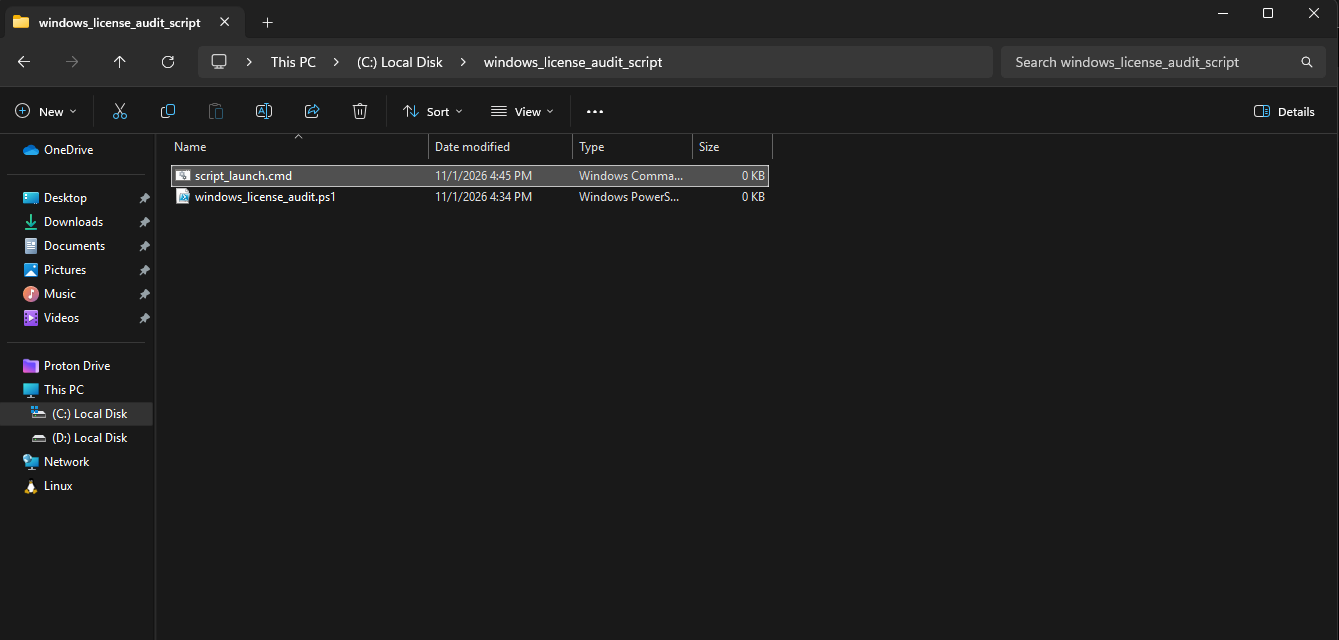
Step 6 – Create another .txt file and rename it to “script_launch.cmd” in the same folder:
Step 7 – Open the new .cmd file in Notepad and copy inside the following code:
@echo off
setlocal
echo Windows License Audit
echo Package folder: “%~dp0”
if not exist “%~dp0windows_license_audit.ps1” (
echo ERROR: windows_license_audit.ps1 was not found beside this launcher.
echo Extract both files from the ZIP into the same folder.
echo Enable file name extensions and check that the script does not end in .ps1.txt.
pause
exit /b 1
)
set “AuditPowerShell=%SystemRoot%\System32\WindowsPowerShell\v1.0\powershell.exe”
if exist “%SystemRoot%\Sysnative\WindowsPowerShell\v1.0\powershell.exe” set “AuditPowerShell=%SystemRoot%\Sysnative\WindowsPowerShell\v1.0\powershell.exe”
if not exist “%AuditPowerShell%” (
echo Windows PowerShell was not found. Version 5.1 or later is required.
pause
exit /b 1
)
“%AuditPowerShell%” -NoLogo -NoProfile -ExecutionPolicy Bypass -File “%~dp0windows_license_audit.ps1”
set “AuditExitCode=%ERRORLEVEL%”
if not “%AuditExitCode%”==”0” (
echo ERROR: The audit failed. Copy the PowerShell error displayed above.
pause
exit /b %AuditExitCode%
)
echo.
echo Audit completed. Report folder: “%~dp0result”
pause
exit /b %AuditExitCode%
Step 8 – Verify the file extensions. The files must not end in .ps1.txt or .cmd.txt
4. Running the Audit
- Run the script_launch.cmd as administrator
- Wait for the summary and recommendation
- Open the result folder
- Open the newly generated .xlsx report
5. Reading the Report
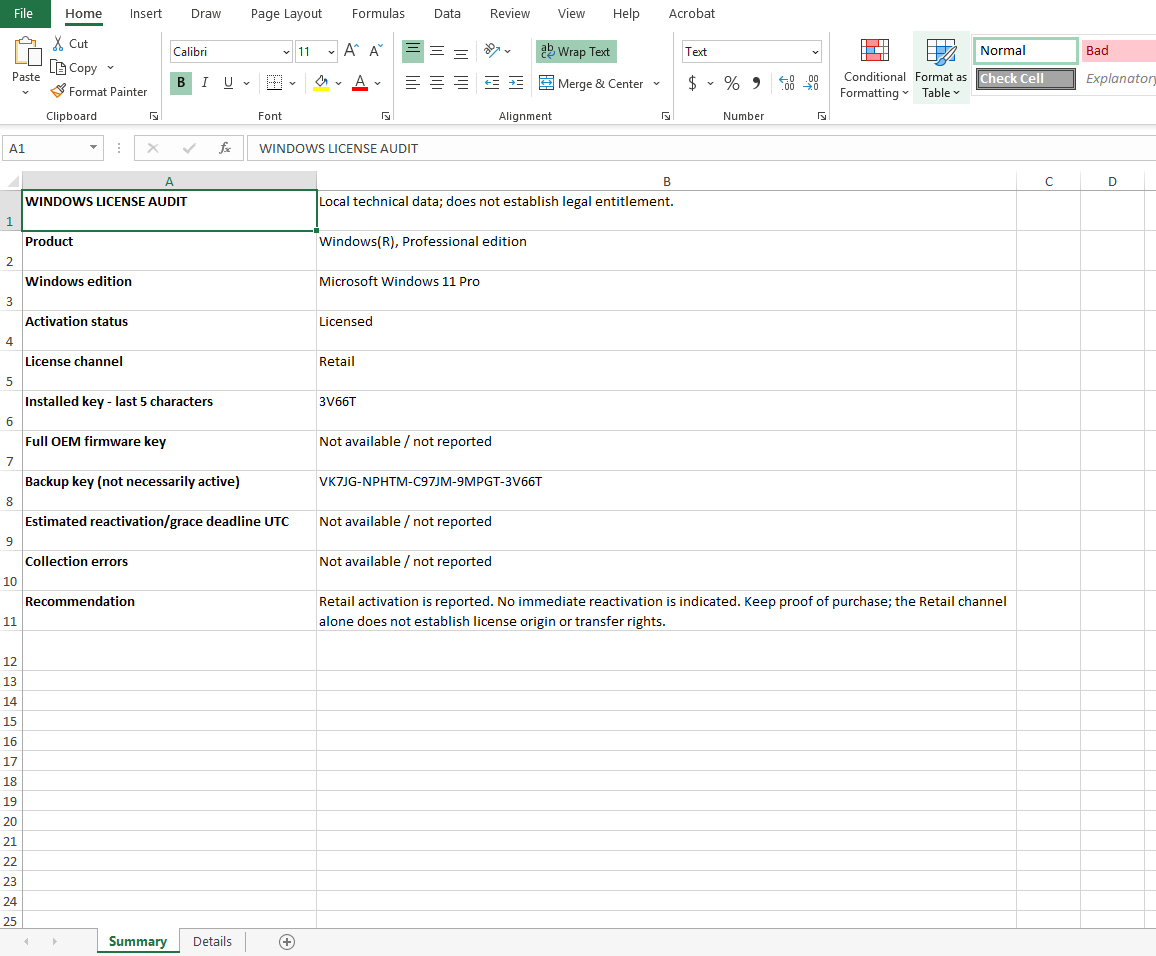
Summary Worksheet
This worksheet presents:
- Windows edition
- Activation status
- License channel
- Last five characters of the installed product key
- Full OEM firmware key, when available
- Estimated reactivation or grace period deadline
- Collection errors
- Recommendation
Details Worksheet
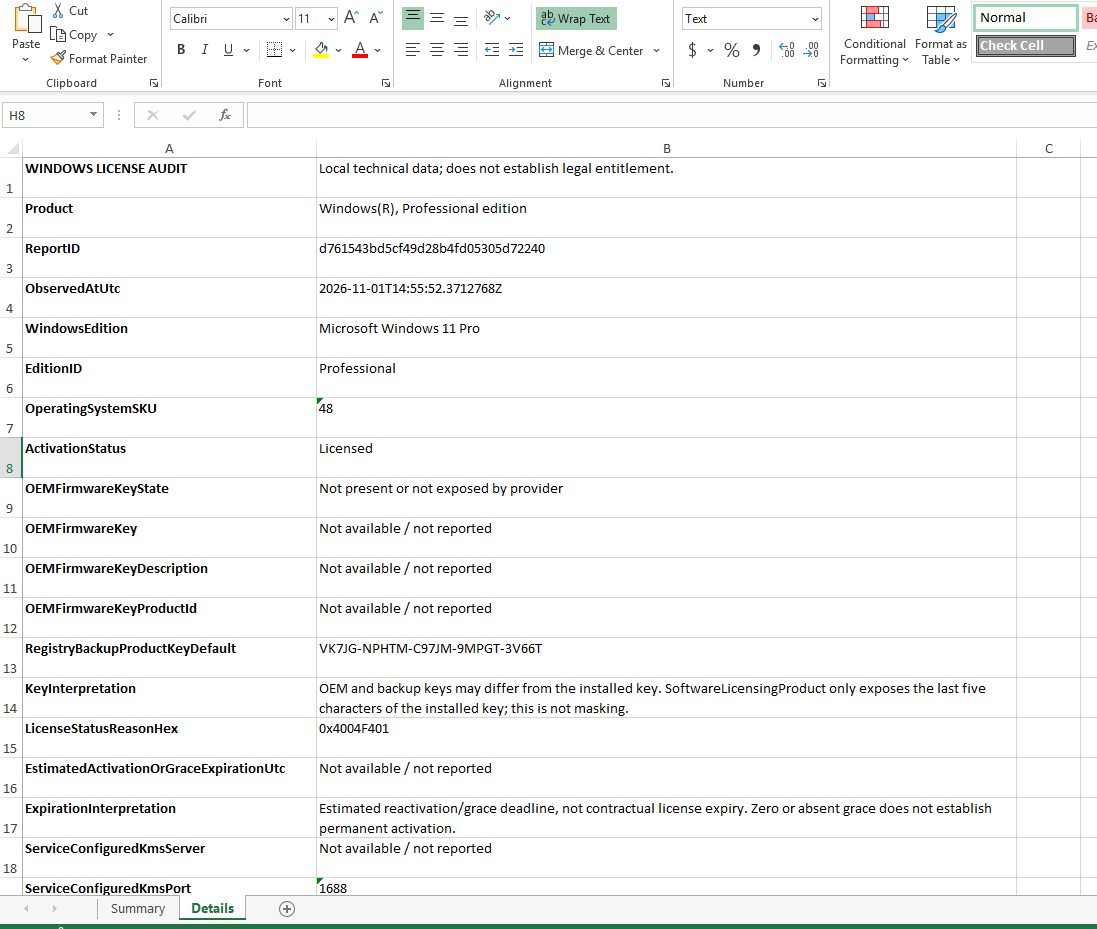
This worksheet contains technical fields, including identifiers, status codes, KMS information, grace periods, and other available licensing properties.
Licensed means that the record reports an activated state. It does not, by itself, prove the license origin or legal entitlement.The OEM key and registry backup key may differ from the key used for current activation.
PartialProductKey contains only the last five characters supplied by Windows. The script is not masking a full key available trough that field.
Requiremenets and Report Security
The package requires Windows with Windows PowerShell 1.5 or later and working local CIM/WMI licensing providers. It is not designed for macOS or Linux. Reports may contain complete product keys. Store them in an access-controlled location and remove keys before publishing reports or screenshots.
Leave A Comment?