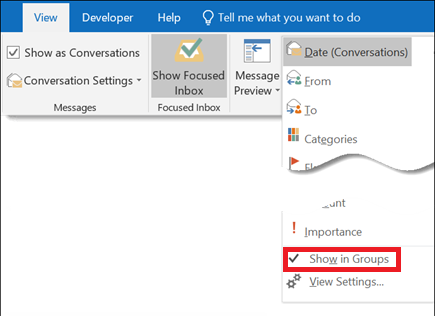
Group or ungroup messages in your Inbox (Outlook) Data 04/11/2020 Autor Ionut Pavel Categorie Configurare program -7 583 Configurare noua (How To) Situatie Solutie Pasi de urmat To add or remove grouping in an arrangement, on the View menu, in the Arrangement section, click More . In the arrangement gallery, click Show in Groups. Tip solutiePermanent Voteaza Up Down (17 din 41 persoane apreciaza acest articol) ShareTweetShare Despre Autor Ionut Pavel Solutii Asemanatoare Remediere probleme acces statie de lucru in domeniu 1 PowerShell ca client MCP – automatizare browser și task-uri externe apelate direct din scripturi 2 Cum folosim Calendly? 0 Configurare Calendly: Manager+Asistent 3 OneDrive Error 0x8004de40: cum rezolvi eroarea de conectare 6 Cum transferi fisierele din OneDrive in Google Drive 1 Leave A Comment? × Cancel Reply Save my name, email, and website in this browser for the next time I comment. one + two =
Leave A Comment?

