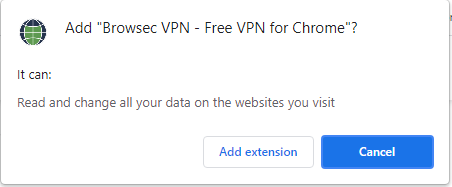
Cum setezi vpn direct din browser cu ajutorul extensiei Browsec VPN Data 06/08/2021 Autor Costinel Cirstea Categorie Soluții, OS - Windows, Configurare program -3 591 Configurare noua (How To) SituatiePentru a utiliza vpn in Chrome, putem folosi extensia Browsec VPN. Pasii de urmat pentru a instala extensia sunt urmatorii: Solutie Pasi de urmat Deschidem o pagina de Google si scriem Browsec VPN Selectati Add to Chrome Selectati Add Extension Tip solutiePermanent Voteaza Up Down (25 din 53 persoane apreciaza acest articol) ShareTweetShare Despre Autor Costinel Cirstea Solutii Asemanatoare How to turn your Android phone into a mini PC with Desktop Mode 4 Cum localizam fisiere mult mai rapid 0 Cum putem monitoriza complet componentele hardware 0 6 Excel UI changes you need to make before starting your next spreadsheet 3 Running out of phone storage? 1 Stop using pie charts in Excel: build this dynamic bar chart instead 4 Leave A Comment? × Cancel Reply Save my name, email, and website in this browser for the next time I comment. + 7 = thirteen
Leave A Comment?