
Follow Us

Soluții pentru problemele tale IT

Home /Stații de lucru/OS - Windows/Cum sa opresti Lock Screen in windows 10.
Home /Stații de lucru/OS - Windows/Configurare Sistem de operare/Cum sa opresti Lock Screen in windows 10.

Cum sa opresti Lock Screen in windows 10.

  • Data 11/10/2016
  • Autor Valentin G
  • Categorie Configurare Sistem de operare, OS - Windows
  • -12
  • 1927
Configurare noua (How To)

Situatie

Cum sa opresti Lock Screen in windows 10.

Solutie

Pasi de urmat

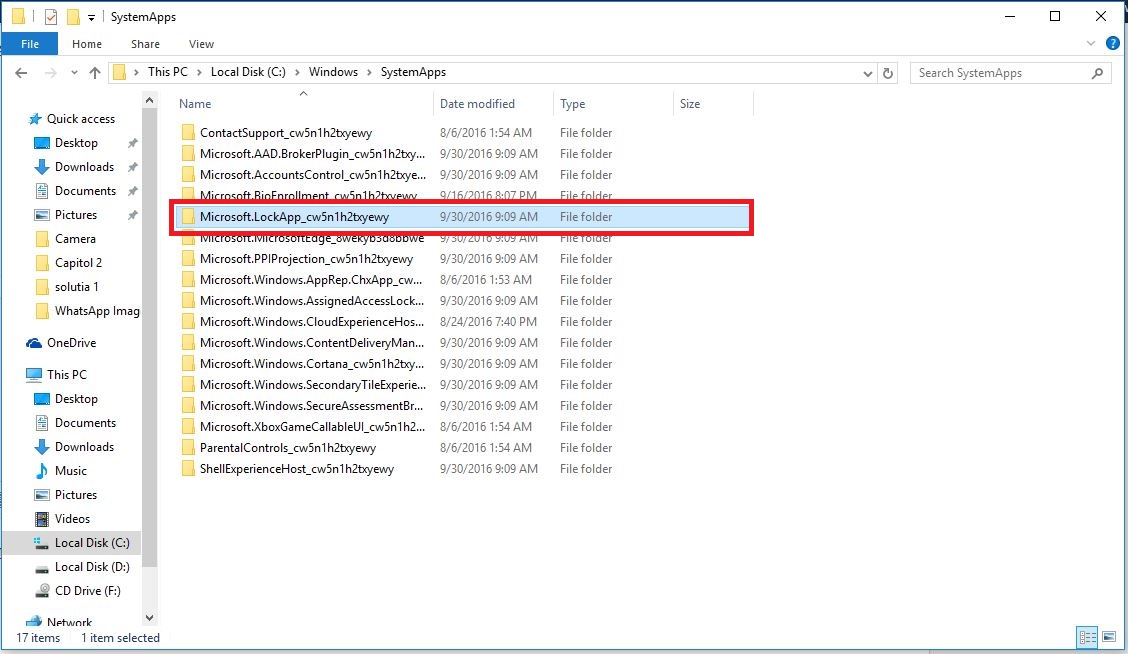
Se deschide Windows Explorer si se merge in calea “C:WindowsSystemApps”.

lockscreen1

Se cauta folderul : “Microsoft.LockApp_cw5n1h2txyewy” si se redenumeste in “Microsoft.LockApp_cw5n1h2txyewy.backup”.
lockscreen2

Daca se doreste restaurarea lock screen-ului se intra in aceeasi locatie si se sterge din folder “.backup”.

In acest moment windows-ul nu va mai arata lock screen-ul si va trece direct la login screen.

Tip solutie

Permanent
Etichetare: .backupaskitaskit.roCum sa opresti Lock Screen in windows 10lock screenlogin screenwindowswindows 10Windows Explorer

Voteaza

Up Down
(34 din 79 persoane apreciaza acest articol)
Share
Tweet
Share

Despre Autor

Valentin G

Solutii Asemanatoare

  • How to fix NVIDIA instant replay not working on Windows 11 via Windows Registry Editor 2
  • How to fix NVIDIA instant replay not working on Windows 11 via Windows Firewall Settings 2
  • How to fix NVIDIA instant replay not working on Windows 11 via Windows Security Settings 5
  • How to fix BSOD Error Rtu53cx22x64.sys by doing a rollback of the driver on Windows 11 1
  • Implementare Windows Autopilot si Microsoft Intune 1
  • Shortcut reload the current page MS Edge v3 5

Leave A Comment? × Cancel Reply

31335

Soluții Disponibile

0 Articole

In ultima saptamana

Cele mai recente soluții

  • 6 tips for using Linux without touching the command line
    • 50
    • 5 days ago
  • 4 Emacs packages that replaced everyday
    • 50
    • 07/04/2026
  • How to fix NVIDIA instant replay not working on Windows 11 via Windows Registry Editor
    • 41
    • 7 days ago
  • How to fix NVIDIA instant replay not working on Windows 11 via Windows Firewall Settings
    • 45
    • 06/04/2026
  • How to fix NVIDIA instant replay not working on Windows 11 via Windows Security Settings
    • 45
    • 06/04/2026
© Askit.ro, 2014 - 2026. All rights reserved. Done by Class IT
Share
Tweet
Share