
Follow Us

Soluții pentru problemele tale IT

Home /Stații de lucru/OS - Windows/Windows 10: Instaleaza windows mobile device center
Home /Stații de lucru/Aplicatii specifice/Configurare program/Windows 10: Instaleaza windows mobile device center
Home /Stații de lucru/Aplicatii specifice/Windows 10: Instaleaza windows mobile device center
Home /Stații de lucru/OS - Windows/Configurare Sistem de operare/Windows 10: Instaleaza windows mobile device center

Windows 10: Instaleaza windows mobile device center

  • Data 13/02/2018
  • Autor Gabriel Mih
  • Categorie Aplicatii specifice, Configurare program, Configurare Sistem de operare, OS - Windows
  • -11
  • 1699
Configurare noua (How To)

Situatie

Odata cu lansarea Windows 10, utilizatorii Windows Mobile Device Center au observat ca cea mai noua versiune de Windows nu mai suporta WDMC.

Din fericire exista un workaround pentru aceasta problema.

Mai intai downloadezi WDMC pentru windows vista cu arhitectura pe care o ai in pc, 32 sau 64x.

Dupa instalarea programului, intra in servicii si cauta serviciul Windows Mobile 2003 – based device connectivity

Deschide proprietati si mergi la LOG ON. Aici trebuie sa bifezi Local Systems Account, asa cum arata in imaginea alaturata.
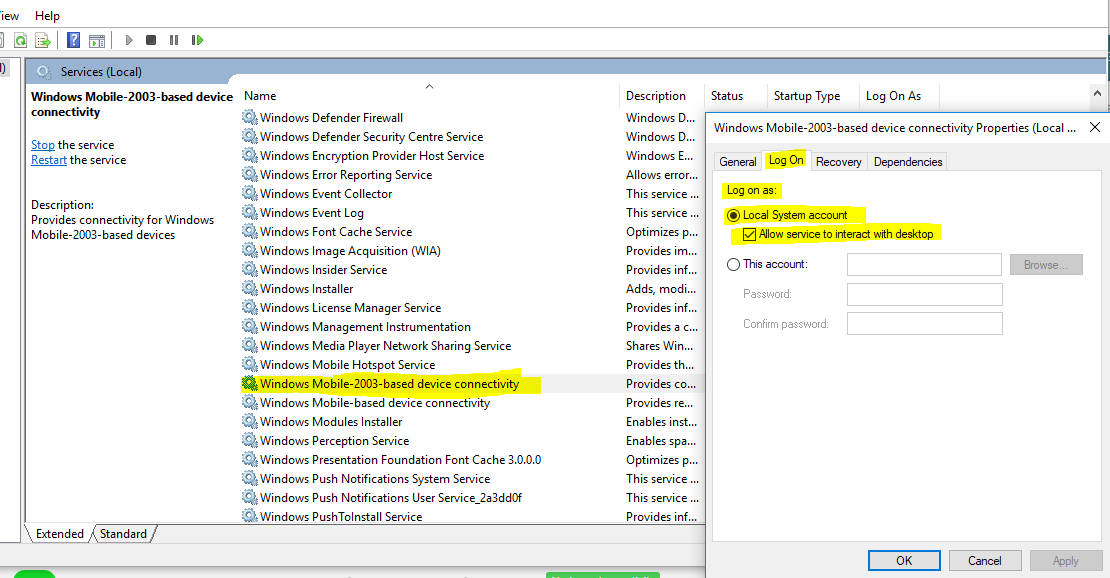
Apoi un restart si WDMC va functiona corect.


Solutie

Tip solutie

Permanent
Etichetare: 64xaskitaskit.roLocal Systems AccountWDMCWDMC; Windows Mobile Device Center; Windows 10; Windows Mobile Device Centerwindows mobile 2003

Voteaza

Up Down
(24 din 59 persoane apreciaza acest articol)
Share
Tweet
Share

Despre Autor

Gabriel Mih

Solutii Asemanatoare

  • Stop using Rufus to burn ISOs, these 2 tools for Windows and Linux are better 4
  • Tuxedo OS install guide 1
  • Spyware-ul pe înțelesul tuturor: cum îl eviți? 3
  • How to enable hidden CPU performance boost mode on Windows 11 3
  • Cum remediem: you can’t Sign in with this account error In Windows 11 1
  • Remediere: ASSIGN_DRIVE_LETTERS_FAILED 2

Leave A Comment? × Cancel Reply

31700

Soluții Disponibile

0 Articole

In ultima saptamana

Cele mai recente soluții

  • Stop using Rufus to burn ISOs, these 2 tools for Windows and Linux are better
    • 92
    • 2 weeks ago
  • How to setup CodeGPT + WSL and Ollama
    • 107
    • 18/06/2026
  • Tuxedo OS install guide
    • 86
    • 2 weeks ago
  • Spyware-ul pe înțelesul tuturor: cum îl eviți?
    • 83
    • 2 weeks ago
  • Bypass Siri AI waitlist on macOS 27 Golden Gate Beta
    • 145
    • 16/06/2026
© Askit.ro, 2014 - 2026. All rights reserved. Done by Class IT
Share
Tweet
Share