
Soluții

Batch Script – Echo Command

In batch scripting, the echo command can be used to display a message, variable value, or system information on the console. The command can be followed by a message or text string enclosed in double quotes. For example, echo “Hello, World!” will display the message “Hello, World!” on the console.

Why use Batch Script – Echo Command?

Here are a few reasons why the echo command is commonly used:

  1. Displaying messages: The echo command can be used to display messages or information on the console or in a text file. This is useful for providing feedback to the user, displaying error messages, or providing instructions.
  2. Displaying variables: Batch scripts often use variables to store information or data. The echo command can be used to display the value of a variable on the console or in a text file, making it easier to debug and troubleshoot scripts.
  3. Debugging: The echo command can be used to debug scripts by displaying the values of variables, commands, or system information. This can help identify errors and improve the efficiency of scripts.
  4. File output: The echo command can be used to redirect output to a file, making it easier to save and share information. This can be particularly useful when generating reports or logs.
  5. Script automation: Batch scripts can automate repetitive tasks, making them more efficient and less prone to human error. The echo command can be used to provide feedback and ensure that scripts are running as expected.
[mai mult...]

Batch Script – Logging

Batch Script is a file that consists of various commands which need to be sequentially executed. It is not like coding and is not frequently used, in order to communicate with the OS through a command prompt, the user can use Batch Script. The commands are known as Batch commands.

Logging refers to the process of converting the command line scripts into .log files or text files. The command processor creates real-time activity logs which collect all the information regarding batch commands and statistics.

[mai mult...]

Batch Script – Input / Output

We are going to learn how to take input from users using Batch Script.

Taking User Input:

@echo off
echo Batch Script to take input.
set /p input= Type any input
echo Input is: %input%
pause

Explanation:

  • The first ‘echo’ command is used to print a string.
  • In the next line, ‘set  /p’ command is used to take user input followed by a variable that will hold user input.
[mai mult...]

Types of trusted Platform module

  • DISCRETE TPM (TPM 1.2 & TPM 2.0)

Discrete TPM provides the highest level of security. The intent of this level is to ensure that the device it’s protecting does not get hacked via even sophisticated methods. To accomplish this, a discrete chip is designed, built and evaluated for the highest level of security that can resist tampering with the chip, including probing it and freezing it with all sorts of sophisticated attacks.

  • INTEGRATED TPM

Integrated TPM is the next level down in terms of security. This level still has a hardware TPM but it is integrated into a chip that provides functions other than security. The hardware implementation makes it resistant to software bugs, however, this level is not designed to be tamper-resistant.

  • FIRMWARE TPM (fTPM)

Firmware TPM is implemented in protected software. The code runs on the main CPU, so a separate chip is not required. While running like any other program, the code is in a protected execution environment called a trusted execution environment (TEE) that is separated from the rest of the programs that are running on the CPU. By doing this, secrets like private keys that might be needed by the TPM but should not be accessed by others can be kept in the TEE creating a more difficult path for hackers. In addition to the lack of tamper resistance, the downside to the TEE or firmware TPM is that now the TPM is dependent on many additional aspects to keep it secure, including the TEE operating system, bugs in the application code running in the TEE, etc.

  • SOFTWARE TPM

Software TPM can be implemented as a software emulator of the TPM. However, a software TPM is open to many vulnerabilities, not only tampering but also the bugs in any operating system running it. It does have key applications: it is very good for testing or building a system prototype with a TPM in it. For testing purposes, a software TPM could provide the right solution/approach.

[mai mult...]

Windows 11 requirements

Windows 11 requirements needed to Install:

CPU – Dual core or better at 1ghz or faster, 64bit processor
RAM – 4gb
Storage – 64gb or more
GPU – DX 12 capable
Display Over 9″ with 720p
Secure Boot
UEFI boot method
Trusted Platform Module 2
Certain Intel & AMD CPU

Secure Boot & UEFI Boot Method

Windows 11 needs your PC to be set up in GPT drive format with UEFI boot method and capable of using Secure boot – it need not be enabled.

Switching to UEFI boot method without swapping drives to GPT first can leave PC unable to boot, on Gigabyte boards.

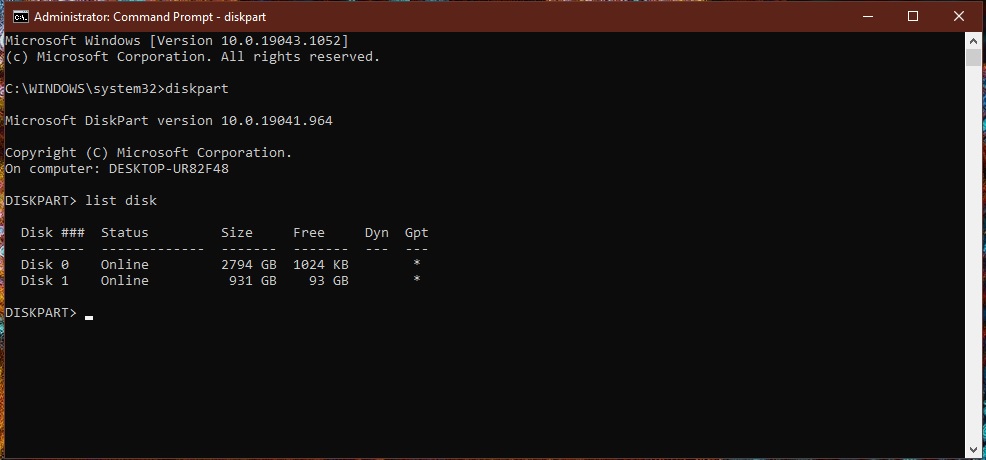
How to check if you have GPT or MBR drives
-open cmd (admin)
-type “diskpart” and press enter
-type list disk and press enter
-any drives with an asterix under GPT is already in GPT format.

[mai mult...]

How to find your phone number

  • On an iPhone, open the Phone app, go to the “Contacts” tab, and tap on “My Card” to find your phone number.
  •  On an Android device, swipe down from the top of the screen, tap the gear icon to open Settings, and open “About Phone” to find your phone number.

It’s a little embarrassing, but we’ve all had the thought at one time or another: “What is my phone number?” Maybe you recently got a new number or you’re just having a mental lapse. The good news is you can find in the settings on your iPhone or Android device.

[mai mult...]