
Aplicatii specifice
Instalare/Reinstalare aplicatii predefinite (ex. Office, PDF reader) 49 Solutii
Instalare/reinstalare aplicatii default(Office, PDF reader) 11 Solutii
Instalare/reinstalare aplicatii la cererea clientului 26 Solutii
Instalare/Dezinstalare aplicatii cerute de client (Viewer .p7m - caiet de sarcini, Autocad) 23 Solutii
Configurare browser 144 Solutii
Configurare program 2625 Solutii
Depanare Office 72 Solutii
Depanare alte aplicatii 40 Solutii
Arduino Ultrasonic Sensor
The sensor sends out an ultrasonic sound wave from the TRIG pin. When the sound wave hits an object, it reflects back and is detected by the ECHO pin.
The Arduino measures the time it takes for the signal to return and uses that to calculate the distance.
Distance (cm) = (Time in microseconds × 0.034) / 2The speed of sound is 0.034 cm/µs. We divide by 2 because the sound travels to the object and back.
Required Components
| Component | Quantity | Purpose |
|---|---|---|
| Arduino Uno / Nano / Mega | 1 | Main microcontroller |
| HC-SR04 Ultrasonic Sensor | 1 | Measures distance |
| Jumper Wires | 4 | Connections |
| Breadboard (optional) | 1 | Easy wiring |
| USB Cable | 1 | Power & programming |
Pin Connections
Connect the HC-SR04 sensor to the Arduino as shown below:
| HC-SR04 Pin | Arduino Pin |
|---|---|
| VCC | 5V |
| GND | GND |
| TRIG | Digital Pin 9 |
| ECHO | Digital Pin 10 |
Note: The ECHO pin outputs 5V, which is safe for Arduino Uno/Nano/Mega.
Arduino Code
Upload the following code to your Arduino:
#define TRIG_PIN 9

#define ECHO_PIN 10
void setup() {
Serial.begin(9600);
pinMode(TRIG_PIN, OUTPUT);
pinMode(ECHO_PIN, INPUT);
}
void loop() {
long duration;
float distance;
// Clear trigger
digitalWrite(TRIG_PIN, LOW);
delayMicroseconds(2);
// Trigger ultrasonic burst
digitalWrite(TRIG_PIN, HIGH);
delayMicroseconds(10);
digitalWrite(TRIG_PIN, LOW);
// Measure echo time
duration = pulseIn(ECHO_PIN, HIGH);
// Convert time to distance
distance = (duration * 0.034) / 2;
// Output result
Serial.print("Distance: ");
Serial.print(distance);
Serial.println(" cm");
delay(500);
}
Code Explanation
- pulseIn() measures the duration of the ECHO signal.
- The sensor sends a 40 kHz ultrasonic burst using the TRIG pin.
- Arduino calculates the distance based on the speed of sound.
- Distance is printed in centimeters to the Serial Monitor.
Testing the Sensor
- Upload the code to your Arduino
- Open the Serial Monitor
- Set the baud rate to 9600
- Move your hand in front of the sensor
- Watch the distance update live
You should see something like:
Distance: 15.4 cmTroubleshooting
| Issue | Cause | Solution |
|---|---|---|
| Always reads 0 cm | Incorrect pin wiring | Check TRIG and ECHO |
| Values jump around | Object surface curved or too small | Use a flat object |
| No Serial output | Wrong baud rate | Set Serial Monitor to 9600 |
| Sensor not working | No power | Ensure 5V and GND connected properly |
[mai mult...]
Transferul datelor de orice tip catre dispozitive cu iOS/iPadOS folosind wi-fi + VLC
Daca dorim sa transferam date catre un smartphone sau tableta Apple fara a utiliza iTunes ori a fi limitati la fotografii si inregistrari video, echipa VideoLan au pus la dispozitie aplicatia VLC inclusiv pe Apple AppStore cu functionalitatea de wi-fi sharing inclusa.
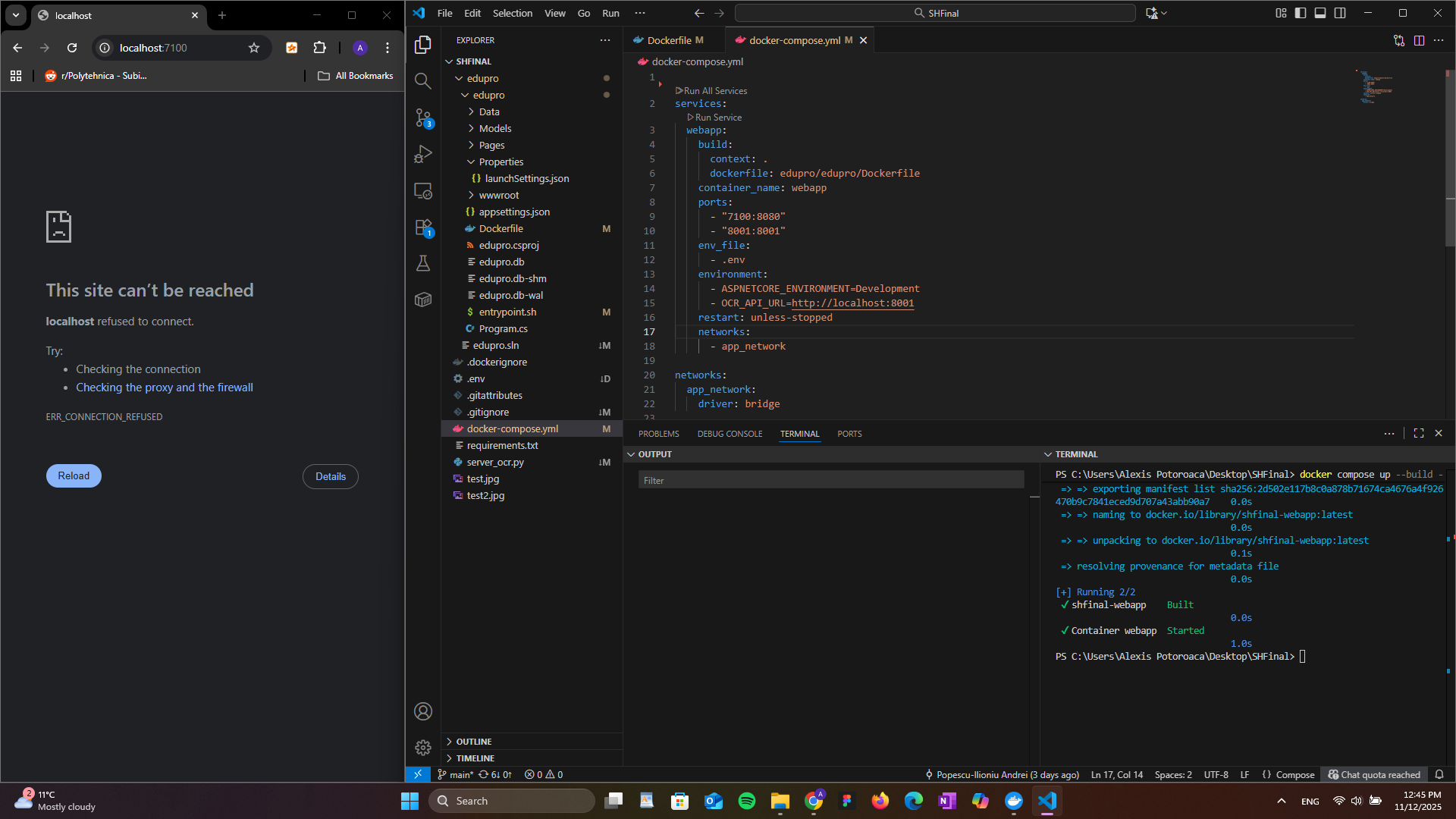
[mai mult...]Docker este configurat corect, dar localhost refuza conexiunea
Ai configurat Docker corect, imaginea se construieste fara erori, toate comenzile docker build si docker compose up se executa cu succes, dar local host nu face conexiunea pe portul ales de noi in fisierul Docker. (vezi imaginea de mai jos)
How to automatically change your Android wallpaper based on time of day
You can spruce up the wallpaper on your Android to match the time of day. Instead of a boring static wallpaper, you can set the phone to change wallpapers dynamically. For example, you could have your phone display a light mode wallpaper during the day, which transitions to a dark mode wallpaper at night. I’m going to show you three ways you can do so.
[mai mult...]