
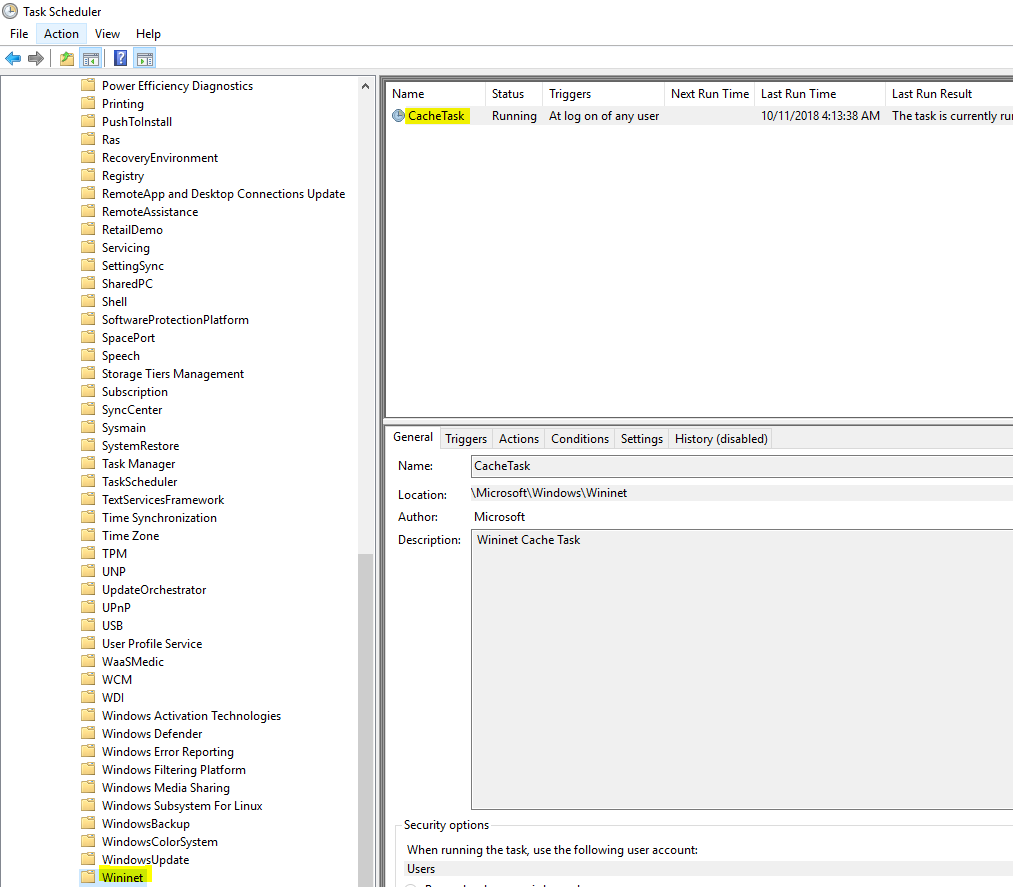
Activarea CacheTask din Task Scheduler Data 20/10/2018 Autor Daniel Chr Categorie Configurare program, Configurare Sistem de operare, OS - Windows, Stații de lucru -4 826 Configurare noua (How To) SituatieCum activam CacheTask din Task Scheduler? Solutie Pasi de urmat Cum activam functia de CacheTask din TaskScheduler? Deschidem Task Scheduler din Start. Mergem pe calea Microsoft > Windows > Wininet Deschidem CacheTask si din sectiunea triggers, setam cand acesta sa ruleze. Tip solutiePermanent Etichetare: activare cachetaskcachetask Voteaza Up Down (28 din 61 persoane apreciaza acest articol) ShareTweetShare Despre Autor Daniel Chr Solutii Asemanatoare How to install and configure Gentoo Linux 2 Cheaper QD-OLED is finally happening 2 How to create a Windows to go with Rufus to run Windows 11 from USB 1 Cum îți faci un raport complet al PC-ului cu PowerShell 7 Cum vezi toate procesele care pornesc automat cu Windows 2 Cum se instalează sistemul de gestionare a fotografiilor Lychee pe Debian 12 1 Leave A Comment? × Cancel Reply Save my name, email, and website in this browser for the next time I comment. − two = six
Leave A Comment?