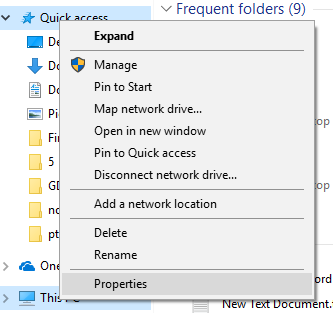
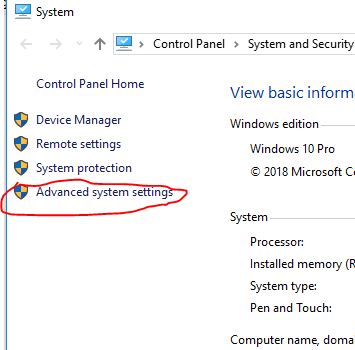
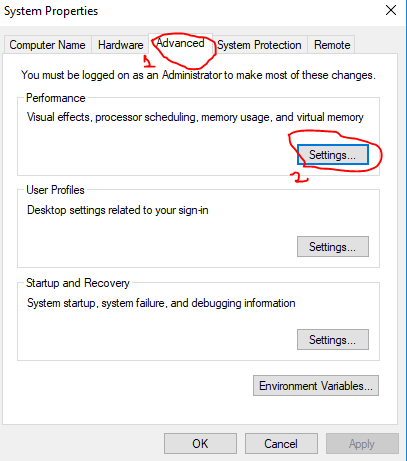
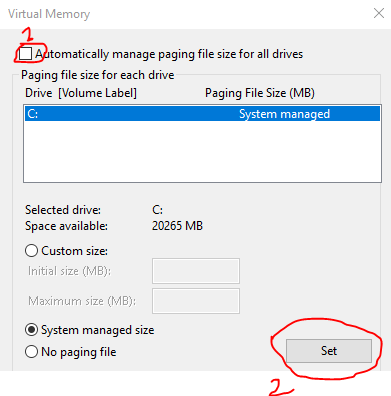
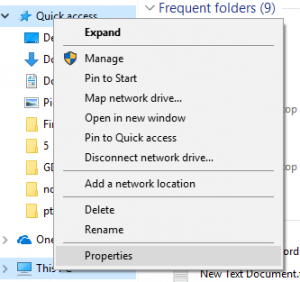
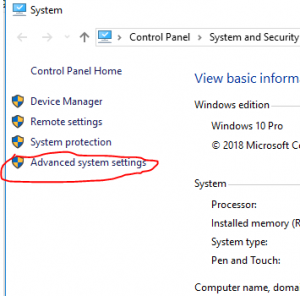
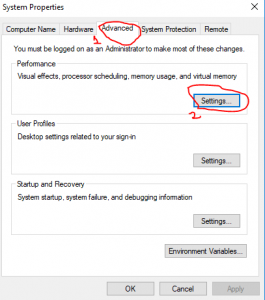
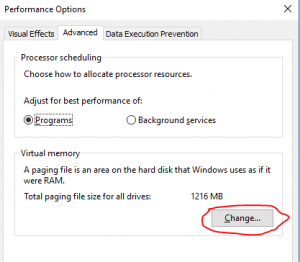
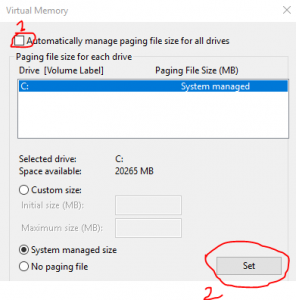
Cum mutam pagefile-ul pe alta partitie windows 10 Data 06/06/2018 Autor Petrache Dan Categorie Soluții, Configurare program -14 1011 Configurare noua (How To) SituatieSa eliberam spatiu pe partita cu sistemul de operare. Solutie Pasi de urmat Selectam “This Pc” si dam right click – Properties Selectam tab-ul “advance system settings” Selectam tab-ul “advanced” si subtab-ul “settings“ in interiorul casutei “performance” In tab-ul “Performance Options” ne ducem pe casuta “virtual memory “ si selectam “ change Debifam “Automatically manage paging file size for all drives”, selectam drive-ul pe care dorim sa fie pagefile-ul si apasam “set” Tip solutiePermanent Etichetare: pagefilespatiu C Voteaza Up Down (37 din 88 persoane apreciaza acest articol) ShareTweetShare Despre Autor Petrache Dan Solutii Asemanatoare Stop using Rufus to burn ISOs, these 2 tools for Windows and Linux are better 3 How to setup CodeGPT + WSL and Ollama 5 Tuxedo OS install guide 1 Bypass Siri AI waitlist on macOS 27 Golden Gate Beta 4 How to enable hidden CPU performance boost mode on Windows 11 5 Functia Accesibilitate pe Samsung 0 Leave A Comment? × Cancel Reply Save my name, email, and website in this browser for the next time I comment. 7 × seven =
Leave A Comment?