
Situatie
To enable an early preview of the Low Latency Profile to boost processor frequency for specific tasks on Windows 11 using the ViveTool, follow these steps:
Solutie
2. Download the ViveTool-vx.x.x.zip file to enable the Low Latency Profile feature
3. Double-click the zip folder to open it with File Explorer
4. Click the Extract all button.
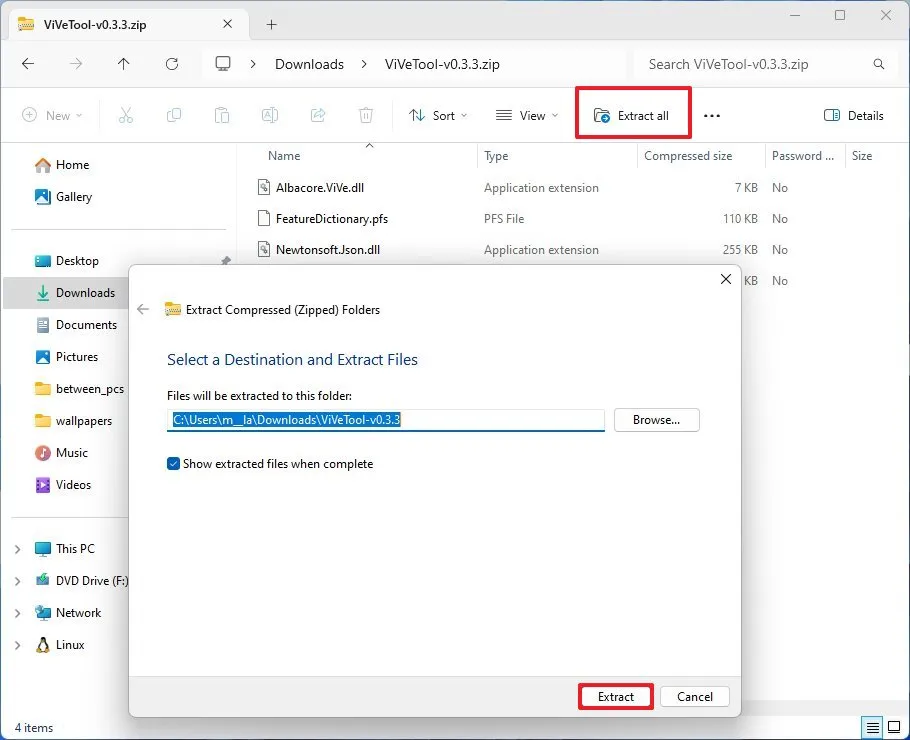
5. Click the Extract button
6. Copy the path to the folder
7. Open Start
8. Search for Command Prompt, right-click the top result, and select the Run as administrator option
9. Type the following command to navigate to the ViveTool folder and press Enter:
cd c:\folder\path\ViveTool-v0.x.x
In the command, remember to change the path to the folder with your path.
10. Type the following command to enable the CPU boost on Windows 11 and press Enter:
vivetool /enable /id:60716524,61391826
11. Restart the computer to apply the changes.
Leave A Comment?