Why you may want to turn off the Apple Watch heart rate and green light?
To be straightforward, if you’re an everyday Apple Watch user, there’s no need to turn it off. You bought an expensive wearable, and you must make full use of it.
[mai mult...]
Soluții pentru problemele tale IT

To be straightforward, if you’re an everyday Apple Watch user, there’s no need to turn it off. You bought an expensive wearable, and you must make full use of it.
[mai mult...]If you add albums or playlists to your Apple Watch that you want to remove later, it’s easy.
[mai mult...]Astazi ne-am propus sa clonam un iPhone (adica transferul tuturor datelor 1:1 de pe un iphone dat, pe unul nou).
Mai intai trebuie indeplinite cateva conditii:
Pasul 1. Activam bluetooth-ul pe iphone-ul de pe care dorim sa clonam si pornim iphone-ul tinta (cel pe care vom clona)
Pasul 2. Asezam device-urile unul langa celalalt. Cand vedem “Quick Start” pe ecranul iphone-ului tinta, selectam “Continue”
Pasul 3. Apoi vom vedea o animatie pe iPhone-ul nou. Tinem iPhone-ul vechi deasupra celui nou, centram animatia si apoi dam click pe: “Finish on New iPhone”
Pasul 4. Introducem passcode-ul iPhone-ului vechi pe cel nou
Pasul 5. Urmam instructiunile pentru AppleID si faceID (acelasi cont pe ambele)
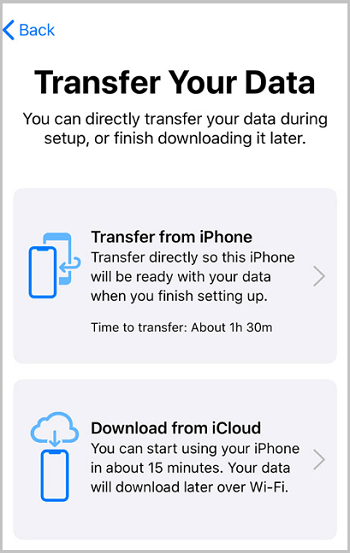
Step 6. Acum click pe “Transfer from iPhone” pentru a se clona integral datele. Cand este gata procesul putem spune ca a avut succes clonarea. * in functie de volumul de date, procesul poate dura.
Avem mai multe situatii in care se mai intampla sa pierdem datele de pe telefonul nostru cu sistem Android. Exista mai multe metode pentru a recupera datele pierdute.
In case your touch screen stops working on your iPhone 14/14 Pro this are some fixes you can try.
[mai mult...]