
Situatie
Solutie
Rotating through voices for announcements
Every day is a surprise
Every morning, Home Assistant generates a morning briefing This pulls in information from connected calendars, weather information, and even scrapes the website where my kids choose their school lunches. All the information is gathered, and an LLM converts it into text for a spoken announcement.
The spoken announcement is generated using the Qwen3-TTS text-to-speech model. As well as its own native voices, you can also use it to clone voices, and I’ve done this for the voices of my wife and me.
The morning briefing is triggered when someone first walks into the kitchen in the morning. A motion sensor detects motion, and then the automation waits for two minutes to ensure that everyone has made it to the kitchen. The randomly selected announcement is then played through the smart speaker.
Selecting a random phrase for repeated announcements
The same phrase soon gets dull
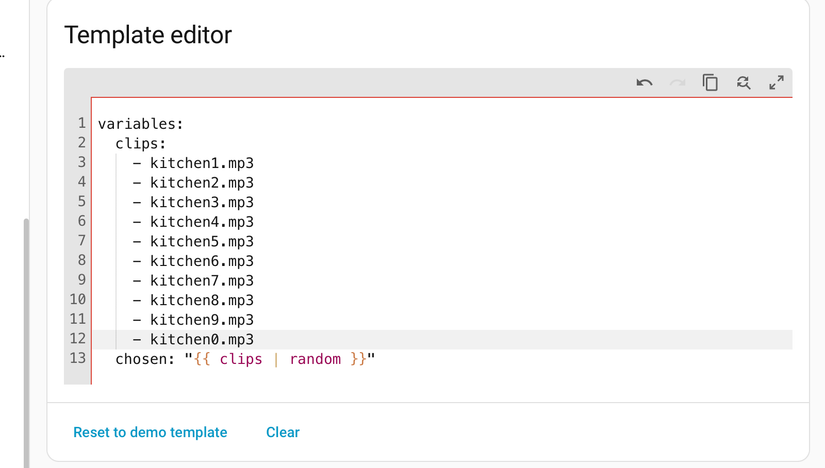
I use the same motion sensor in the kitchen for another automation. Whenever motion is detected during the day, if there hasn’t been any motion in the previous ten minutes, another announcement will play.
The announcement is a reminder to put something away or into the dishwasher while you’re in the kitchen. It works really well as a quick reminder to tidy something up while you’re there, and helps to keep the kitchen clean without so much effort.
I use a script to play the announcement. The script includes a template in which I list the names of all the audio files under a variable called clips, and then use chosen: "{{ clips | random }}" to set chosen to one of the clips at random. The smart speaker then plays the audio with the chosen file name.
Testing automations with the Random integration
No need to wait for real sensors
You can use a Random sensor helper that generates a random value between the maximum and minimum values you set. The value will change each time the sensor is polled, so you can set up a small automation that uses the update_entity action to update the sensor every few seconds or every minute.
You can then use this sensor in place of your humidity sensor to test what happens when the value rises above your threshold and when it drops below it. It’s a much quicker way than waiting for the humidity in your bathroom to drop.
Presence simulation
Turning lights on and off within a random window
For a long time, I used randomization to turn my lights on and off within set hours whenever we went away for any period of time, to make it appear like people were at home. It worked reasonably well, with some lights coming on in the evening and turning off later that same evening, and others remaining off the entire time.
Eventually, I switched to using the Presence simluation integration, which mimics your behavior even more accurately by using the state history of devices such as your lights and media players. While the random method was good, this is even more convincing.
Leave A Comment?