
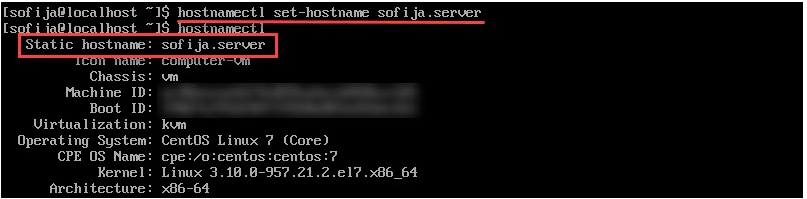
Cum sa schimbi numele unei masini Centos 7 Data 01/11/2019 Autor Gabriel Burtea Categorie Configurare Sistem de operare, Depanare -6 858 Configurare noua (How To) SituatieSe doreste schimbarea numelui (hostname) unei masini Centos 7 Solutie Deschidem terminalul cu drepturi root si tastam comanda: “hostnamectl” (aceasta ne afiseaza numele actual al masinii) Pentru a schimba numele tastam : “hostnamectl set-hostname nume-nou.server” Verificam daca s-a schimbat numele tastand din nou comanda “hostnamectl” Tip solutiePermanent Voteaza Up Down (29 din 65 persoane apreciaza acest articol) ShareTweetShare Despre Autor Gabriel Burtea Solutii Asemanatoare Framework Laptop — A new approach to personal computing -3 Updating HP LaserJet Pro 400MFP M425dn Printer Firmware to troubleshoot Scan to Email issues 4 Slackware Linux guide 4 Unable to recharge mobile terminals that have a swappable power connector 4 Workaround pentru optimizarea spatiului pe un server windows 4 Configurare Server Mail Postfix & Dovecot 10 Leave A Comment? × Cancel Reply Save my name, email, and website in this browser for the next time I comment. + four = eleven
Leave A Comment?