Pc Cleanup Batch file
How to create a cleanup tool using a batch file.
First open a notepad, paste the following and save as a batch file( .bat extension).
[mai mult...]
Soluții pentru problemele tale IT

How to create a cleanup tool using a batch file.
First open a notepad, paste the following and save as a batch file( .bat extension).
[mai mult...]Remote Process Viewer este un tool gratuit ce afiseaza toate procesele care ruleaza in prezent pe un calculator din reteaua locala asemeni Task Manager din Windows. Acest explorator de procese arata informatii detaliate pentru toate procesele care ruleaza pe computerul de la distanta si dezvaluie informatii precum numele procesului, calea completa unde se afla acesta, PID (identificatorul procesului), RAM utilizat, timpul de procesare, manerele, PID-ul procesului parinte, ID-ul sesiunii de utilizator , numarul de thread-uri si prioritatea proceselor.
Acest program este compatibil cu Windows 10, 8, 7, Vista, XP sau Windows Server ,nu necesita instalare si nu modifica in niciun fel sistemul.
[mai mult...]When this problem occurs, Microsoft Store begins downloading but very shortly afterward will trigger an error stating that something unexpected has happened. Upon expanding the error details, users see the 0x80D03805 error code. However, this error code might also be encountered during the installation of a system update the Windows Store via Windows Update. The issue is exclusive to Windows 10.
[mai mult...]Several users are getting the “Error code: -506” error on their Google Play Store whenever they try to download or update an application. This issue can occur on a specific application for some users and on all of the applications for others. Google Play Store is an important application of your phone to download and use other applications. However, this error will prevent users from downloading or updating any application from Google Play Store.

We managed to discover some of the most common causes that will trigger this particular issue. We have done this by looking at various user reports and the repair strategies that they used to get the issue resolved. Here is a shortlist with common scenarios that have the chance of triggering this particular error message:
This article will help you with different methods to resolve the “Error code: -506“. We will start from the most common and simple method to the detailed one.
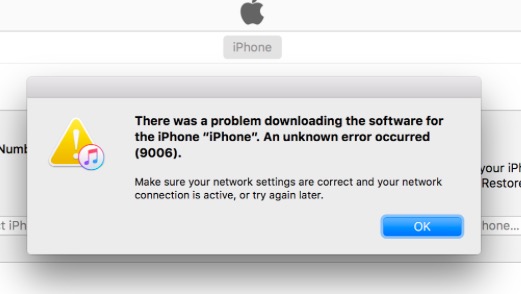
[mai mult...]iTunes is a mobile device management application that was developed by Apple. This application can also be used as a media library and many other multimedia purposes. The application is basically used to manage digital multimedia files on macOS and Windows. However, quite recently, a lot of reports have been coming in of users who are unable to update their devices and a “There was a Problem Downloading the Software for the iPhone. An unknown error occurred Error 9006” is seen while trying to download the update.
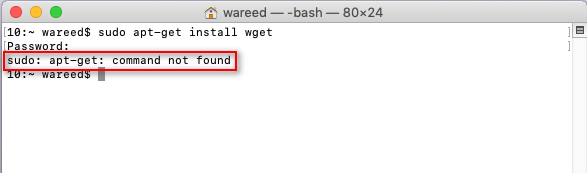
Softul Debian utilizeaza sistemul de pachete DPKG care furnizeaza programe si aplicatii pentru instalare. Datorita acestui sistem utilizatorii nu sunt nevoiti sa construiasca programe de la 0. Tool-ul necesar pentru acest sistem de pachete este APT ( advanced package tool), uneori acest instrument nu functioneaza pe sistemele de operare Macintosh (macOS) si returneaza eroarea “sudo: apt-get: command not found”.