Stații de lucru

OS - Windows 9179 Solutii

Reguli si plangeri 11 Solutii

OS - OS X 410 Solutii

Reguli de configurare 12 Solutii

Licentiere 18 Solutii

Securitate 182 Solutii

Copie de rezerva (Backup) 68 Solutii

Antivirus 72 Solutii

Aplicatii specifice 5303 Solutii

Hardware 291 Solutii

Types of trusted Platform module

  • DISCRETE TPM (TPM 1.2 & TPM 2.0)

Discrete TPM provides the highest level of security. The intent of this level is to ensure that the device it’s protecting does not get hacked via even sophisticated methods. To accomplish this, a discrete chip is designed, built and evaluated for the highest level of security that can resist tampering with the chip, including probing it and freezing it with all sorts of sophisticated attacks.

  • INTEGRATED TPM

Integrated TPM is the next level down in terms of security. This level still has a hardware TPM but it is integrated into a chip that provides functions other than security. The hardware implementation makes it resistant to software bugs, however, this level is not designed to be tamper-resistant.

  • FIRMWARE TPM (fTPM)

Firmware TPM is implemented in protected software. The code runs on the main CPU, so a separate chip is not required. While running like any other program, the code is in a protected execution environment called a trusted execution environment (TEE) that is separated from the rest of the programs that are running on the CPU. By doing this, secrets like private keys that might be needed by the TPM but should not be accessed by others can be kept in the TEE creating a more difficult path for hackers. In addition to the lack of tamper resistance, the downside to the TEE or firmware TPM is that now the TPM is dependent on many additional aspects to keep it secure, including the TEE operating system, bugs in the application code running in the TEE, etc.

  • SOFTWARE TPM

Software TPM can be implemented as a software emulator of the TPM. However, a software TPM is open to many vulnerabilities, not only tampering but also the bugs in any operating system running it. It does have key applications: it is very good for testing or building a system prototype with a TPM in it. For testing purposes, a software TPM could provide the right solution/approach.

[mai mult...]

Windows 11 requirements

Windows 11 requirements needed to Install:

CPU – Dual core or better at 1ghz or faster, 64bit processor
RAM – 4gb
Storage – 64gb or more
GPU – DX 12 capable
Display Over 9″ with 720p
Secure Boot
UEFI boot method
Trusted Platform Module 2
Certain Intel & AMD CPU

Secure Boot & UEFI Boot Method

Windows 11 needs your PC to be set up in GPT drive format with UEFI boot method and capable of using Secure boot – it need not be enabled.

Switching to UEFI boot method without swapping drives to GPT first can leave PC unable to boot, on Gigabyte boards.

How to check if you have GPT or MBR drives
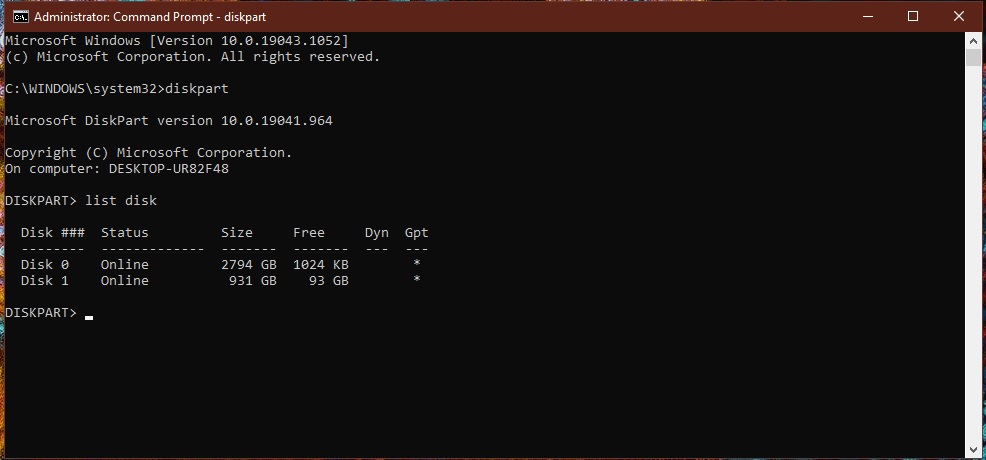
-open cmd (admin)
-type “diskpart” and press enter
-type list disk and press enter
-any drives with an asterix under GPT is already in GPT format.

[mai mult...]

Cum activam “Hyper-V” in Windows 10

Microsoft Hyper-V este un sistem de virtualizare de nivel înalt care permite utilizatorilor să creeze și să ruleze mai multe sisteme de operare virtuale pe același computer fizic. Acest lucru poate fi util în multe situații, cum ar fi testarea aplicațiilor în medii cu sisteme de operare diferite sau crearea unui mediu de dezvoltare integrat.

Hyper-V este inclus în mai multe versiuni de Windows, inclusiv Windows 8 și 10,11, dar poate fi instalat și pe Windows Server.

[mai mult...]