

Stații de lucru
OS - Windows 9182 Solutii
Reguli si plangeri 11 Solutii
OS - OS X 410 Solutii
Reguli de configurare 12 Solutii
Licentiere 18 Solutii
Securitate 182 Solutii
Copie de rezerva (Backup) 68 Solutii
Antivirus 72 Solutii
Aplicatii specifice 5306 Solutii
Hardware 291 Solutii
Instalare Dell Data Security pe Dell Optiplex 3060
[mai mult...]Erori de sistem: ce inseamna erorile de sistem si cum le poti rezolva
Erorile de sistem reprezinta erori numerice pe care calculatorul le afiseaza in momentul in care o actiune a utilizatorului sau a unui program instalat de catre utilizator nu poate fi procesata de catre software-ul sistemului. Aceste erori mai sunt cunoscute si drept erori ale sistemului de operare si reprezinta modul prin care windows-ul este programat sa raspunda in diferite instante.
[mai mult...]How to find your/domain computer MAC address
How you can find your computer’s mac adress +how to find a same domain computer’s address.
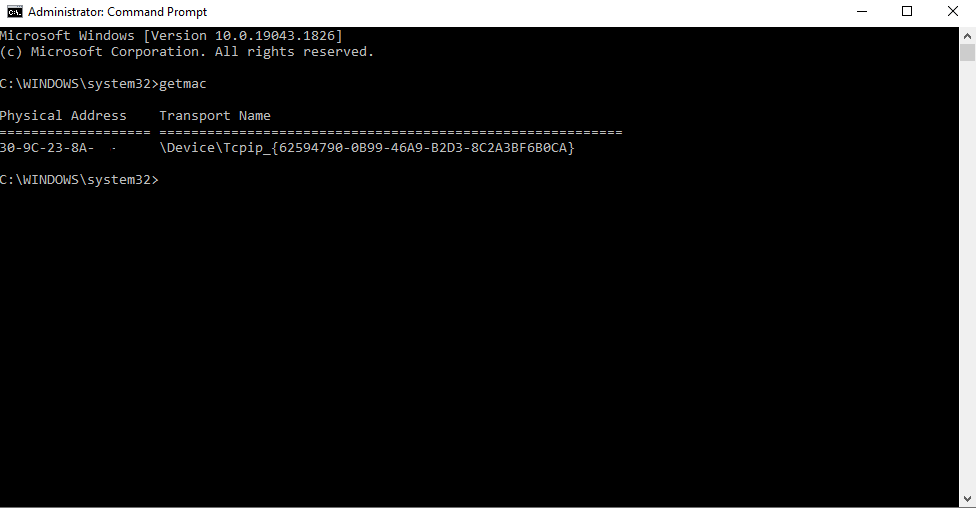
1.Click on the start button,type in “CMD” and open command prompt and simply type “getmac”.
2.To find a specific domain computer’s mac adress remotely,you need either the ip,or the full name of the computer using
“nbtstat -a”
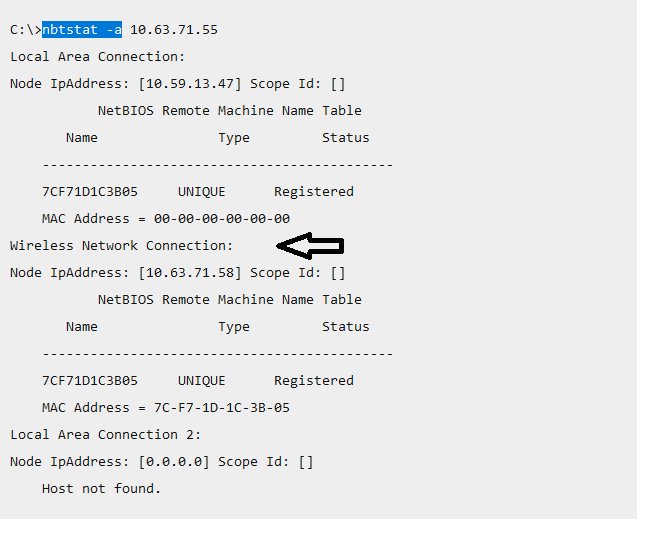
It will search through all types of connection. MAC address is a unique number given by the manufacturer which is used to track a device in a network. MAC address provides a secure way to find senders or receivers in the network.
Mac address can also be found on the physical sticker glued onto the laptop,next to the S/N.

How to Fix 0x4005 (16389) Error When Upgrading Windows?
[mai mult...]How to Bypass “Administrator Blocked You From Running This App” in Windows 10
Similarly to earlier releases of the operating system, Windows 10 also comes with built-in protection tools to help you avoid malware. One of these features allows local administrators to block users from running certain apps. For example, the warning may prevent you from installing new software, updating apps, and so on. When you try to run one of these apps, the UAC (User Account Control) will stop you, unless you have the right permissions.
The “An administrator has blocked you from running this app” warning message is frustrating, but it’s not something you can’t bypass. The guide below introduces you to several methods to get around this roadblock.
[mai mult...]