How to change alert sounds on Mac
When you try to do something that isn’t allowed on your Mac, it responds with a loud, annoying alert sound. You can change the alert sound and its volume using System Preferences on your Mac.
[mai mult...]
Soluții pentru problemele tale IT

When you try to do something that isn’t allowed on your Mac, it responds with a loud, annoying alert sound. You can change the alert sound and its volume using System Preferences on your Mac.
[mai mult...]In momentul in care dorim sa accesam un “Shared drive” din drive-ul Google prin intermediul aplicatiei Google Drive in Windows 10 observam ca ne lipsesc anumite fisiere sau chiar foldere, care in interfata din Google Chrome exista.
[mai mult...]Pasul 1
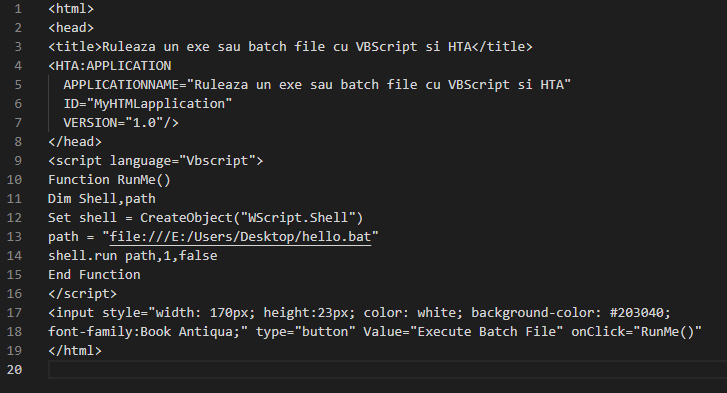
Copiem urmatorul cod intr-un editor de text:
<html>
<head>
<title>Ruleaza un exe sau batch file cu VBScript si HTA</title>
<HTA:APPLICATION
APPLICATIONNAME=”Ruleaza un exe sau batch file cu VBScript si HTA”
ID=”MyHTMLapplication”
VERSION=”1.0″/>
</head>
<script language=”Vbscript”>
Function RunMe()
Dim Shell,path
Set shell = CreateObject(“WScript.Shell”)
path = “file:///E:/Users/Desktop/hello.bat”
shell.run path,1,false
End Function
</script>
<input style=”width: 170px; height:23px; color: white; background-color: #203040;
font-family:Book Antiqua;” type=”button” Value=”Execute Batch File” onClick=”RunMe()”
</html>
Modificam calea programului pe care dorim sa il executam (path)
Pasul 2
Salvam fisierul cu numele dorim si extensia .hta
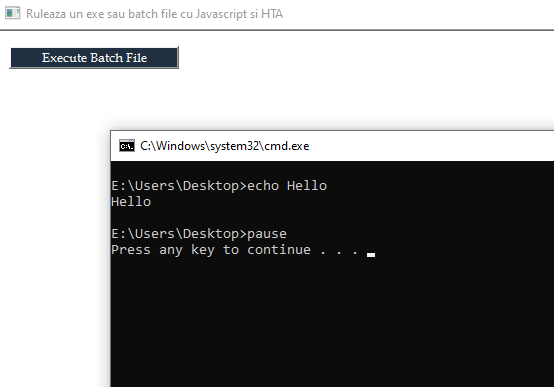
Cum putem executa un batch file sau un executabil folosind Javascript si HTA
Pasul 1
Copiem urmatorul cod intr-un editor de text
<html>
<head>
<title>Ruleaza un exe sau batch file cu Javascript si HTA</title>
<HTA:APPLICATION
APPLICATIONNAME=”Ruleaza un exe sau batch file cu Javascript si HTA”
ID=”MyHTMLapplication”
VERSION=”1.0″/>
</head>
<script language=”Javascript”>
function RunMe(){
var shell = new ActiveXObject(“WScript.Shell”);
var path = ‘”file:///E:/Users/Desktop/hello.bat”‘;
shell.run(path,1,false);
}
</script>
<input style=”width: 170px; height:23px; color: white; background-color: #203040;
font-family:Book Antiqua;” type=”button” Value=”Execute Batch File” onClick=”RunMe();”
</html>
Pasul 2
Modificam calea programului pe care dorim sa il executam (var path)
Pasul 3
Salvam fisierul cu numele dorim si extensia .hta
Batch file pentru minimizarea ferestrelor
Pasul 1
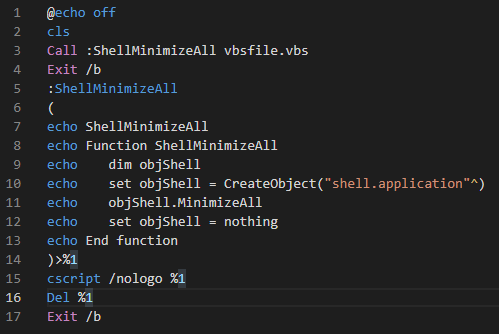
Intr-un editor de text copiem urmatorul cod:
@echo off
cls
Call :ShellMinimizeAll vbsfile.vbs
Exit /b
:ShellMinimizeAll
(
echo ShellMinimizeAll
echo Function ShellMinimizeAll
echo dim objShell
echo set objShell = CreateObject(“shell.application”^)
echo objShell.MinimizeAll
echo set objShell = nothing
echo End function
)>%1
cscript /nologo %1
Del %1
Exit /b
Pasul 2
Salvam fisierul cu numele dorit si extensia .bat