Stații de lucru

OS - Windows 9179 Solutii

Reguli si plangeri 11 Solutii

OS - OS X 410 Solutii

Reguli de configurare 12 Solutii

Licentiere 18 Solutii

Securitate 182 Solutii

Copie de rezerva (Backup) 68 Solutii

Antivirus 72 Solutii

Aplicatii specifice 5303 Solutii

Hardware 291 Solutii

How to Change a PowerPoint Show (PPSX) to a Work File (PPTX)

PowerPoint files come in two formats: PPTX files are editable PowerPoint presentations and PPSX files are a view-only format intended for presentations. You can edit a PPSX file, but you must first convert it back to a PPTX format.

  • PowerPoint can convert a PPSX file to a PPTX one. Here’s how.

First, open “PowerPoint” and choose File > Open to find the file you want to edit.

Go to File > Save As to save the file.

From the drop-down menu at the top right, choose “PowerPoint Presentation (*.pptx)” to save the file as an editable file you can share with colleagues. Be sure to hit the “Save” button when you’re done.

Now, when colleagues click to open the file, they’ll be taken to the PowerPoint editor to make quick edits and revisions.

[mai mult...]

How to Turn Off Smart Objects in Photoshop

Smart objects do a few different things but their biggest advantage is that they preserve the original data of the embedded image or vector file. They’re one of the ways Photoshop enables you to work non-destructively.

For example, in the composite above, the image on the left is the original image, the image in the middle is a smart object that was resized down to 10% and then resized up again, while the very blurry mess on the right is the rasterized layer resized down to 10% and then resized up again. As you can see, the smart object preserved the original image throughout the transformation while the rasterized layer has lost a lot of data.

This means that if you’re creating a composite image, you can move, resize, crop, filter, use adjustment layers, and otherwise mess around with how things look without fear that you’ll make some changes that can’t be undone. By contrast, if you work with rasterized layers, the only way to try something new is to undo everything you’ve already done and start from scratch.

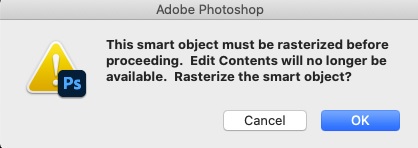
On the other hand, the bonus of a rasterized layer is that you can edit them directly without getting any annoying dialog boxes.

How to Stop Photoshop from Always Creating Smart Objects

By default, whenever you add an image or vector to a Photoshop document it gets embedded as a smart object. To change that behavior so they get embedded as rasterized layers, head to Edit > Preferences General on a PC or Photoshop > Preferences > General. on a Mac.

Uncheck “Always Create Smart Objects When Placing,” and click “OK.”

[mai mult...]

How to Increase Network Speed via Regedit in Windows 10

IRPStackSize (I/O Request Packet Stack Size) represents how many 36-byte receive buffers your computer can use simultaneously. It allows your computer to receive more data at the same time. Your system usually allocates 15 IRPs in its network stack. More often than not, you’d benefit much more with 32, although you can configure up to 50. Try 32 first.

[mai mult...]

How to Automatically Delete Pagefile on Shutdown in Windows 10

Pagefile.sys acts as a virtual RAM, which Windows uses as RAM to store programs that are not in use, thus putting less pressure on the actual RAM. The page file size is usually near the size of your actual RAM, so it can take up a lot of space depending on your RAM. If you set the pagefile to delete with shutdown, you will save some hard drive space in exchange for slightly prolonging your shutdown time.

Here is one way you can get the system to automatically delete the pagefile.sys on shutdown in Windows 10.

[mai mult...]