
Cum dezactivati notificarile Screen Time pe MAC

Daca doriti sa utilizati in cotinuare Screen Time, dar sa nu mai primiti notificari, iata ce trebuie sa faceti pentru a le dezactivata.

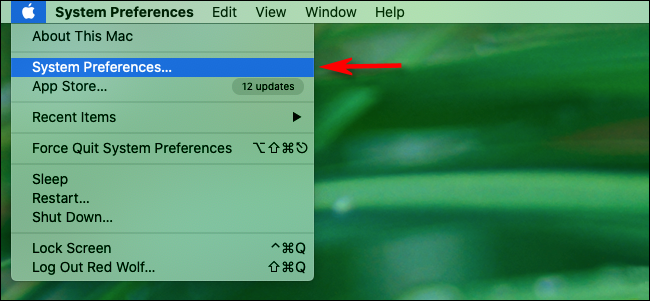
  • Mai intai faceti click pe sigla Apple din coltul din stanga sus al ecranului si selectati “System Preferences”
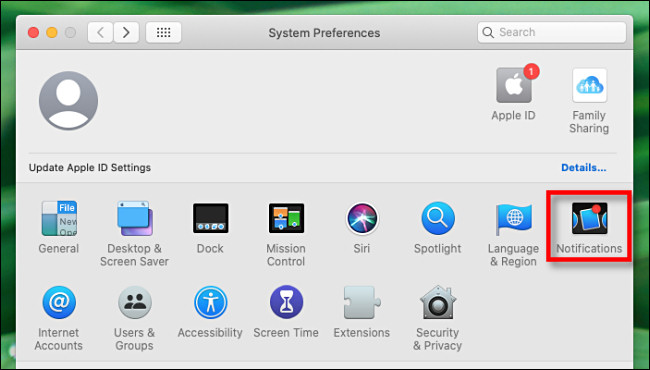
  • In System Preferences, faceti click pe “Notifications”
  • In Notifications preferences, derulati de scroll in jos pana gasiti “Screen Time” si faceti click pe acesta. Apoi faceti click pe comutatorul de langa ,,Allow Notifications From Screen Time” pana cand este oprit.

Inchideti “System Preferences” si incepand de acum nu veti mai primi notificari de la Screen Time.

[mai mult...]

Cum se instaleaza Heimdall in Docker

Heimdall este un organizator pentru website-uri, linkuri, un fel de bookmark manager. Il poti seta ca start page la browser si ca pagina pentru new tab si astfel ai toate bookmark-urile la indemana. Pentru instalare avem nevoie de un ubuntu server cu docker si docker-compose.

[mai mult...]

Cum se instaleaza Pyload in Docker

Pyload este un download manager gratuit, foarte folositor pentru cei care fac download in mod regulat si vor organizare. Faptul ca ruleaza pe server si poate fi accesat din browser este un mare avantaj pentru ca nu mai trebuie sa tinam deschisa statia de lucru sa asteptam sa se descarce. pentru instalare avem nevoie de un ubuntu server cu docker si docker-compose.

[mai mult...]

How to Reduce Steam’s RAM Usage From 400 MB to 60 MB

The Steam library in Small Mode

Want a more lightweight Steam experience than doesn’t use 400 MB of RAM just to display your game library? We’ll show you how to cut that RAM usage down to a cool 60 MB and get a more minimal Steam client.

What Is Steam Client WebHelper?

Steam, like many other modern applications, has a built-in web browser. This built-in web browser is named “Steam Client WebHelper” (steamwebhelper.exe).

When you launch Steam, it normally launches multiple WebHelper processes in the background—we counted seven. These are used to display the Steam Store, the Community, and even your game Library.

But what if you could get rid of Steam’s WebHelper processes? Well, you can—with a hidden command-line option.

[mai mult...]