Cum deschizi o pagina in incognito Microsoft Edge
Daca dorim sa nu ne ramana parolele si istoricul salvat cand navigam pe internet din Microsoft Edge.
[mai mult...]
Soluții pentru problemele tale IT

Daca dorim sa nu ne ramana parolele si istoricul salvat cand navigam pe internet din Microsoft Edge.
[mai mult...]If you’re spending a lot of your time taking phone calls while using your pc, you may often feel the need of an way that will allow you to do this without using your phone.
One application that allows you to do this is Remote Phone Call Trial.
1st thing you need to do is to install Remote Phone Call Trial from your Play Store. This is a 15 days trial version, but there is also a full version called Remote Phone Call which needs to be purchased.
After the installation is complete, tap on Install client software at the top of the screen, scroll down at Setup Transfer and choose one of the two methods for downloading the app on your computer.
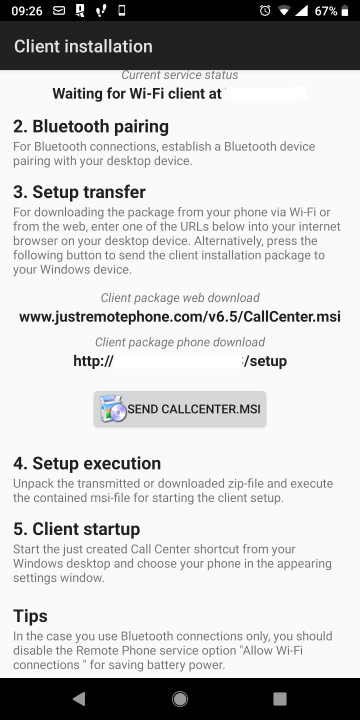
After installing and running the application on your pc, click on the Settings button at the top right corner of the window(Wrench Button), click on the + button under wi-fi and enter your phone IP address which can be found on your phone at the previous step.
[mai mult...]
If you’re using VPN connections a lot,you may have stumbled upon this error where you can not connect via WiFi networks because it gets disconnected.
In order to fix this, you have to type on Start Menu and type Services and run it as Administrator.
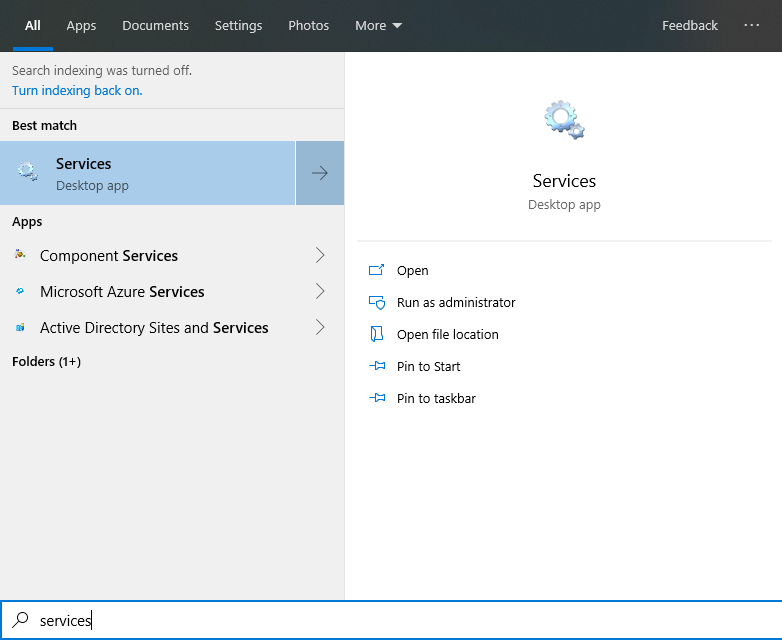
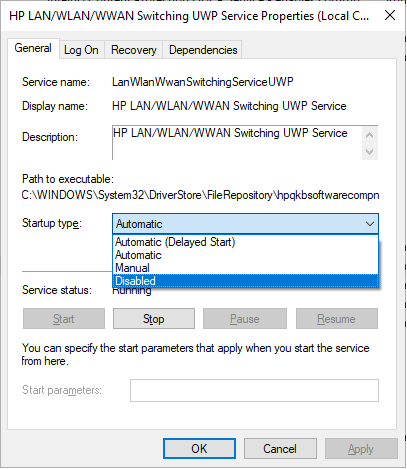
Now you need to search for HP LAN/WLAN/WWAN Switching UWP Service, right click on it and choose Properties.
In the new window, from the Startup type drop down menu choose Disabled, and for the Service status option down below, click on Stop button and on Apply afterwards. Now it won’t deconnect you anymore from the WiFi network.
Doar pentru a fi în siguranță, ar trebui mai întâi să încercați acest mod de utilizare cu nişte fișiere pe care va permiteți să le pierdeți, doar în cazul în care metoda nu funcționează pentru dvs.
Acest script va creea un folder si il va ascunde, acesta fiind acesibil doar prin rularea bat-ului respectiv si introducerea parolei setate prealabil.
[mai mult...]În mod normal, în colțul din dreapta jos al ecranului de conectare Windows 10 există o pictogramă a butonului de power. Astfel, utilizatorul să poată opta pentru oprire, reporniți sau pune PC-ul în starea de sleep din meniul de opțiuni fără a fi nevoie să vă conectați. Cu toate acestea, ocazional din anumite motive, acest buton de power ar putea să lipsească din ecranul de conectare Windows.

Există mai multe modalități de a închide sau reporni computerul , dar majoritatea modurilor necesită click-uri de mai multe mouse-uri. Dacă creați un shortcut pe desktop pentru oprire sau repornire, puteți închide sau reporni computerul printr-un simlu dublu-click pe pictograma comenzi rapide.
[mai mult...]