Trimiterea datelor de conectare din Cisco Webex
Am creat meetingul, insa trebuie sa aflam datele de conectare catre personal-roomul nostru.
[mai mult...]
Soluții pentru problemele tale IT

Am creat meetingul, insa trebuie sa aflam datele de conectare catre personal-roomul nostru.
[mai mult...]Uneori, ca sa schimbi rezolutia este una dintre cele mai usoare lucruri pentru useri Windows. Doar dai click dreapta pe Desktop -> Display Settings -> Advanced Display Settings si o sa vezi setarile pentru rezolutia ecranului cu mai multe optiuni dintre care sa alegi. Totusi, unii useri au raportat faptul ca optiunea pentru schimbarea rezolutie este indisponibila. Cel mai probabil asta este o problema cu placa grafica.
[mai mult...]
Daca aveti conexiune tip pppoe, windows 10 si nu aveti router trebuie de fiecare data cand porniti calculatorul sa va conectati manual din setari cu username si parola. Insa putem crea un bat. file in start up folder pentru a face asta automat.
[mai mult...]Windows 10 Apps are a huge part of every Windows operating system since their introduction in Windows 8. But many of those apps are useless without an internet connection. In some cases, an error could prevent your apps from connecting to internet, but fortunately, there’s a fix for this issue.
[mai mult...]

Din punct de vedere al specificațiilor, Razer Phone nu prea face compromisuri. Are procesor Snapdragon 835, cel mai puternic de la momentul apariției telefonului, dar și 8 GB de memorie RAM. Acestea, alături de placa video Adreno 540, îți dau certitudinea că jocurile de care vrei să te bucuri n-or să aibă probleme. Asta e crucial pe partea de specificații pentru gaming, dar nu e tot.

Ecranul telefonului ar putea fi cel mai interesant element al acestuia. Display-ul are 5,7 inci și raport de aspect clasic, de 16:9, dar nu asta e important. Ai parte de rezoluția de 2.560 x 1.440 pixeli pe panoul IGZO IPS LCD, iar ce e și mai intrigant e faptul că display-ul vine cu o rată de refresh de 120 Hz.
Telefonul are camere foto duale pe spate, un aranjament cu doi senzori de 12 MP și cu zoom optic 2x. Instinctiv, nu m-am preocupat prea tare de camera foto, pentru că am avut impresia că Razer Phone ar fi prea bun dacă ar avea și o cameră foto ca a altor flagshipuri care rup topurile în ultimele luni.
Intuiția nu m-a trădat, iar pozele cu Razer Phone n-au avut nimic care să mă atragă în mod special. Fotografiile exemplare sunt rezervate câtorva producători și chiar mai restrictiv de atât, doar câtorva telefoane. Dar dacă îți iei Razer Phone, nu ți-l iei pentru poze.

Pentru că sunt mai degrabă un fan al jocurilor de curse, spre ele m-am orientat atunci când m-am apucat de treburi serioase cu telefonul. Am jucat CSR Racing 2, Real Racing 3, Asphalt 7 și Need for Speed: No Limits.
Fiecare dintre jocuri mi-a făcut probleme pe device-uri pe care le-am avut în trecut; încă îmi amintesc de chinurile prin care treceam ca să joc CSR pe un Galaxy S5, mai ales când temperatura telefonului o lua razna. În paralel, Razer Phone a reușit să se încingă doar atunci când a descărcat toate aplicațiile aferente configurării inițiale. Dincolo de asta, jocurile anterior amintite n-au nicio problemă de lag pe telefon.
Am mai jucat și alte câteva titluri diverse, unele mai pretențioase, altele mai mici și mai simple, iar rezultatul e același. Nu am găsit un joc care să-i facă probleme lui Razer Phone, iar asta e mai mult decât bine. Dacă te interesează funcția de refresh la 120 Hz a ecranului, trebuie să știi că aceasta trebuie activată din meniul telefonului. Apoi, sunt câteva jocuri care oferă suport pentru acest tip de refresh.

Din păcate pentru cei care vor o experiență cât mai actuală, Razer Phone vine cu Android 7.1.1. Reversul medaliei e că ai parte de o interfață stoc, fără o personalizare care să-ți îngreuneze telefonul. Un alt dezavantaj este că telefonul nu are jack de căști de 3,5 mm, așa că va trebui să te bazezi pe căști USB-C, sau pe un adaptor 3,5 mm – USB-C.
Razer Phone e unul dintre puținele telefoane care au senzor de amprenta amplasat lateral.
În față e mai explicabil, iar asta se datorează difuzoarelor destul de puternice pe care le are telefonul. Astfel, pe partea din dreapta, ai acces la senzorul de amprentă. Deși într-o poziție ciudată, acesta devine ușor de folosit dacă îți configurezi amprenta pentru degetul mare de la mâna dreaptă, în condițiile în care telefonul stă în buzunarul drept.

Per total, Razer Phone e, într-adevăr, un telefon pentru gameri, pe care poți să-l cumperi dacă ai o pasiune pentru astfel de activități și dacă vrei un dispozitiv creat în primul rând pentru jocuri. Firește, aici se pune problema prețului: la aceiași bani, găsești telefoane cel puțin la fel de performante și care au ceva mai multe forme decât colțurile lui Razer.
Pe de altă parte, la vremea când acest dreptunghi va deveni funcțional pentru shell-ul de laptop pe care producătorul îl pregătește, atunci și-ar putea justifica prețul și mai mult. Până atunci, dacă ești fan Razer, dacă vrei un telefon pentru nișa de gaming sau dacă ești doritor de un display de 120 Hz.

Introduction
Developed by Kingsoft, the WPS Office package is a kit of several software programs that provide the user with all the main office tools that one might need. There is a writer program, one for creating spreadsheets, one for presentations and even a PDF reader that can convert files from PDF to .doc/.docx and vice versa. As we already mentioned, the office suite is free, but there are also two paid version: premium and professional – each suited for the specific needs of the user.
Interface
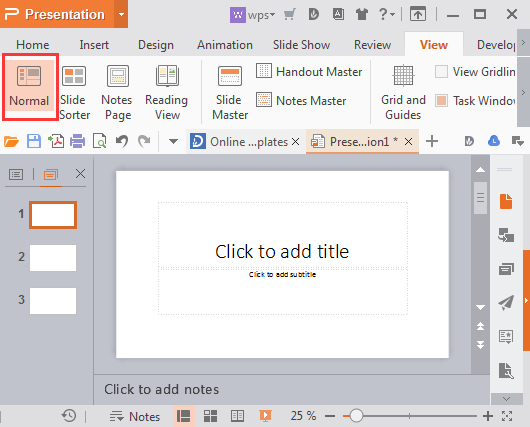
The interface of WPS Office programs is similar to this of Microsoft Office – the same ribbon-based interface is implemented, where the toolbars are placed in different tabs. Anyone who is familiar with Word, PowerPoint or Excel should have no issue navigating and using the WPS programs.


Compatibility
As you might expect, WPS programs work with all the standard document formats so that compatibility isn’t an issue. As far as Operating Systems are concerned, the WPS Office suite is available for Windows, Mac, Linux, iOS and Android.
Features
While WPS programs may not have as many different features as their Microsoft counterparts might, there’s certainly a good variety of options to choose from as well as a couple of neat additions which some of the users might enjoy.
WPS supports a small cloud storage (1GB) which users can use to save and backup their files and alter access them from other devices. Of course, 1GB is nothing to be overly excited about but then again, considering the fact that most document files hardly ever go above 1 Mb, one gigabyte should prove to be more than enough for casual document backups.
Another thing that you might notice as soon as you open the WPS Writer is that there is a wide variety of templates to choose from (and they are free). While they aren’t automatically available and must first be downloaded, the process takes no more than a couple of seconds so it doesn’t really affect your working process.
There is also a neat backup feature that saves unfinished files in the WPS folder even if you haven’t manually saved them before closing the program. This is extremely useful in instances where your device suddenly shuts down for whatever reason and you did not have the chance to save the file that you were working on. So far, this feature has proven to be invaluable and a nice addition to the WPS programs. Of course, this is not to say that WPS is the only office software kit that has this backup feature, yet we had to mention that it works properly and is highly effective.
Spell Check
Something we noticed while using the WPS writer is that its spell-checker wasn’t all that good. While it worked fine, the word database seemed to lack a lot of words that are technically correct and so the program was marking them as incorrect. Additionally, when a we right-clicked on an incorrect word in order to replace it with a correct one using the automatic suggestions, we found out that the list of suggestions is rather ineffective as most suggested words had totally different meaning from the one word that the original was supposed to be. This makes it somewhat confusing and oftentimes ineffective to use the suggestions which is why most of the time we were forced to manually correct the word instead of using the supposedly faster option of using the predetermined list of word suggestions from the Writer.
Conclusion
WPS is a fine choice for an office package that offers its users all the necessary tools for creating and editing document files. Apart from the free version, you can buy either one of the two paid ones to gain access to additional options as well as stop the ads that the free version comes with. As far as functionality is concerned, the office applications are adequate and have a couple of neat additions and features that can improve your working experience. To sum up – if you are looking for an adequate Office package alternative that is free and you don’t mind occasional ads displayed on your screen, then you might might want to give WPS Office a try.


Pros
Cons