Stații de lucru

OS - Windows 9179 Solutii

Reguli si plangeri 11 Solutii

OS - OS X 410 Solutii

Reguli de configurare 12 Solutii

Licentiere 18 Solutii

Securitate 182 Solutii

Copie de rezerva (Backup) 68 Solutii

Antivirus 72 Solutii

Aplicatii specifice 5303 Solutii

Hardware 291 Solutii

How to encrypt files using command prompt

Couple steps you need to follow:

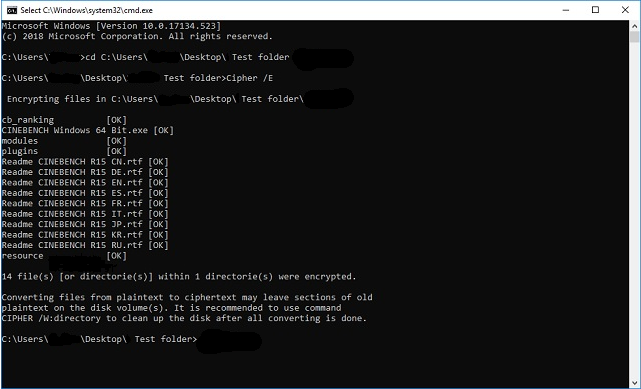
  • Open command prompt -> start -> cmd as shown

  • Change your working directory to the folder where your files are Using “cd” command followed by the folder pathway.
  • Next,using the “Cipher /E“ will encrypt everything inside that pathway

Important note: The files will open normally for you, however, any other user will not be able to view the files unless they login into your account, so make sure you have a password set.

[mai mult...]

How to Reset the View in Outlook 2021

Is your Outlook inbox view not what you’d like it to be? Maybe the email columns aren’t the way they used to be? Luckily, you can bring it back to the default view so that all the app elements are exactly the way they were when you first opened the app, with all customizations removed.

[mai mult...]