

Stații de lucru
OS - Windows 9179 Solutii
Reguli si plangeri 11 Solutii
OS - OS X 410 Solutii
Reguli de configurare 12 Solutii
Licentiere 18 Solutii
Securitate 182 Solutii
Copie de rezerva (Backup) 68 Solutii
Antivirus 72 Solutii
Aplicatii specifice 5303 Solutii
Hardware 291 Solutii
How to Remove Windows 10 Built-in Apps
Windows 10 comes with a lot of pre-installed Apps that you may find useful, while a few you will probably never need. Unfortunately, Windows 10 doesn’t allow you to get rid of them easily. These built-in apps can’t be uninstalled using Settings or Control Panel. In this article, we will discuss how to remove the default Windows 10 Apps from your device.
[mai mult...]How to Disable Preloading Microsoft Edge at Startup
[mai mult...]How to fix Your phone some settings are managed by your organization in Windows 10
How to Find Fonts in Google Docs
When you want to change the font style in Google Docs, use the Font drop-down box in the toolbar.
Click the “Font” drop-down and pick the “More Fonts” option.
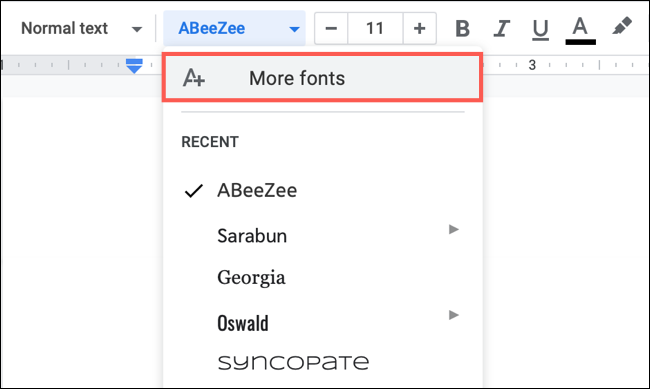
You’ll then see a pop-up window where you can find, add, or remove the fonts in the drop-down list.

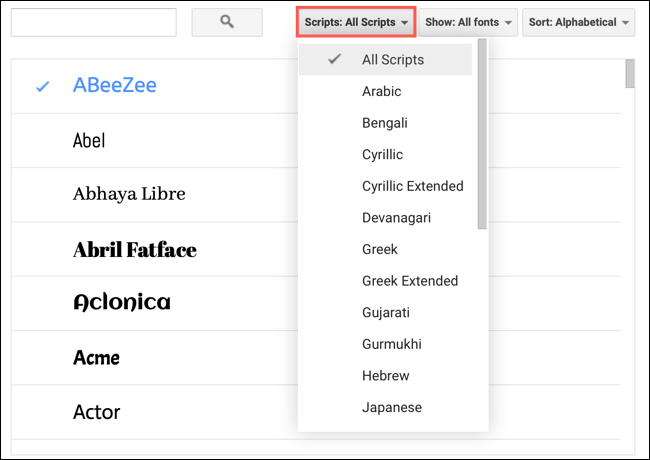
Use the Search box at the top left if you have a particular font style in mind. You can search for a specific name to see whether it’s available. In the first drop-down menu to the right of the search, “Scripts,” you can select fonts for languages.
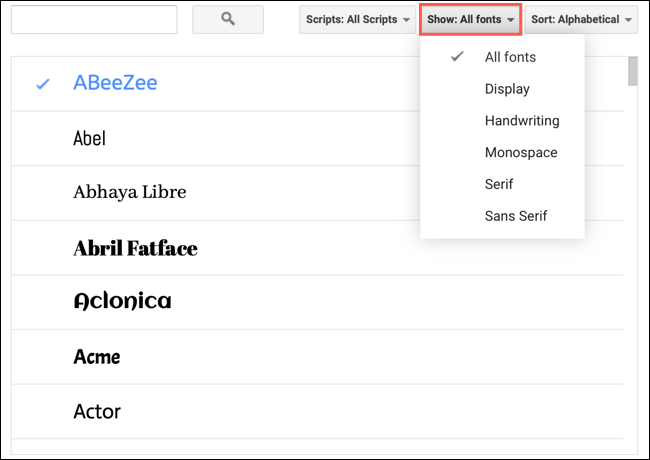
In the “Show” menu, you can filter font styles by “Display,” “Handwriting,” “Monospace,” “Serif,” or “Sans Serif.”
Finally, in the “Sort” menu, you can sort the fonts by popularity, alphabetical order, date added, or what’s trending.

How to Set the Default Currency in Google Sheets
To set the default currency for all new Google Sheets, visit your profile language settings at https://myaccount.google.com/language. Once you’ve selected your language in the “Preferred Language” section, Sheets will assume that you want to use the currency of your language region as the default in all the new Sheets that you’ll create going forward.
[mai mult...]