Stații de lucru

OS - Windows 9179 Solutii

Reguli si plangeri 11 Solutii

OS - OS X 410 Solutii

Reguli de configurare 12 Solutii

Licentiere 18 Solutii

Securitate 182 Solutii

Copie de rezerva (Backup) 68 Solutii

Antivirus 72 Solutii

Aplicatii specifice 5303 Solutii

Hardware 291 Solutii

Imposibil de descărcat fișiere mari din Sharepoint

Încercați să descărcați un fișier mai mare de 50000000 bytes intr-un folder Web din Windows XP Service Pack 2 (SP2) sau o versiune ulterioară de Windows. Este posibil să primiți un mesaj de eroare similar cu următorul:
Cannot Copy FileName: Cannot read from the source file or disk

In acest scenariu pe Windows 7, 8 sau 8.1, este posibil să primiți următorul mesaj de eroare:

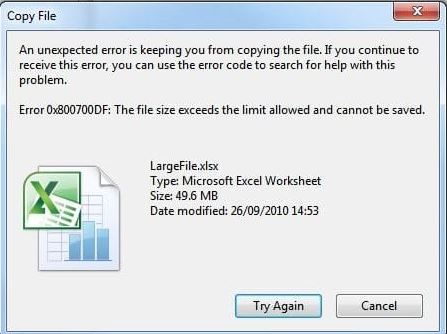
An unexpected error is keeping you from copying the folder. If you continue to receive this error, you can use the error code to search for help with this problem.

Error 0x800700DF: The file size exceeds the limit allowed and cannot be saved

Dacă încercați să descărcați un fișier mai mare de 50000000 bytes, computerul client interpretează această descărcare ca un atac. Prin urmare, procesul de descărcare se oprește.

[mai mult...]

How to View and Restore Old Versions of PowerPoint Files

Microsoft PowerPoint lets you view and switch to older versions of your presentations. If you accidentally deleted something important and it got overwritten in PowerPoint, here’s how to restore it.

Before you get started, make sure that you have a Microsoft 365 subscription. The ability to view and restore previous versions of PowerPoint presentations can be accessed only through a Microsoft 365 subscription. Fortunately, this subscription also gives you access to all other Office apps, along with 1TB of OneDrive storage. You can put the cloud storage to good use by automatically saving your presentations to OneDrive.

Also, enabling auto-save on PowerPoint is required for accessing version history. To do so, you’ll need to create a new PowerPoint presentation and then turn the “AutoSave” switch on in the document’s title bar. When PowerPoint shows you a confirmation pop-up, select “OneDrive.”

[mai mult...]

How to Search for Songs in a Spotify Playlist

Finding a specific song in a 150-song Spotify playlist can be tedious, but we’re going to show you how to search within playlists easily on iPhone, Android, Windows, and Mac.

This feature is available on Spotify’s apps, but unfortunately not on its web player. Spotify doesn’t show this option in certain algorithm-based playlists such as Uniquely Yours, but it works for almost all other playlists on the service.

[mai mult...]