Stații de lucru

OS - Windows 9179 Solutii

Reguli si plangeri 11 Solutii

OS - OS X 410 Solutii

Reguli de configurare 12 Solutii

Licentiere 18 Solutii

Securitate 182 Solutii

Copie de rezerva (Backup) 68 Solutii

Antivirus 72 Solutii

Aplicatii specifice 5303 Solutii

Hardware 291 Solutii

How to Stop “Your Phone” From Opening at Startup on Windows 10

The Your Phone feature in Windows 10 is a handy way to link your PC with your smartphone. Sometimes, Your Phone might keep popping up at startup when you don’t want it to. If so, there’s a way to disable the Your Phone popup.

First, open Task Manager. To do so, right-click your taskbar. In the menu that appears, select “Task Manager.”

In the Task Manager window, click “More details” if you start with a simple view, then click the “Startup” tab.

In the “Startup” tab, locate “Your Phone” in the list and select it. Next, click the “Disable” button in the lower-right corner of the window.

After clicking disable, you’ll see “Disabled” in the “Status” column beside Your Phone in the Task manager Startup list. When you’re done, close Task Manager. From now on, Your Phone will no longer launch on Startup.

[mai mult...]
Cum sa reluati automat aplicatiile cand va conectati la Windows 10

Windows 10 isi poate aminti si redeschide automat aplicatiile atunci cand va conectati din nou.

  • Iata cum trebuie sa configurati Windows 10 pentru a face acest lucru posibil:

Mai intai deschideti Settings din meniul Start sau apasati pe tastatura Start + I

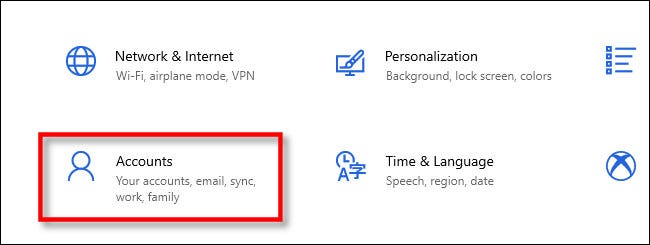
In “Settings” dati click pe “Accounts”

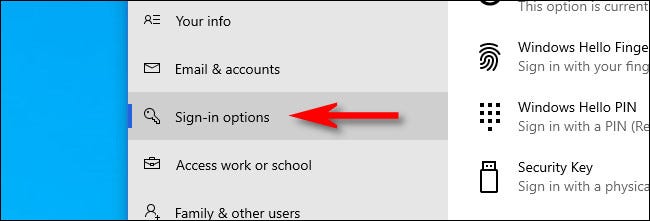
In “Accounts,” dati click pe “Sign-in options” in bara laterala

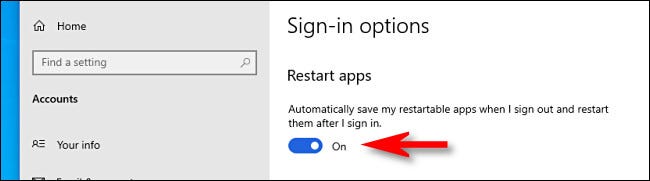
In Sign-in options, dati scroll pana ajungeti la optiunea “Restart apps”.

Comutatorul trebuie sa fie pe ,,ON’’.

Data viitoare cand va reconectati Windows 10 va deschide aplicatiile rulate recent.

[mai mult...]

Configurați ReadyBoost

Pentru a utiliza instrumentul de defragmentare pe dispozitive cu hardware mai vechi, puteți utiliza și funcția ReadyBoost pentru a vă accelera computerul. ReadyBoost nu este nou pentru Windows 10, există de mulți ani și este o caracteristică care folosește o unitate flash sau un card SD pentru a memora în cache fișierele pentru a spori performanța generală a sistemului. (Dacă dispozitivul are un SSD, această caracteristică nu va fi disponibilă, deoarece este puțin probabil să ofere avantaje suplimentare).

[mai mult...]

How to Create a Progress Bar in Microsoft PowerPoint

A progress bar is a graphic that, in PowerPoint, visually represents the percentage of the slideshow that has been completed. It’s also a good indicator of the remaining amount. Here’s how to create a progress bar in Microsoft PowerPoint.

You can manually create a progress bar by inserting a shape at the bottom of each slide. The problem with this approach is that you’ll need to measure the length of each shape based on the number of slides in the presentation. Additionally, if you add or remove a slide, you’ll need to manually redo the progress bar on every slide in the slideshow.

[mai mult...]

Efectuați scanarea malware

Când un dispozitiv începe să funcționeze lent, acesta ar putea fi un semn al unei infecții malware. De obicei, se știe că virușii, spyware-ul și alte tipuri de malware utilizează multe resurse de sistem, ceea ce face un dispozitiv inutilizabil.

Deși Windows 10 vine cu Microsoft Defender Antivirus, nu garantează că malware-ul va intra în sistem. Dacă bănuiți că computerul a fost infectat, ar trebui să încercați să efectuați o scanare completă a virusului.

[mai mult...]